Why Pay $20/month, When you can Self Host n8n @ $3.99 only

50+ InMails. Advanced Lead search. First 2 Users only

Promoted by BULDRR AI

A warm lead alert system n8n workflow.

The Philosophy (important, because it shapes the system)

You are not automating action.

You are automating attention.

So the system must:

  • Remember behavior over time
  • Reduce noise aggressively
  • Surface why someone matters
  • Never decide what to do

If automation sends messages, it’s already broken.


High-Level System Overview

n8n becomes the memory + reasoning layer, not the scraper.

Daily Trigger
→ Collect Engagement Signals
→ Normalize Profiles
→ Update Memory Store
→ Apply Signal Rules
→ Rank & Filter
→ Morning Alert (3–5 profiles)

DATA MODEL (non-negotiable)

Before workflows, define what you store.

Profile Table (core memory)

profile_id
linkedin_url
name
headline
company
industry
role
first_seen
last_seen
engagement_count_7d
engagement_count_30d
last_engagement_type

Engagement Log (event stream)

profile_id
post_url
engagement_type (comment | reaction)
timestamp
post_author

This separation is what allows pattern detection.
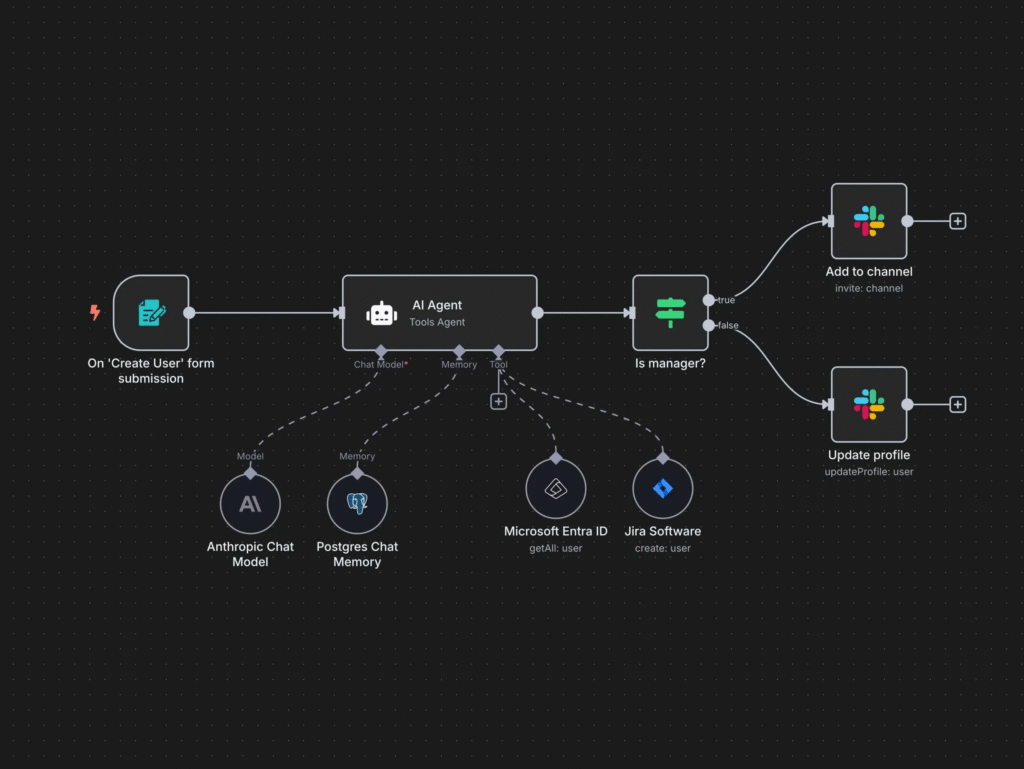

WORKFLOW 1: Daily Engagement Collector

Trigger

  • Cron → every morning (e.g. 6:30 AM)

Step 1: Scrape Engagement Data

Input:

  • List of your own post URLs
  • Or last N posts from profile

Collected signals:

  • Comments
  • Reactions (likes, celebrates, insights)

Each record becomes:

{ profile_url, name, type, post_url, timestamp }

⚠️ Correction:

Tracking reactions is not optional.

High-intent people often react repeatedly before commenting.


Step 2: Normalize Profiles

LinkedIn URLs are messy.

You must:

  • Strip tracking params
  • Convert /in/xyz/ → canonical ID
  • Deduplicate across posts

Result:

canonical_profile_id

This is how memory survives months.


Step 3: Noise Filtering (early, brutal)

Immediately discard:

  • Profiles without profile photos
  • Obvious engagement pods
  • Recruiters (if irrelevant)
  • Students (if not target)

Rules example:

headline contains "student" → drop
headline contains "growth hacker" → drop
company = "LinkedIn" → drop

Noise filtered early = cheaper system later.


WORKFLOW 2: Memory Update Engine

This workflow updates behavior over time.

For each engagement event:

If profile exists

  • Increment counters
  • Update last_seen
  • Append engagement log

If new profile

  • Enrich once (headline, role, industry)
  • Initialize counters

⚠️ Correction:

Do not re-enrich every time.

That’s slow, expensive, and unnecessary.


WORKFLOW 3: Signal Detection Logic (the brain)

This is where “warmth” is defined.

Signal Rules (examples)

Rule 1: Repeat Engagement

engagement_count_7d ≥ 2

→ Flag:

“Commented twice this week”


Rule 2: Cross-Post Interaction

engaged_with ≥ 2 different posts

→ Flag:

“Engaged across multiple posts”


Rule 3: ICP Match

industry IN [past_clients_industries]
role MATCHES [founder, ceo, head of growth]

→ Flag:

“Matches past clients”


Rule 4: Escalating Behavior

reaction → comment progression

→ Flag:

“Engagement intensity increasing”

This is an underrated signal.


WORKFLOW 4: Scoring (but subtle)

No numeric score shown to the user.

Internally:

+2 repeat engagement
+2 ICP match
+1 recent activity
-2 noisy role

Used only for ranking, not decisions.


WORKFLOW 5: Daily Alert Composer

Final filter:

  • Top 3–5 profiles only
  • Must have at least 1 strong signal
  • Must be recent (≤ 7 days)

Alert Format (example)

Today’s profiles worth noticing:

  1. Name
    • Commented twice this week
    • Matches past client profile
    • Engaged on Post X
  2. Name
    • Reacted to last two posts
    • Founder in SaaS
    • New but consistent

No CTA.

No suggestion.

No pressure.


DELIVERY (choose one)

  • Email (plain text, short)
  • Slack DM
  • Notion page (daily refresh)

Keep it skimmable in under 2 minutes.

If it takes longer, you failed.


What This System Is (and Isn’t)

This system IS:

  • A memory amplifier
  • A pattern detector
  • A signal filter

This system is NOT:

  • A growth hack
  • A lead scraper
  • An outreach bot

Why This Actually Works

Most people:

  • Chase volume
  • Forget context
  • Burn trust

This system:

  • Respects timing
  • Surfaces intent
  • Preserves human judgment

That’s why it scales without breaking relationships.

Learn how to Build this Workflow with AI:

Follow us:

There’s no automation you can’t learn to build with BULDRR AI.

I'll show how you can implement AI AGENTS to take over repetitive tasks.

Promoted by BULDRR AI

A warm lead alert system n8n workflow.

The Philosophy (important, because it shapes the system)

You are not automating action.

You are automating attention.

So the system must:

  • Remember behavior over time
  • Reduce noise aggressively
  • Surface why someone matters
  • Never decide what to do

If automation sends messages, it’s already broken.


High-Level System Overview

n8n becomes the memory + reasoning layer, not the scraper.

Daily Trigger
→ Collect Engagement Signals
→ Normalize Profiles
→ Update Memory Store
→ Apply Signal Rules
→ Rank & Filter
→ Morning Alert (3–5 profiles)

DATA MODEL (non-negotiable)

Before workflows, define what you store.

Profile Table (core memory)

profile_id
linkedin_url
name
headline
company
industry
role
first_seen
last_seen
engagement_count_7d
engagement_count_30d
last_engagement_type

Engagement Log (event stream)

profile_id
post_url
engagement_type (comment | reaction)
timestamp
post_author

This separation is what allows pattern detection.


WORKFLOW 1: Daily Engagement Collector

Trigger

  • Cron → every morning (e.g. 6:30 AM)

Step 1: Scrape Engagement Data

Input:

  • List of your own post URLs
  • Or last N posts from profile

Collected signals:

  • Comments
  • Reactions (likes, celebrates, insights)

Each record becomes:

{ profile_url, name, type, post_url, timestamp }

⚠️ Correction:

Tracking reactions is not optional.

High-intent people often react repeatedly before commenting.


Step 2: Normalize Profiles

LinkedIn URLs are messy.

You must:

  • Strip tracking params
  • Convert /in/xyz/ → canonical ID
  • Deduplicate across posts

Result:

canonical_profile_id

This is how memory survives months.


Step 3: Noise Filtering (early, brutal)

Immediately discard:

  • Profiles without profile photos
  • Obvious engagement pods
  • Recruiters (if irrelevant)
  • Students (if not target)

Rules example:

headline contains "student" → drop
headline contains "growth hacker" → drop
company = "LinkedIn" → drop

Noise filtered early = cheaper system later.


WORKFLOW 2: Memory Update Engine

This workflow updates behavior over time.

For each engagement event:

If profile exists

  • Increment counters
  • Update last_seen
  • Append engagement log

If new profile

  • Enrich once (headline, role, industry)
  • Initialize counters

⚠️ Correction:

Do not re-enrich every time.

That’s slow, expensive, and unnecessary.


WORKFLOW 3: Signal Detection Logic (the brain)

This is where “warmth” is defined.

Signal Rules (examples)

Rule 1: Repeat Engagement

engagement_count_7d ≥ 2

→ Flag:

“Commented twice this week”


Rule 2: Cross-Post Interaction

engaged_with ≥ 2 different posts

→ Flag:

“Engaged across multiple posts”


Rule 3: ICP Match

industry IN [past_clients_industries]
role MATCHES [founder, ceo, head of growth]

→ Flag:

“Matches past clients”


Rule 4: Escalating Behavior

reaction → comment progression

→ Flag:

“Engagement intensity increasing”

This is an underrated signal.


WORKFLOW 4: Scoring (but subtle)

No numeric score shown to the user.

Internally:

+2 repeat engagement
+2 ICP match
+1 recent activity
-2 noisy role

Used only for ranking, not decisions.


WORKFLOW 5: Daily Alert Composer

Final filter:

  • Top 3–5 profiles only
  • Must have at least 1 strong signal
  • Must be recent (≤ 7 days)

Alert Format (example)

Today’s profiles worth noticing:

  1. Name
    • Commented twice this week
    • Matches past client profile
    • Engaged on Post X
  2. Name
    • Reacted to last two posts
    • Founder in SaaS
    • New but consistent

No CTA.

No suggestion.

No pressure.


DELIVERY (choose one)

  • Email (plain text, short)
  • Slack DM
  • Notion page (daily refresh)

Keep it skimmable in under 2 minutes.

If it takes longer, you failed.


What This System Is (and Isn’t)

This system IS:

  • A memory amplifier
  • A pattern detector
  • A signal filter

This system is NOT:

  • A growth hack
  • A lead scraper
  • An outreach bot

Why This Actually Works

Most people:

  • Chase volume
  • Forget context
  • Burn trust

This system:

  • Respects timing
  • Surfaces intent
  • Preserves human judgment

That’s why it scales without breaking relationships.

Learn how to Build this Workflow with AI:

Follow us:

Promoted by BULDRR AI

Our AI Articles

Learn from our AI Articles to excel in your profession ;)

THE RUBEN HASSID BLUEPRINT: Complete Creator & Channel Analysis

A comprehensive breakdown of Ruben Hassid’s digital presence, covering actionable insights, proven frameworks, and structured analysis designed for clarity, usability,...

Workflow Orchestration

1. Plan Node Default 2. Subagent Strategy 3. Self-Improvement Loop 4. Verification Before Done 5. Demand Elegance (Balanced) 6. Autonomous...

How to Use OpenClaw Skills — A Complete Beginner’s Guide

What is OpenClaw? OpenClaw is an open-source AI assistant designed as “AI that actually does things.” It doesn’t just chat....

Build a $10,000 RAG system using Gemini + Claude Code

This ‘$10,000 RAG system’ isn’t about expensive infrastructure—it’s about how you structure retrieval....

Free OpenRouter API Keys & Free Models List [Updated April 2026]

Get a free OpenRouter API key in minutes. See all free models available in 2026, rate limits, and how to...

7 AI Agents Clients Are Paying $2,000+/Month For in 2026 [Real Examples]

Discover the 7 AI agents businesses are actively buying in 2026 — with real pricing, use cases, and how to...

Comprehensive Channel Analysis: Alex Hormozi

Alex Hormozi gives away what others sell for $10K—not to make money from content, but to manufacture million-dollar businesses at...

Beginner to Pro Guide: Using the Agentic SEO Claude Skill

This isn’t just an SEO audit—it’s a feedback loop where your system analyzes, prioritizes, and answers based on your data,...

Top 60 Claude Skills, Workflows & GitHub Repos for AI

This isn’t just a list. It’s a full-stack AI toolkit: from coding agents → to frameworks → to workflows →...

How to Use Claude Code for Free in 2026 (No Subscription Needed)

Yes, you can use Claude Code for free. This guide shows exactly how — free tier limits, local model workarounds,...

Frequently Asked Questions

We share all our insights and resources for free, but building them isn’t cheap. Ads help us recover those costs so we can keep offering everything at no charge forever.

Yes, Ofcourse. Contact us and we’ll set it up. We also offer 100+ hours of free visibility to select brands.

No, nothing at all. In fact, many ads come with extra discounts for you.

Yes, sometimes. If you buy through our links, we may earn a small commission at no extra cost to you.

1:1 Free Strategy Session
Your competitors are already automating. Are you still paying for it manually?

Do you want to adopt AI Automation?

Every hour your team does repetitive work, you're burning real money.
While you wait, faster businesses are cutting costs and moving quicker.
AI and automations aren't the future anymore — they're the present.

Book a live 1-on-1 session where we show you exactly which of your daily tasks can be automated — and what it’s costing you not to.