
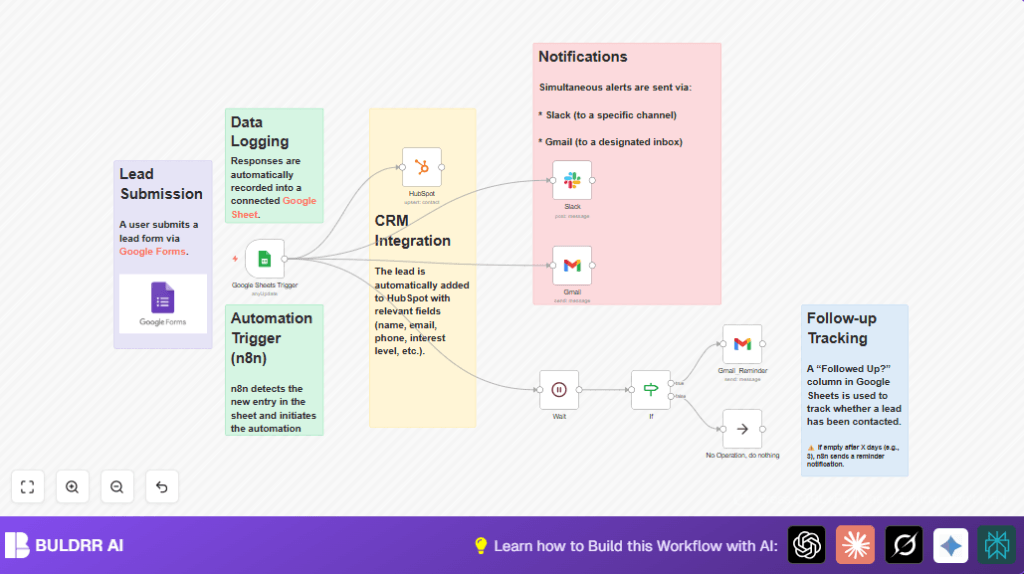

What This Automation Does
This workflow watches a Google Sheet for new lead entries every minute.
When a new lead is found, it sends a message to a Slack channel, emails lead details through Gmail, and adds the contact to HubSpot CRM.
It also checks if hot leads have been followed up.
If not followed up within 3 minutes, it emails a follow-up reminder.
This saves time by automating manual data entry and follow-up alerts.
How This Workflow Works (Input → Process → Output)
Inputs
- Google Sheets: New leads added via a linked Google Form.
Processing Steps
- The Google Sheets Trigger polls the sheet every minute to detect new leads.
- A message with lead info is prepared and sent to Slack using the Slack node.
- The same lead data is formatted into an email and sent using the Gmail node.
- Lead details are mapped and added to HubSpot CRM through the HubSpot node.
- A Wait node pauses the workflow for 3 minutes.
- An If node checks if the “Followed Up?” column is empty and the “Interest Level” contains “Hot”.
- If the conditions are true, a reminder email is sent via the Gmail_Reminder node.
- If conditions fail, the workflow ends with a No Operation node.
Output
- Slack channel receives instant lead alerts.
- The sales inbox gets detailed lead emails.
- HubSpot CRM is updated without manual input.
- Follow-up reminders ensure hot leads are not missed.
Who Should Use This Workflow
This is for sales teams who get leads through Google Forms and track them in Google Sheets.
It helps teams tired of manual data copying and missing quick follow-ups.
If your team uses HubSpot CRM, Gmail, and Slack, this workflow fits well.
Tools and Services Used
- Google Sheets: Stores new lead information.
- Slack: Sends instant team notifications.
- Gmail: Sends lead notification and follow-up reminder emails.
- HubSpot CRM: Stores lead contact details.
- n8n automation platform: Runs this workflow and connects all services.
Beginner Step-by-Step: How to Use This Workflow in n8n
Step 1: Download and Import
- Click the Download button on this page.
- Open your n8n editor.
- Select Import > Import from File to upload the downloaded workflow.
Step 2: Configure Credentials
- Add or update OAuth2 credentials for Google Sheets, Gmail, Slack, and HubSpot nodes.
- Make sure you have access tokens and API keys ready.
Step 3: Update IDs and Addresses
- Change the Google Sheet Document ID and Sheet Name if different.
- Update Slack channel ID or name.
- Set the correct email addresses in the Gmail nodes.
Step 4: Test the Workflow
- Submit a test lead on your Google Form or add a test row to the sheet.
- Check Slack, email inbox, and HubSpot for the new lead.
Step 5: Activate the Workflow
- Switch the workflow to ‘Active’ in n8n to start automatic runs.
- Monitor executions to check for errors.
For better control and scaling, consider self-host n8n.
Edge Cases and Failures
If authentication fails on any node, reauthorize OAuth2 credentials in n8n.
Slack messages missing? Check channel ID and OAuth tokens.
Follow-up reminders sent incorrectly? Verify the If node checks the exact “Followed Up?” and “Interest Level” fields.
Customization Ideas
- Change the Wait node delay from 3 minutes to a longer time for slower follow-ups.
- Send notifications to Microsoft Teams or Discord by swapping the Slack node.
- Add more HubSpot contact fields like company size or deal value.
- Update Gmail email templates with company branding.
- Use a Google Sheets Write node to mark leads as “Followed Up” automatically.
Summary
✓ Saves hours by automating lead data input and notification.
✓ Stops missed follow-ups by reminding about hot leads.
✓ Reduces errors and manual work.
→ Outputs real-time alerts in Slack and emails.
→ Creates contacts automatically in HubSpot CRM.
→ Enables fast sales team reaction.
