
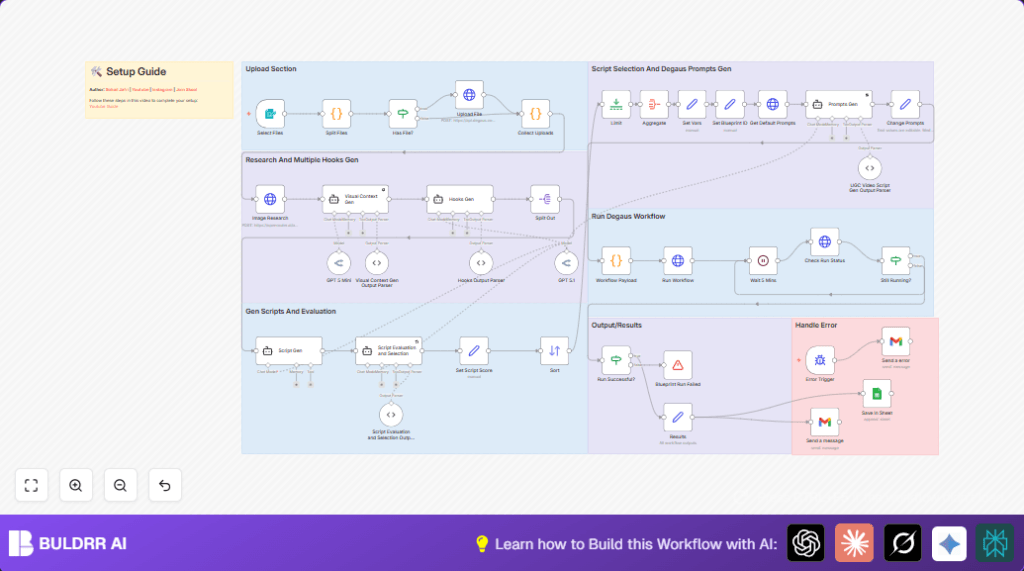

This practical guide shows how to rebuild and use this n8n workflow step-by-step without deep theory.
You’ll import the workflow, configure a few fields, copy-paste ready prompts/code, and run it in production.
???? What This Workflow Actually Does (Plain English)
This automation turns one product input into a complete UGC video package:
- Generates visual context (scene, character, action)
- Creates 5 viral hooks
- Writes UGC scripts
- Scores and selects the best script
- Generates A-roll & B-roll prompts
- Sends prompts to Degaus to generate the video
- Saves results in Google Sheets
- Emails you the final video link
- Alerts you if anything breaks
No manual prompting. No copy-paste chaos.
???? Before You Start (Required Setup)
Make sure you already have:
- ✅ n8n (Cloud or Self-Hosted)
- ✅ Degaus API Key (Bearer token)
- ✅ OpenRouter API Key
- ✅ Google Sheets account
- ✅ Gmail OAuth connected in n8n
???? Step 1: Import the Workflow (Important)
Do NOT build this from scratch.
- Download the workflow JSON
- Open n8n Editor
- Click Import from File
- Select the JSON
- Save the workflow
That’s it.
⚙️ Step 2: Configure Only What Matters
You don’t need to touch every node. Focus on these ????
???? Credentials to Set (Once)
| Service | Where |
|---|---|
| Degaus API | HTTP Request nodes |
| OpenRouter | GPT / Claude nodes |
| Gmail | Send a message |
| Google Sheets | Save In Sheet |
✏️ Editable Inputs (Safe to Change)
1️⃣ Product Image (Optional)
Upload via the Form Trigger
If skipped → workflow uses default blueprint media.
2️⃣ Visual Context Prompt (COPY-PASTE)
Node: Visual Context Gen
You will receive product details.

Return JSON with:
DesiredScene
CharacterAction
ProductNameBrand
ProductTypeDescription
CharacterPrompt

Keep it natural, indoor, UGC-style.
Avoid dramatic lighting.
3️⃣ Viral Hooks Prompt (COPY-PASTE)
Node: Hooks Gen
Generate 5 short viral UGC hooks.
Simple language.
No AI tone.
No explanations.

Return JSON array only.
4️⃣ Script Generation Prompt (COPY-PASTE)
Node: Script Gen
Generate a 15–30s TikTok UGC script.

Structure:
Hook
Problem
Solution
Benefits
CTA

Make it sound natural.
Avoid salesy tone.
5️⃣ Script Evaluation Prompt (COPY-PASTE)
Node: Script Evaluation and Selection
Score script on:
AI feasibility
Natural tone
Virality
Overall

Return JSON only.
6️⃣ Degaus Prompt Builder (AUTO)
Node: Workflow Payload
⚠️ Do not edit unless you know JS.
This node converts prompts into Degaus-ready payload.
▶️ Step 3: Run the Workflow
- Click Execute Workflow
- Upload product image (optional)
- Wait ~3–6 minutes
- Check:
- ???? Email inbox
- ???? Google Sheet
- ???? Degaus video link
???? Error Handling (Already Built-In)
If anything fails:
- Workflow stops safely
- You get an email with exact error
- No partial data saved
You don’t need to debug logs.
???? Final Output You Get
- ✔️ Best viral hook
- ✔️ Full UGC script
- ✔️ A-roll + B-roll prompts
- ✔️ Generated video URL
- ✔️ Saved row in Google Sheet
- ✔️ Email notification
???? Workflow Sections (Mental Model)
Upload
↓
Research + Hooks
↓
Script Writing
↓
Script Scoring
↓
Prompt Generation
↓
Degaus Video
↓
Save + Email
That’s all.
