Build an AI SDR with N8n + La Growth Machine That Runs Multichannel Campaigns For You

Your weekend build → Monday pipeline filler

🎁 Sign up for La Growth Machine now with this magical link

and get 30 days free instead of 14 days. No credit card needed.

Build Multichannel Funnels Today


❌ Why Most Outreach Stacks Are Broken

$300/monthFor data enrichment
$400/monthFor email sequencing
$150/monthTo sync your CRM

And you’re still copying LinkedIn URLs manually.

The worst part?

You’re doing half the work that should’ve been automated 2 years ago.


✅ What This System Does Differently

This isn’t another cold email playbook.

This is a fully autonomous multichannel outbound engine — powered by AI agents, stitched together by n8n, and deployed through La Growth Machine.

Build an AI SDR with N8n + La Growth Machine That Runs Multichannel Campaigns For You
  • It finds leads.
  • It qualifies them with GPT.
  • It personalizes every message.
  • Then it launches multichannel campaigns across LinkedIn, Email, Voice, Video, X, and even Calls.

No reps. No tabs. No missed replies.


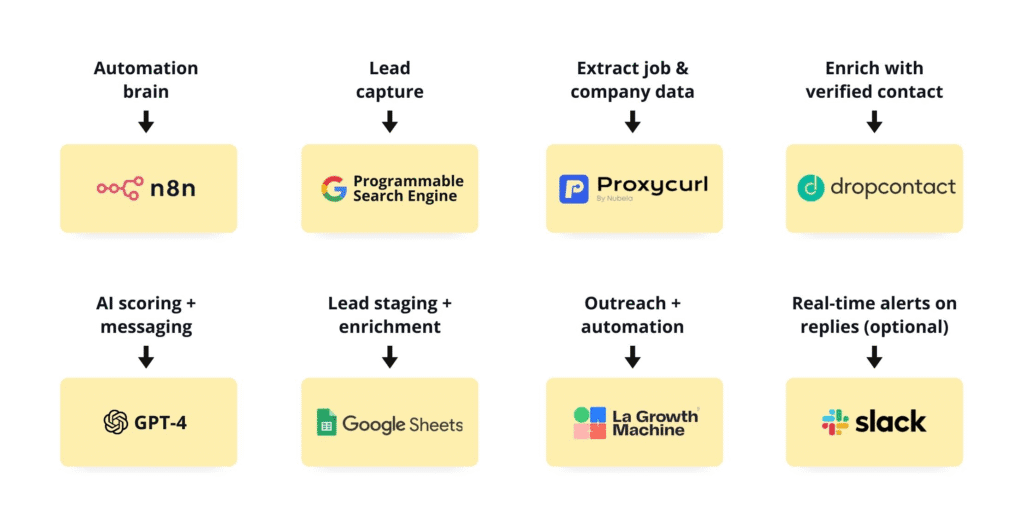
🧠 The Outreach Engine Behind the Scenes

Here’s how it works under the hood:

Build an AI SDR with N8n + La Growth Machine That Runs Multichannel Campaigns For You

🛠️ Tools You’ll Need (All Plug-and-Play)
Build an AI SDR with N8n + La Growth Machine That Runs Multichannel Campaigns For You

⚙️ Why This System Exists?

Build an AI SDR with N8n + La Growth Machine That Runs Multichannel Campaigns For You

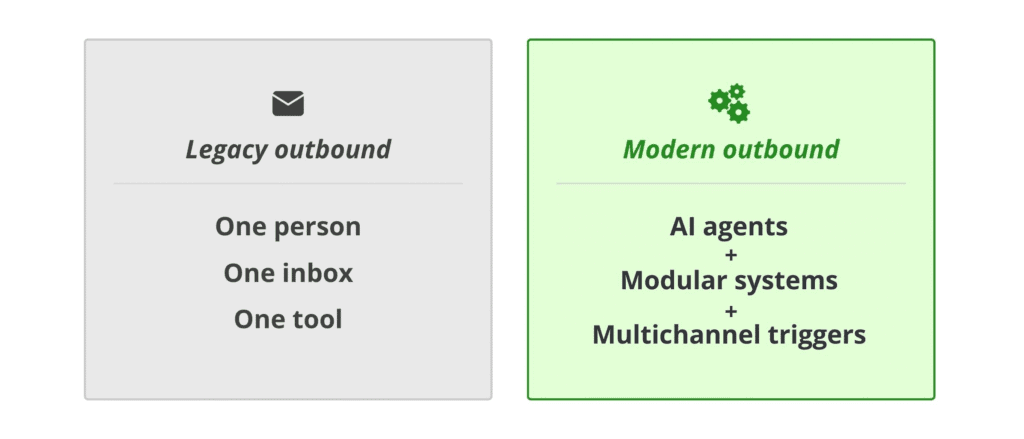
Legacy outbound = One person, One inbox, One tool.

Modern outbound = AI agents + modular systems + intelligent multichannel triggers.

The goal of this workflow is simple:

Automate every single step from lead sourcing → targeting → qualification → personalization… before you ever hit send.

By combining:

  • Web scraping
  • API enrichment
  • Language model reasoning
  • Intent detection
  • and multichannel sequencing

You create a machine that can scale outbound like a team of SDRs — without actually hiring them.


STEP 1: Lead Discovery via Programmable Google Search

Extract LinkedIn URLs of potential prospects based on niche signals (e.g., titles, geography, company type).
Build an AI SDR with N8n + La Growth Machine That Runs Multichannel Campaigns For You

🟡 Tools:

🔵 Setup:

Build an AI SDR with N8n + La Growth Machine That Runs Multichannel Campaigns For You

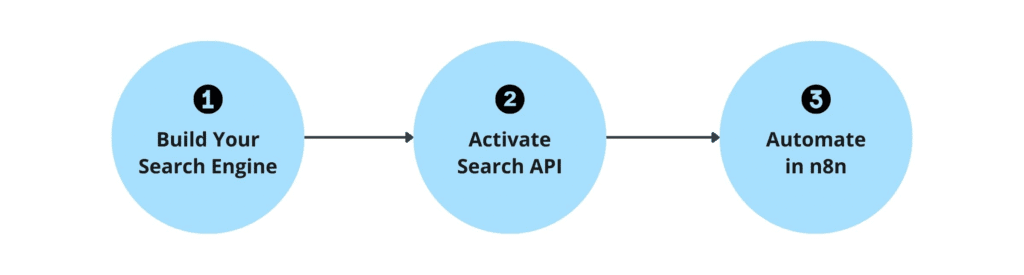
A. Build Your Search Engine

  • Go to: programmablesearchengine.google.com Create a search engine that only indexes: bash CopyEdit site:linkedin.com/in
  • Enable “Image Search” (helps improve relevance)
  • Save your CSE ID

B. Activate Search API in Google Cloud

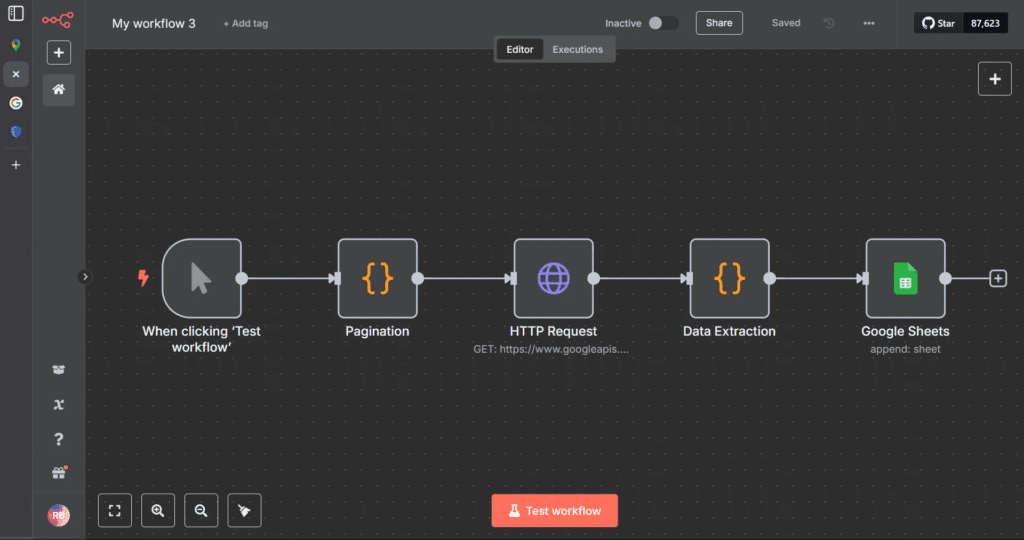
C. Build in n8n:

  1. HTTP Request node → Calls Search API with your query: bash CopyEdit site:linkedin.com/in "Founder" "SaaS" "New York"
  2. Loop node → Uses pagination to get more than 10 results
  3. Wait node → Introduce delay (1-2s) to avoid rate limit
  4. Set node → Clean data, extract URLs
  5. Google Sheets node → Push URLs into your master lead sheet

| HTTP Request node |

bash
CopyEdit
site:linkedin.com/in “Founder” “SaaS” “New York”

💡You now have 100+ real-time LinkedIn URLs from public data.


STEP 2: Enrichment Layer — Convert URLs to Full Profiles

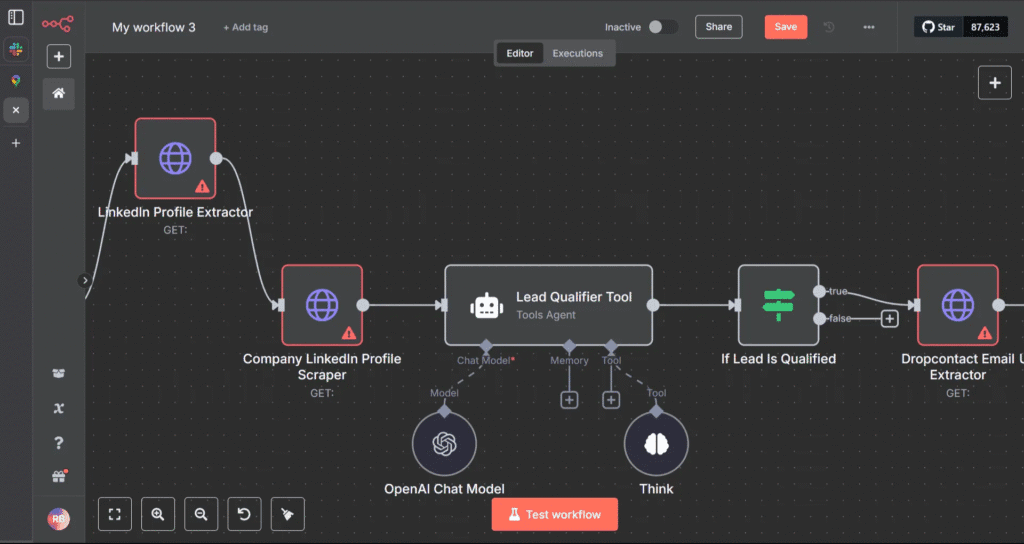
Now that you’ve collected raw LinkedIn URLs, the next task is to enrich those leads with actionable data — names, titles, companies, emails, and phone numbers.
Build an AI SDR with N8n + La Growth Machine That Runs Multichannel Campaigns For You

🟡 Tools:

🔵 Workflow:

Build an AI SDR with N8n + La Growth Machine That Runs Multichannel Campaigns For You

A. Proxycurl API Integration

  • Input: LinkedIn profile URL
  • Output:
    • First Name
    • Last Name
    • Title
    • Company Name
    • Company Website
    • LinkedIn Handle
  • In n8n:
    • Use HTTP node with Proxycurl API key
    • Parse JSON response and extract the above fields
    • Append to the same row in Google Sheets

B. Dropcontact API Integration

  • Input: Full Name + Company Domain
  • Output:
    • Work Email
    • Personal Email (if available)
    • Mobile Number
    • Verification Status
  • In n8n:
    • Send each contact’s data to Dropcontact
    • Clean and normalize phone number formatting
    • Filter out bounced/unverified records

🧠 At this stage, you’ve built a dynamic, real-time database of enriched leads — verified and sales-ready.


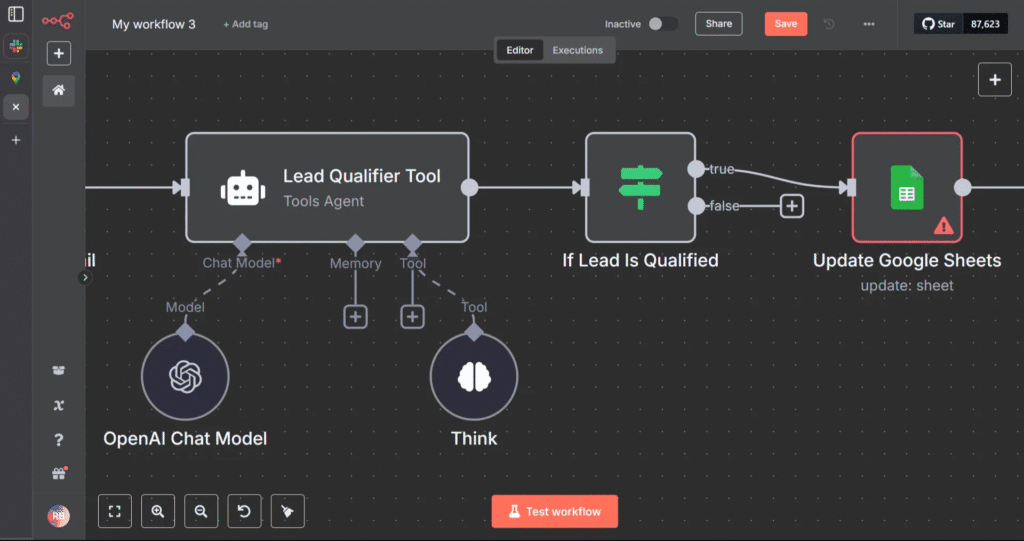
STEP 3: AI-Based Lead Qualification (Using GPT)

Not every lead deserves to enter your campaign.

Instead of scoring manually or using dumb filters (like job title contains “founder”), we use GPT as a reasoning engine.
Build an AI SDR with N8n + La Growth Machine That Runs Multichannel Campaigns For You

🟡 Tools:

🧠 What the AI Should Do:

  • Read job title, company type, industry, and funding history (if available)
  • Compare it to your Ideal Customer Profile
  • Return:
    • A score (1–10)
    • A match status (High, Medium, Low)
    • A justification (1-sentence reasoning)

🔵 Prompt Design:

You’re a sales assistant for a B2B SaaS company.

Our ICP is:

  • Founders or GTM leads
  • SaaS companies
  • <$10M in revenue
  • Based in the US/Canada
  • Hiring SDRs or running outbound

Does this lead fit?

{lead_info_here}

Respond as JSON like this:

{

“score”: 8.7,

“match”: “High”,

“why”: “SaaS founder hiring for sales in NY”

}

In n8n:

Build an AI SDR with N8n + La Growth Machine That Runs Multichannel Campaigns For You
  • Set up an OpenAI API node
  • Dynamically insert enriched data into the prompt
  • Parse the JSON result
  • Store values in the sheet (in columns: match_score, match_reason)

🎯 Now, every lead has an intelligent score — not based on filters, but on context.


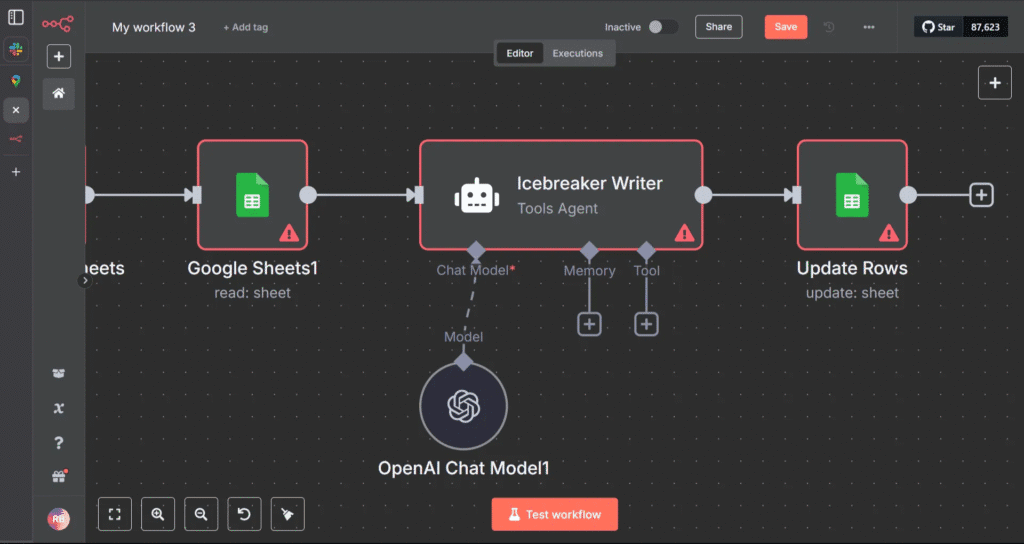
STEP 4: Icebreaker Personalization at Scale (Using GPT)

Most outreach tools allow variables and custom attributes. Few generate human lines that stand out.
Build an AI SDR with N8n + La Growth Machine That Runs Multichannel Campaigns For You

The Goal:

Create contextual, relevant intros for each lead’s first message — auto-generated via GPT.

🟡 Tools:

🔵 Prompt:

Go to this company website: https://{company_url}

Write a 1-line cold email intro that feels natural, personal, and relevant.

Reference tone, copy, value prop, or design. Avoid generic compliments.

Output:

“Loved how you called your product the ‘Notion for IT teams’ — clean, smart positioning.”

Add this icebreaker into a new {icebreaker_line} column in your Google Sheet.


📦 End of Part 1 Summary

At this point, you’ve built:

✅ A Google Search + n8n lead extractor

✅ A GPT-4-powered lead qualifier

✅ A Proxycurl + Dropcontact enrichment engine

✅ A dynamic personalization machine

All of this runs on autopilot and outputs a neatly organized Google Sheet with:

Build an AI SDR with N8n + La Growth Machine That Runs Multichannel Campaigns For You

AI-first pre-pipeline engine that:

  • Finds leads based on intent or role signals
  • Enriches and verifies them
  • Qualifies them using GPT
  • Crafts icebreaker messages tailored to each lead

Now it’s time to deploy them into battle using La Growth Machine’s full stack — from first touch to multi-stage follow-up to dynamic optimization.


🔍 Full Walkthrough: How to Deploy Campaigns in La Growth Machine

1. Campaign Architecture: How LGM Thinks (Deep Dive) 🧱

La Growth Machine (LGM) runs campaigns as modular, multistep workflows—giving you total control and flexibility to design the perfect sequence for your market and channel mix.

Each campaign is built as a series of “steps” with four key attributes:


A. Channel-Specific Steps

Each step can target a unique channel:

LinkedInProfile Visits, Follows, Post Likes, Connection Requests, Direct Messages with Chat Mode, Voice Notes, A/B tests & spintax
EmailCold emails, Rotation Inbox, follow-ups, A/B tests & spintax
X (Twitter)Follows, DMs
CallsManual or automated call tasks, Scripts
VoiceLinkedIn Voice Messages, optional AI-cloned voice for custom “Hey {{Firstname}}”
VideoPersonalized video prospecting (via Sendspark, Weezly)

C. Time-Controlled Logic

Delay logic is set between each step:

  1. It prevents your messages and actions from coming across as automated or spammy. </aside>
  2. You can set delays like “+3 hours after previous step,” “+1 day after DM,” or “+2 days if no reply.” </aside>

D. Data-Enriched Personalization

  • Every action can use dynamic variables imported with your leads (e.g., {{firstName}}, {{company}}, {{role}}, {{icebreaker}}, {{score}}).
  • Personalization can be injected into any message, follow, or touch, making every interaction contextually relevant and unique to each lead.
  • Real-time data updates: variables can be edited mid-campaign as new info or responses are gathered.

E. Example Sequence (Showing Step-by-Step Flow)

| Profile Visit

(auto)Instant awareness, zero friction.
Profile Follow
(auto, +3h)Signal ongoing interest.
Post Like
(auto, +2h)Social warming—shows up in notifications, builds trust and subconscious rapport.
Wait
(+1 day)Natural timing, prevents message overload.
Message 1: Connection Request or DMPersonalized with {{firstName}}, {{company}}, {{icebreaker}}.
Wait (+2 days)
Message 2: Follow-Up or EmailCan be a reminder, a Voice note, a CTA, or sharing a resource—again, fully personalized.
Manual TaskExample: Call high-scoring leads, or research for deeper personalization in a custom message.
Branch/Conditional LogicIf a lead replies, trigger new sequence or alert the team. If no reply, continue sequence.

With LGM’s modular campaign builder, you can design, test, and optimize any sequence—automating the routine, humanizing the critical, and driving replies at scale.


2. Set Up Your Campaign Workspace 🗂

A. Build Your Audience List

LGM gives you multiple ways to get leads into your campaign. Choose the method that matches your workflow or target audience:

1. Manual Import

  • Upload a CSV file
  • Ideal for leads you’ve already processed via your AI pipeline (e.g., Proxycurl + GPT-enriched)
  • You can also import leads in LGM from a LinkedIn search (Basic or Sales Navigator)

2. CRM Sync

  • Auto-import leads directly from any CRM or Databases via LGM native integrations (Pipedrive, HubSpot, Breakcold, Clay, PersanaAI, Phantombuster…) or custom connectors (Zapier, Make, n8n)
  • It keeps your outreach aligned with your existing CRM lists and workflows

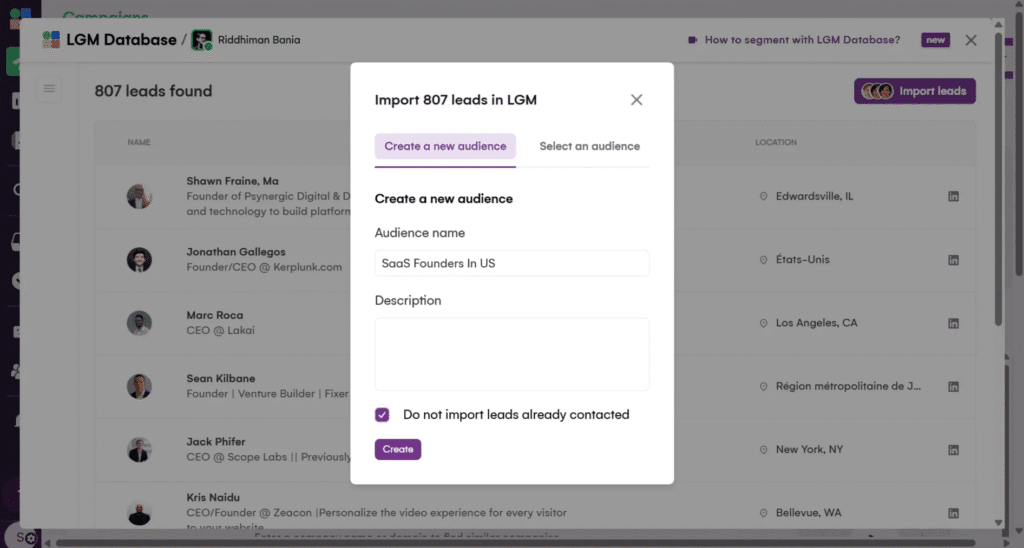
3. LGM Database & Lookalike

  • Use the LGM Database to identify in one click companies that match your ideal client profile with a turnkey ABM solution
  • Find new leads with the LGM Lookalike Engine: name your best client, and it finds the next ones for you based on your criteria and similarity score. But that’s not all — whenever a prospect responds positively, the tool suggests you similar companies to fill your pipeline.
Build an AI SDR with N8n + La Growth Machine That Runs Multichannel Campaigns For You

4. Intent-Based Triggers

Dynamically pull in contacts who have shown engagement signals on LinkedIn.

You can target:

👍 Anyone who commented or liked any LinkedIn post (yours or your competitors’)

📅 Anyone who registered for any LinkedIn event (yours or your competitors’)

💻 Your company page followers (great for warm outbound or community nurturing)

Pro tip:

If you’re just getting started, we recommend beginning with a CSV import from your AI-powered pipeline once you’ve mastered your workflow, layer in CRM sync and intent-based triggers to capture more opportunities and warmer leads.

Good To Know: LGM enriches leads automatically after your campaign is launched and it’s unlimited (no token or credit): work emails powered by waterfall enrichment ****(7 providers), personal emails, phones, LinkedIn and X profiles are found.

B. Create a New Campaign

Give it a name using the syntax:

[Persona]-[Offer]-[Channel]-[Quarter]

Examples:

  • Founders-OutboundPlaybook-MULTI-Q2
  • HiringCMOs-VoiceIntro-EmailOnly-Q3 </aside>

This helps later with testing and dashboard tracking.


3. Define Step-by-Step Sequences (Exact Breakdown) 🧩

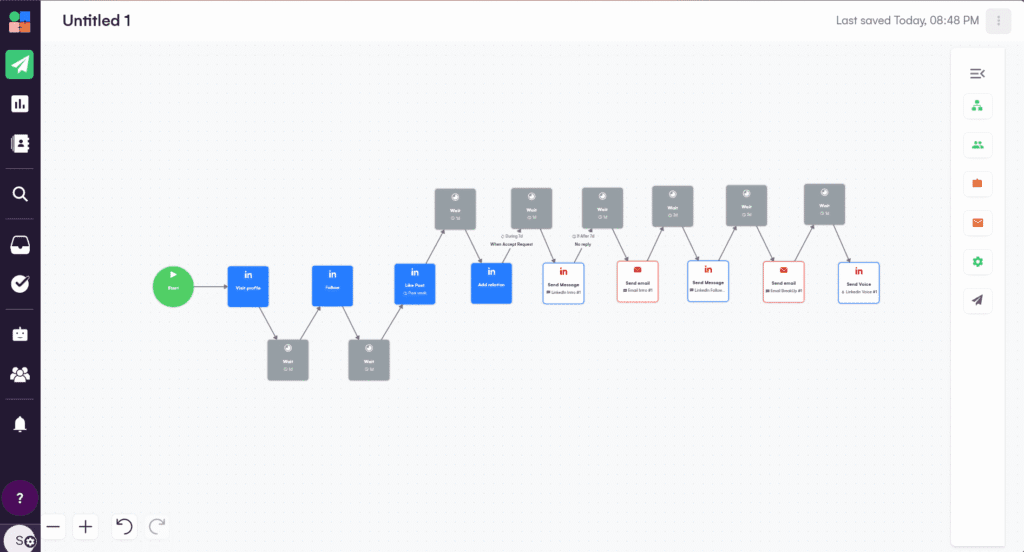
Below is a proven 10-day multichannel sequence inside La Growth Machine.
Build an AI SDR with N8n + La Growth Machine That Runs Multichannel Campaigns For You

Each step is designed for maximum engagement and reply rates:


Step 1: LinkedIn Profile Visit

  • Type: Auto-action
  • Goal: Passive touch—show up in prospect’s “Who viewed your profile” notifications
  • Delay: 0h (immediate)
  • Personalization: None
  • Why: Warms up lead before any messaging

Step 2: LinkedIn Follow

  • Type: Auto-action
  • Goal: Increase future DM and connection request acceptance rate
  • Delay: +3 hours after profile visit
  • Personalization: None
  • Why: Builds passive familiarity
  • Pro Tip: Also triggers notification, subtly signaling your interest

Step 3: Social Warming — Like a Recent Post

  • Type: Auto-action
  • Goal: Appear in the prospect’s notifications with a relevant, value-aligned action
  • Delay: +2 hours after follow
  • Personalization: Like their latest post
  • Why: Most people check “who liked my post”—your name now appears for a third time
  • Bonus Move: Like a post on a mutual connection’s timeline or one of their company’s announcements (shows research and intent)

Step 4: LinkedIn Message 1 — Connection Request (with Personalization)

  • Type: Connection request message
  • Dynamic fields:
    • {{firstName}}
    • {{company}}
    • {{icebreaker}} (GPT-powered, unique to each lead)
  • Delay: +1 day after like
  • CTA: Subtle offer or open-ended “curiosity” nudge
  • Example: <aside> “Hey {{firstName}}, came across {{company}} — super interesting space. Curious if you’re testing outbound workflows internally or still refining? I have something you might find useful if you’re open to it.” </aside>
  • Out-of-Box Option:
    • Mention something specific from the post you liked (e.g., “Saw your take on outbound automation in your last post—really aligned with how we’re thinking about scaling sales teams.”)

Step 5: LinkedIn Message 2 — “Thank You”/First DM

  • Type: DM after connection accepted
  • Goal: Open a real conversation (not a pitch)
  • Delay: +1 day after accepted connection
  • Personalization: Reference the post or icebreaker again
  • Example: <aside> “Thanks for connecting, {{firstName}}! Quick one: saw you recently posted about {{topic}}. Curious—what’s your #1 focus in outbound right now?” </aside>
  • Pro Tip: Use the LGM Chat Mode to mimics human behaviour. It splits your long message into short messages spaced out naturally, just like a natural chat.

Step 6: Email #1 (Multichannel Touch)

  • Type: Personalized cold email
  • Delay: +1 day after first DM
  • Dynamic fields:
    • {{firstName}}, {{company}}, {{role}}, {{icebreaker}}
  • Subject Line Tip: Use an A/B test (e.g., “Quick idea for {{company}}” vs. “{{company}} + AI-powered outbound?”)
  • Body Example: <aside> “Saw what you’re building at {{company}}—especially liked your approach to {{icebreaker}}. We recently helped a team in your space triple their reply rates using a multichannel AI workflow. Worth a look?” </aside>

Step 7: LinkedIn Message 3 (Follow-Up/Value Add)

  • Type: Follow-up DM
  • Delay: +2 days after initial email
  • Goal: Add a resource, mini-case study, or just a soft bump
  • Example: <aside> “Just sharing this playbook we used with {{otherCompany}}—happy to send details if helpful for you!” </aside>

Step 8: Email #2 (Follow-Up/Content Drop)

  • Type: Follow-up email
  • Delay: +2 days after LinkedIn follow-up
  • Goal: Share a relevant article, teardown, or video—positioned as helpful, not salesy
  • Bonus: Reference a unique signal you spotted in their posts or company news

Step 9: LinkedIn Voice Note (Optional but Powerful)

  • Type: With or without AI-cloned voice
  • Delay: +1 day after follow-up
  • Goal: Stand out from text-based noise
  • Content: <aside> “Hey {{firstName}}, wanted to share a quick voice note—loved your recent post on {{topic}}. Thought this might be a fit for {{company}}…” </aside>

Step 10: Call Task/Manual Touch

  • Type: Manual task assigned in LGM
  • Delay: +2 days after voice note
  • Goal: Call only high-scoring or engaged leads
  • Tip: Include quick context and last touchpoint in your notes

Bonus/Out-of-the-Box Unique Steps:

👉 Send a relevant podcast episode or invite to a community

“Saw you’re scaling {{company}}’s GTM. If you’re into growth ops, we host a monthly founder roundtable—DM me if you want an invite!”

👉 Share a short loom/teardown video personalized to their company/website “Recorded a quick breakdown on how we’ve automated LinkedIn + email for similar teams—here’s the 2-minute clip.”

👉 Trigger intent retargeting (using LGM’s Lookalike Engine) After a positive reply, instantly queue up a new campaign for similar companies or buyer personas.


4. Variable Mapping & Personalization in LGM 🔗

In LGM’s import sheet, define the following columns:

Column HeaderPurpose
firstNameGreeting
companyRelevance
roleSegmenting context
icebreakerCustom intro
websiteGPT prompt input
scoreCustom scoring via GPT
statusUsed for smart routing, filters

These variables and custom attributes are usable across all steps and can be updated mid-campaign if needed.


5. Automation Settings & Optimization Features ⚙️

✅ Inbox Rotation

🧊 OOO Detection

🔬 A/B Testing (Built-in)


6. Real-Time Monitoring with LGM Inbox 📬

LGM’s Unified Inbox lets you:

✅ View all conversations across channels

✅ See previous touchpoints in timeline view

✅ Reply manually or trigger automated sequences

✅ Use response templates (customize per campaign)

✅ Qualify leads instantly (mark as Interested, Follow up, Not a fit)

You can even assign leads to teammates with comments.


7. Auto-Pipeline Expansion with Lookalike Engine 🧬

When a lead responds positively:

  • LGM identifies similar companies based on:
    • Industry
    • Keywords
    • Headcount
    • Tech Stack
  • Suggests new leads in-app
  • You can one-click import them into new or existing campaigns

8. Campaign Duplication for Scaling 📦

Once a campaign hits product-market resonance:

  • Clone it
  • Change:
    • Persona
    • Geography
    • Offer positioning
    • Copy angle

Each LGM campaign becomes a sales asset that can be redeployed with small changes to hit new verticals.


🧠 Final Recap: What You’ve Built

You now know how to:

Architect and deploy a full multichannel campaign in LGM

Optimize sequences via testing, enrichment, and personalization

Reactivate and expand using LGM’s lookalike engine

Map enriched AI-generated data into scalable outreach flows

Manage replies across all channels in one place with the LGM inbox

⚡ Ready to Build Your Own Multichannel SDR Machine?

You’ve just walked through a playbook that replaces $1,000+/mo in tools and hours of SDR grunt work — with one lean, AI-enhanced system.

Now you can:

✅ Find leads from anywhere

✅ Enrich them with verified data

✅ Personalize messages at scale

✅ Reach them across LinkedIn, Email, Voice, Video, X and Call

✅ Optimize replies with GPT-powered learning

✅ Expand your TAM with Lookalike triggers

All from a single dashboard. No switching tools. No duct-tape workflows.

Stop wasting leads.

Start running outbound that gets replies.

<aside>

🎁 Sign up for La Growth Machine now with this magical link

and get 30 days free instead of 14 days. No credit card needed.

Try La Growth Machine

Your weekend build → Monday pipeline filler

🎁 Sign up for La Growth Machine now with this magical link

and get 30 days free instead of 14 days. No credit card needed.

Build Multichannel Funnels Today


❌ Why Most Outreach Stacks Are Broken

$300/monthFor data enrichment
$400/monthFor email sequencing
$150/monthTo sync your CRM

And you’re still copying LinkedIn URLs manually.

The worst part?

You’re doing half the work that should’ve been automated 2 years ago.


✅ What This System Does Differently

This isn’t another cold email playbook.

This is a fully autonomous multichannel outbound engine — powered by AI agents, stitched together by n8n, and deployed through La Growth Machine.

Build an AI SDR with N8n + La Growth Machine That Runs Multichannel Campaigns For You
  • It finds leads.
  • It qualifies them with GPT.
  • It personalizes every message.
  • Then it launches multichannel campaigns across LinkedIn, Email, Voice, Video, X, and even Calls.

No reps. No tabs. No missed replies.


🧠 The Outreach Engine Behind the Scenes

Here’s how it works under the hood:

Build an AI SDR with N8n + La Growth Machine That Runs Multichannel Campaigns For You

🛠️ Tools You’ll Need (All Plug-and-Play)

Build an AI SDR with N8n + La Growth Machine That Runs Multichannel Campaigns For You

⚙️ Why This System Exists?

Build an AI SDR with N8n + La Growth Machine That Runs Multichannel Campaigns For You

Legacy outbound = One person, One inbox, One tool.

Modern outbound = AI agents + modular systems + intelligent multichannel triggers.

The goal of this workflow is simple:

Automate every single step from lead sourcing → targeting → qualification → personalization… before you ever hit send.

By combining:

  • Web scraping
  • API enrichment
  • Language model reasoning
  • Intent detection
  • and multichannel sequencing

You create a machine that can scale outbound like a team of SDRs — without actually hiring them.


STEP 1: Lead Discovery via Programmable Google Search

Extract LinkedIn URLs of potential prospects based on niche signals (e.g., titles, geography, company type).

Build an AI SDR with N8n + La Growth Machine That Runs Multichannel Campaigns For You

🟡 Tools:

🔵 Setup:

Build an AI SDR with N8n + La Growth Machine That Runs Multichannel Campaigns For You

A. Build Your Search Engine

  • Go to: programmablesearchengine.google.com Create a search engine that only indexes: bash CopyEdit site:linkedin.com/in
  • Enable “Image Search” (helps improve relevance)
  • Save your CSE ID

B. Activate Search API in Google Cloud

C. Build in n8n:

  1. HTTP Request node → Calls Search API with your query: bash CopyEdit site:linkedin.com/in "Founder" "SaaS" "New York"
  2. Loop node → Uses pagination to get more than 10 results
  3. Wait node → Introduce delay (1-2s) to avoid rate limit
  4. Set node → Clean data, extract URLs
  5. Google Sheets node → Push URLs into your master lead sheet

| HTTP Request node |

bash
CopyEdit
site:linkedin.com/in “Founder” “SaaS” “New York”

💡You now have 100+ real-time LinkedIn URLs from public data.


STEP 2: Enrichment Layer — Convert URLs to Full Profiles

Now that you’ve collected raw LinkedIn URLs, the next task is to enrich those leads with actionable data — names, titles, companies, emails, and phone numbers.

Build an AI SDR with N8n + La Growth Machine That Runs Multichannel Campaigns For You

🟡 Tools:

🔵 Workflow:

Build an AI SDR with N8n + La Growth Machine That Runs Multichannel Campaigns For You

A. Proxycurl API Integration

  • Input: LinkedIn profile URL
  • Output:
    • First Name
    • Last Name
    • Title
    • Company Name
    • Company Website
    • LinkedIn Handle
  • In n8n:
    • Use HTTP node with Proxycurl API key
    • Parse JSON response and extract the above fields
    • Append to the same row in Google Sheets

B. Dropcontact API Integration

  • Input: Full Name + Company Domain
  • Output:
    • Work Email
    • Personal Email (if available)
    • Mobile Number
    • Verification Status
  • In n8n:
    • Send each contact’s data to Dropcontact
    • Clean and normalize phone number formatting
    • Filter out bounced/unverified records

🧠 At this stage, you’ve built a dynamic, real-time database of enriched leads — verified and sales-ready.


STEP 3: AI-Based Lead Qualification (Using GPT)

Not every lead deserves to enter your campaign.

Instead of scoring manually or using dumb filters (like job title contains “founder”), we use GPT as a reasoning engine.

Build an AI SDR with N8n + La Growth Machine That Runs Multichannel Campaigns For You

🟡 Tools:

🧠 What the AI Should Do:

  • Read job title, company type, industry, and funding history (if available)
  • Compare it to your Ideal Customer Profile
  • Return:
    • A score (1–10)
    • A match status (High, Medium, Low)
    • A justification (1-sentence reasoning)

🔵 Prompt Design:

You’re a sales assistant for a B2B SaaS company.

Our ICP is:

  • Founders or GTM leads
  • SaaS companies
  • <$10M in revenue
  • Based in the US/Canada
  • Hiring SDRs or running outbound

Does this lead fit?

{lead_info_here}

Respond as JSON like this:

{

“score”: 8.7,

“match”: “High”,

“why”: “SaaS founder hiring for sales in NY”

}

In n8n:

Build an AI SDR with N8n + La Growth Machine That Runs Multichannel Campaigns For You
  • Set up an OpenAI API node
  • Dynamically insert enriched data into the prompt
  • Parse the JSON result
  • Store values in the sheet (in columns: match_score, match_reason)

🎯 Now, every lead has an intelligent score — not based on filters, but on context.


STEP 4: Icebreaker Personalization at Scale (Using GPT)

Most outreach tools allow variables and custom attributes. Few generate human lines that stand out.

Build an AI SDR with N8n + La Growth Machine That Runs Multichannel Campaigns For You

The Goal:

Create contextual, relevant intros for each lead’s first message — auto-generated via GPT.

🟡 Tools:

🔵 Prompt:

Go to this company website: https://{company_url}

Write a 1-line cold email intro that feels natural, personal, and relevant.

Reference tone, copy, value prop, or design. Avoid generic compliments.

Output:

“Loved how you called your product the ‘Notion for IT teams’ — clean, smart positioning.”

Add this icebreaker into a new {icebreaker_line} column in your Google Sheet.


📦 End of Part 1 Summary

At this point, you’ve built:

✅ A Google Search + n8n lead extractor

✅ A GPT-4-powered lead qualifier

✅ A Proxycurl + Dropcontact enrichment engine

✅ A dynamic personalization machine

All of this runs on autopilot and outputs a neatly organized Google Sheet with:

Build an AI SDR with N8n + La Growth Machine That Runs Multichannel Campaigns For You

AI-first pre-pipeline engine that:

  • Finds leads based on intent or role signals
  • Enriches and verifies them
  • Qualifies them using GPT
  • Crafts icebreaker messages tailored to each lead

Now it’s time to deploy them into battle using La Growth Machine’s full stack — from first touch to multi-stage follow-up to dynamic optimization.


🔍 Full Walkthrough: How to Deploy Campaigns in La Growth Machine

1. Campaign Architecture: How LGM Thinks (Deep Dive) 🧱

La Growth Machine (LGM) runs campaigns as modular, multistep workflows—giving you total control and flexibility to design the perfect sequence for your market and channel mix.

Each campaign is built as a series of “steps” with four key attributes:


A. Channel-Specific Steps

Each step can target a unique channel:

LinkedInProfile Visits, Follows, Post Likes, Connection Requests, Direct Messages with Chat Mode, Voice Notes, A/B tests & spintax
EmailCold emails, Rotation Inbox, follow-ups, A/B tests & spintax
X (Twitter)Follows, DMs
CallsManual or automated call tasks, Scripts
VoiceLinkedIn Voice Messages, optional AI-cloned voice for custom “Hey {{Firstname}}”
VideoPersonalized video prospecting (via Sendspark, Weezly)

C. Time-Controlled Logic

Delay logic is set between each step:

  1. It prevents your messages and actions from coming across as automated or spammy. </aside>
  2. You can set delays like “+3 hours after previous step,” “+1 day after DM,” or “+2 days if no reply.” </aside>

D. Data-Enriched Personalization

  • Every action can use dynamic variables imported with your leads (e.g., {{firstName}}, {{company}}, {{role}}, {{icebreaker}}, {{score}}).
  • Personalization can be injected into any message, follow, or touch, making every interaction contextually relevant and unique to each lead.
  • Real-time data updates: variables can be edited mid-campaign as new info or responses are gathered.

E. Example Sequence (Showing Step-by-Step Flow)

| Profile Visit

(auto)Instant awareness, zero friction.
Profile Follow
(auto, +3h)Signal ongoing interest.
Post Like
(auto, +2h)Social warming—shows up in notifications, builds trust and subconscious rapport.
Wait
(+1 day)Natural timing, prevents message overload.
Message 1: Connection Request or DMPersonalized with {{firstName}}, {{company}}, {{icebreaker}}.
Wait (+2 days)
Message 2: Follow-Up or EmailCan be a reminder, a Voice note, a CTA, or sharing a resource—again, fully personalized.
Manual TaskExample: Call high-scoring leads, or research for deeper personalization in a custom message.
Branch/Conditional LogicIf a lead replies, trigger new sequence or alert the team. If no reply, continue sequence.

With LGM’s modular campaign builder, you can design, test, and optimize any sequence—automating the routine, humanizing the critical, and driving replies at scale.


2. Set Up Your Campaign Workspace 🗂

A. Build Your Audience List

LGM gives you multiple ways to get leads into your campaign. Choose the method that matches your workflow or target audience:

1. Manual Import

  • Upload a CSV file
  • Ideal for leads you’ve already processed via your AI pipeline (e.g., Proxycurl + GPT-enriched)
  • You can also import leads in LGM from a LinkedIn search (Basic or Sales Navigator)

2. CRM Sync

  • Auto-import leads directly from any CRM or Databases via LGM native integrations (Pipedrive, HubSpot, Breakcold, Clay, PersanaAI, Phantombuster…) or custom connectors (Zapier, Make, n8n)
  • It keeps your outreach aligned with your existing CRM lists and workflows

3. LGM Database & Lookalike

  • Use the LGM Database to identify in one click companies that match your ideal client profile with a turnkey ABM solution
  • Find new leads with the LGM Lookalike Engine: name your best client, and it finds the next ones for you based on your criteria and similarity score. But that’s not all — whenever a prospect responds positively, the tool suggests you similar companies to fill your pipeline.
Build an AI SDR with N8n + La Growth Machine That Runs Multichannel Campaigns For You

4. Intent-Based Triggers

Dynamically pull in contacts who have shown engagement signals on LinkedIn.

You can target:

👍 Anyone who commented or liked any LinkedIn post (yours or your competitors’)

📅 Anyone who registered for any LinkedIn event (yours or your competitors’)

💻 Your company page followers (great for warm outbound or community nurturing)

Pro tip:

If you’re just getting started, we recommend beginning with a CSV import from your AI-powered pipeline once you’ve mastered your workflow, layer in CRM sync and intent-based triggers to capture more opportunities and warmer leads.

Good To Know: LGM enriches leads automatically after your campaign is launched and it’s unlimited (no token or credit): work emails powered by waterfall enrichment ****(7 providers), personal emails, phones, LinkedIn and X profiles are found.

B. Create a New Campaign

Give it a name using the syntax:

[Persona]-[Offer]-[Channel]-[Quarter]

Examples:

  • Founders-OutboundPlaybook-MULTI-Q2
  • HiringCMOs-VoiceIntro-EmailOnly-Q3 </aside>

This helps later with testing and dashboard tracking.


3. Define Step-by-Step Sequences (Exact Breakdown) 🧩

Below is a proven 10-day multichannel sequence inside La Growth Machine.

Build an AI SDR with N8n + La Growth Machine That Runs Multichannel Campaigns For You

Each step is designed for maximum engagement and reply rates:


Step 1: LinkedIn Profile Visit

  • Type: Auto-action
  • Goal: Passive touch—show up in prospect’s “Who viewed your profile” notifications
  • Delay: 0h (immediate)
  • Personalization: None
  • Why: Warms up lead before any messaging

Step 2: LinkedIn Follow

  • Type: Auto-action
  • Goal: Increase future DM and connection request acceptance rate
  • Delay: +3 hours after profile visit
  • Personalization: None
  • Why: Builds passive familiarity
  • Pro Tip: Also triggers notification, subtly signaling your interest

Step 3: Social Warming — Like a Recent Post

  • Type: Auto-action
  • Goal: Appear in the prospect’s notifications with a relevant, value-aligned action
  • Delay: +2 hours after follow
  • Personalization: Like their latest post
  • Why: Most people check “who liked my post”—your name now appears for a third time
  • Bonus Move: Like a post on a mutual connection’s timeline or one of their company’s announcements (shows research and intent)

Step 4: LinkedIn Message 1 — Connection Request (with Personalization)

  • Type: Connection request message
  • Dynamic fields:
    • {{firstName}}
    • {{company}}
    • {{icebreaker}} (GPT-powered, unique to each lead)
  • Delay: +1 day after like
  • CTA: Subtle offer or open-ended “curiosity” nudge
  • Example: <aside> “Hey {{firstName}}, came across {{company}} — super interesting space. Curious if you’re testing outbound workflows internally or still refining? I have something you might find useful if you’re open to it.” </aside>
  • Out-of-Box Option:
    • Mention something specific from the post you liked (e.g., “Saw your take on outbound automation in your last post—really aligned with how we’re thinking about scaling sales teams.”)

Step 5: LinkedIn Message 2 — “Thank You”/First DM

  • Type: DM after connection accepted
  • Goal: Open a real conversation (not a pitch)
  • Delay: +1 day after accepted connection
  • Personalization: Reference the post or icebreaker again
  • Example: <aside> “Thanks for connecting, {{firstName}}! Quick one: saw you recently posted about {{topic}}. Curious—what’s your #1 focus in outbound right now?” </aside>
  • Pro Tip: Use the LGM Chat Mode to mimics human behaviour. It splits your long message into short messages spaced out naturally, just like a natural chat.

Step 6: Email #1 (Multichannel Touch)

  • Type: Personalized cold email
  • Delay: +1 day after first DM
  • Dynamic fields:
    • {{firstName}}, {{company}}, {{role}}, {{icebreaker}}
  • Subject Line Tip: Use an A/B test (e.g., “Quick idea for {{company}}” vs. “{{company}} + AI-powered outbound?”)
  • Body Example: <aside> “Saw what you’re building at {{company}}—especially liked your approach to {{icebreaker}}. We recently helped a team in your space triple their reply rates using a multichannel AI workflow. Worth a look?” </aside>

Step 7: LinkedIn Message 3 (Follow-Up/Value Add)

  • Type: Follow-up DM
  • Delay: +2 days after initial email
  • Goal: Add a resource, mini-case study, or just a soft bump
  • Example: <aside> “Just sharing this playbook we used with {{otherCompany}}—happy to send details if helpful for you!” </aside>

Step 8: Email #2 (Follow-Up/Content Drop)

  • Type: Follow-up email
  • Delay: +2 days after LinkedIn follow-up
  • Goal: Share a relevant article, teardown, or video—positioned as helpful, not salesy
  • Bonus: Reference a unique signal you spotted in their posts or company news

Step 9: LinkedIn Voice Note (Optional but Powerful)

  • Type: With or without AI-cloned voice
  • Delay: +1 day after follow-up
  • Goal: Stand out from text-based noise
  • Content: <aside> “Hey {{firstName}}, wanted to share a quick voice note—loved your recent post on {{topic}}. Thought this might be a fit for {{company}}…” </aside>

Step 10: Call Task/Manual Touch

  • Type: Manual task assigned in LGM
  • Delay: +2 days after voice note
  • Goal: Call only high-scoring or engaged leads
  • Tip: Include quick context and last touchpoint in your notes

Bonus/Out-of-the-Box Unique Steps:

👉 Send a relevant podcast episode or invite to a community

“Saw you’re scaling {{company}}’s GTM. If you’re into growth ops, we host a monthly founder roundtable—DM me if you want an invite!”

👉 Share a short loom/teardown video personalized to their company/website “Recorded a quick breakdown on how we’ve automated LinkedIn + email for similar teams—here’s the 2-minute clip.”

👉 Trigger intent retargeting (using LGM’s Lookalike Engine) After a positive reply, instantly queue up a new campaign for similar companies or buyer personas.


4. Variable Mapping & Personalization in LGM 🔗

In LGM’s import sheet, define the following columns:

Column HeaderPurpose
firstNameGreeting
companyRelevance
roleSegmenting context
icebreakerCustom intro
websiteGPT prompt input
scoreCustom scoring via GPT
statusUsed for smart routing, filters

These variables and custom attributes are usable across all steps and can be updated mid-campaign if needed.


5. Automation Settings & Optimization Features ⚙️

✅ Inbox Rotation

🧊 OOO Detection

🔬 A/B Testing (Built-in)


6. Real-Time Monitoring with LGM Inbox 📬

LGM’s Unified Inbox lets you:

✅ View all conversations across channels

✅ See previous touchpoints in timeline view

✅ Reply manually or trigger automated sequences

✅ Use response templates (customize per campaign)

✅ Qualify leads instantly (mark as Interested, Follow up, Not a fit)

You can even assign leads to teammates with comments.


7. Auto-Pipeline Expansion with Lookalike Engine 🧬

When a lead responds positively:

  • LGM identifies similar companies based on:
    • Industry
    • Keywords
    • Headcount
    • Tech Stack
  • Suggests new leads in-app
  • You can one-click import them into new or existing campaigns

8. Campaign Duplication for Scaling 📦

Once a campaign hits product-market resonance:

  • Clone it
  • Change:
    • Persona
    • Geography
    • Offer positioning
    • Copy angle

Each LGM campaign becomes a sales asset that can be redeployed with small changes to hit new verticals.


🧠 Final Recap: What You’ve Built

You now know how to:

Architect and deploy a full multichannel campaign in LGM

Optimize sequences via testing, enrichment, and personalization

Reactivate and expand using LGM’s lookalike engine

Map enriched AI-generated data into scalable outreach flows

Manage replies across all channels in one place with the LGM inbox

⚡ Ready to Build Your Own Multichannel SDR Machine?

You’ve just walked through a playbook that replaces $1,000+/mo in tools and hours of SDR grunt work — with one lean, AI-enhanced system.

Now you can:

✅ Find leads from anywhere

✅ Enrich them with verified data

✅ Personalize messages at scale

✅ Reach them across LinkedIn, Email, Voice, Video, X and Call

✅ Optimize replies with GPT-powered learning

✅ Expand your TAM with Lookalike triggers

All from a single dashboard. No switching tools. No duct-tape workflows.

Stop wasting leads.

Start running outbound that gets replies.

<aside>

🎁 Sign up for La Growth Machine now with this magical link

and get 30 days free instead of 14 days. No credit card needed.

Try La Growth Machine

Author
Written By
Vikash Kumar
Building AI agents, n8n workflows and end-to-end automation for 30+ Brands across India, the US, Europe, Dubai & Australia. 7+ years of Experience saving founders real hours every week - no code required.
Author
Written By
Vikash Kumar
Building AI agents, n8n workflows and end-to-end automation for 30+ Brands across India, the US, Europe, Dubai & Australia. 7+ years of Experience saving founders real hours every week - no code required.
Ask more Questions about this Blog with AI:

Our AI Articles

Learn from our AI Articles to excel in your profession ;)

n8n AI Agent Node: Build Your First AI Agent in 15 Minutes

Learn how the n8n AI Agent node works and build your first AI agent in 15 minutes. Step-by-step beginner guide...

Best Free OpenRouter Models in 2026: Which One Should You Use?

OpenRouter has 29 free AI models as of June 2026. Picking the wrong one for your task wastes your daily...

ClawdBot Tutorial 2026: Complete Beginner Guide to Install, Configure & Run Your First AI Agent

The complete beginner guide to Clawdbot in 2026 — from installation to your first running AI agent, with config templates,...

What Are Claude Skills? A Beginner’s Guide to AI Skills in 2026

Every time you start a new conversation with Claude, it forgets everything from the last one. Your preferences, your writing...

Claude vs ChatGPT in 2026: I Tested Both on the Same 10 Real Tasks

You’re probably paying $20 a month for one of these tools and quietly wondering if the other one is better....

HOW TO GET CLAUDE TO TEACH YOU STEP BY STEP

This framework turns any “I want to do X with Claude but have no idea where to start” into a...

Claude Code Without a Subscription: 3 Free Ways to Run It in 2026

Claude Code is Anthropic’s terminal-based AI coding assistant. It edits files, runs commands, plans projects, and debugs errors — entirely...

Best Claude Prompts 2026: 75 Templates That Actually Work

If your Claude outputs feel generic, the fix isn’t switching models — it’s fixing the prompt. Most people send a...

Build n8n Workflows Without Coding Using Claude Code: Step-by-Step (2026)

For years, building an n8n automation meant dragging nodes around a canvas, guessing field names, and bouncing between docs and...

7 Claude Code prompts

7 simple Claude Code prompts to get you started...
1:1 Free Strategy Session
Your competitors are already automating. Are you still paying for it manually?

Do you want to adopt AI Automation?

Every hour your team does repetitive work, you're burning real money.
While you wait, faster businesses are cutting costs and moving quicker.
AI and automations aren't the future anymore — they're the present.

Book a live 1-on-1 session where we show you exactly which of your daily tasks can be automated — and what it’s costing you not to.