
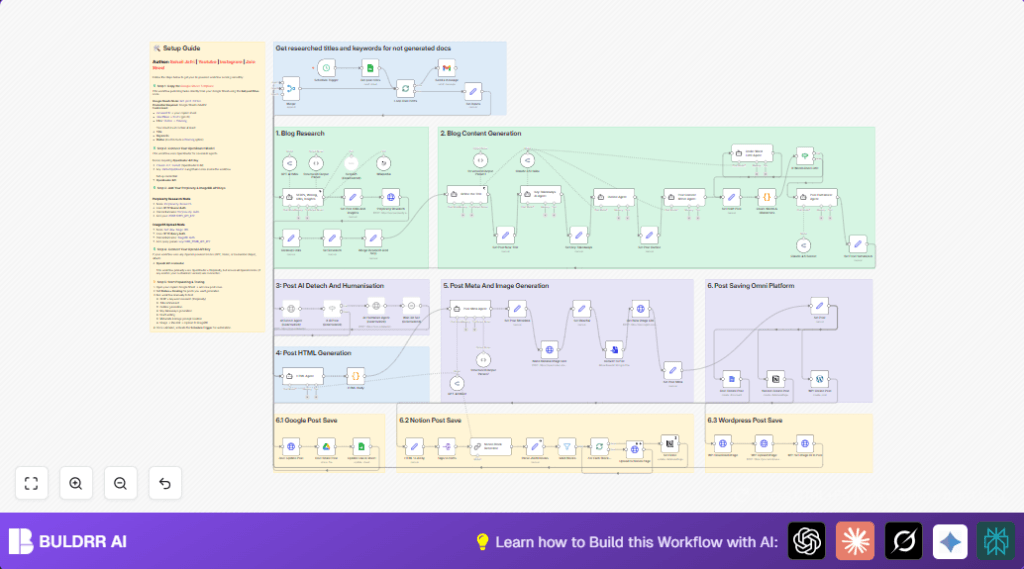

Introduction
Writing long, AI SEO-optimized blog posts usually takes hours of research, outlining, writing, and metadata preparation.
This n8n workflow turns that entire process into an automated system.
Once set up, it:
- Pulls blog ideas from Google Sheets
- Researches search intent and keywords
- Improves the blog title
- Generates outlines, key takeaways, and full content
- Creates SEO metadata and featured image prompts
- Prepares the blog draft for publishing
All of this runs automatically on a schedule using n8n.

What This Workflow Does (High Level)
In simple words
You maintain a Google Sheet with blog ideas marked as Pending.
n8n picks one idea, researches it, writes a full SEO blog post using AI, and prepares everything needed to publish.
No manual writing.
No copy-paste chaos.
Tools Used in This Workflow
- Google Sheets
- Perplexity AI
- OpenRouter (Claude Sonnet)
- ImageBB
- n8n LangChain Agents
Step-by-Step: How to Build This Workflow in n8n
Step 1: Trigger the Automation
Node: Schedule Trigger
What it does
Runs the workflow automatically on a time schedule.
Why it’s needed
So blog generation happens daily, weekly, or whenever you want—without manual clicks.
How to set it up
- Add Schedule Trigger
- Choose interval (daily / weekly)
- Save
Input: Time rule
Output: Triggers workflow execution
Step 2: Fetch Blog Ideas from Google Sheets
Node: Google Sheets – “Get post titles”
What it does
Fetches blog titles marked as Pending from your sheet.
Why it’s needed
This is your content backlog.
How to set it up
- Connect Google Sheets credentials
- Select document + sheet
- Filter:
Status = Pending
Input: Sheet rows
Output: Blog title + keywords
Step 3: SERP & Keyword Research
Node: SERPs, Writing, KWs, Insights (AI Agent)
What it does
Analyzes:
- Search intent
- Writing style & tone
- Keywords (primary, secondary, long-tail)
- Target audience
- Article goal
Why it’s needed
SEO content fails without search intent clarity.
Input: Blog title + keyword
Output: Structured SEO research JSON
Step 4: Clean Research References
Node: Cleanup Links (Set)
What it does
Replaces numbered citations with readable sources.
Why it’s needed
Makes AI research usable in long-form content.
Input: AI research text
Output: Clean research block
Step 5: Refine the Blog Title
Node: Refine the Title (AI Agent)
What it does
Creates a high-CTR SEO title under 55 characters.
Why it’s needed
Titles decide clicks.
Input: Old title + keywords + intent
Output: Optimized title (JSON)
Step 6: Parse the AI Output Safely
Node: Structured Output Parser
What it does
Ensures AI returns valid JSON only.
Why it’s needed
Prevents workflow breaking due to formatting errors.
Step 7: Store the New Title
Node: Set Post New Title
What it does
Saves the refined title for later steps.
Blog Content Creation Phase
Step 8: Generate Key Takeaways
Node: Key Takeaways AI Agent
What it does
Creates:
- Intro paragraph
- Bullet key takeaways
- Outro bridge
Why it’s needed
Improves readability and featured snippet chances.
Step 9: Create Blog Outline
Node: Outline Agent
What it does
Builds a detailed H2 / H3 structure.
Why it’s needed
Long blogs need structure before writing.
Step 10: Save Outline
Node: Set Post Outline
Stores outline + word limit.
Step 11: Write the Full Blog Content
Node: Post Content Writer Agent
What it does
Writes:
- Introduction
- Body sections
- Conclusion
- Examples + SEO optimization
Why it’s needed
This is the actual blog draft.
Output: 2000+ word article in Markdown
Step 12: Save Draft
Node: Set Draft Post
Stores the final article body.
SEO Metadata & Image Generation
Step 13: Generate SEO Meta
Node: Post Meta Agent
What it does
- SEO title
- Meta description
- Featured image prompt
Step 14: Parse SEO Metadata
Node: Structured Output Parser
Ensures clean JSON.
Step 15: Convert AI Image to File
Nodes:
- Set Base64
- Convert to File
Step 16: Upload Image
Node: HTTP Request (ImageBB)
Uploads featured image and returns public URL.
Workflow Completion
At this point, you have:
- SEO title
- Meta description
- Featured image
- Full blog content
- Keywords & research
Ready to push to CMS, Notion, Webflow, WordPress, or Airtable.
