

What This Automation Does
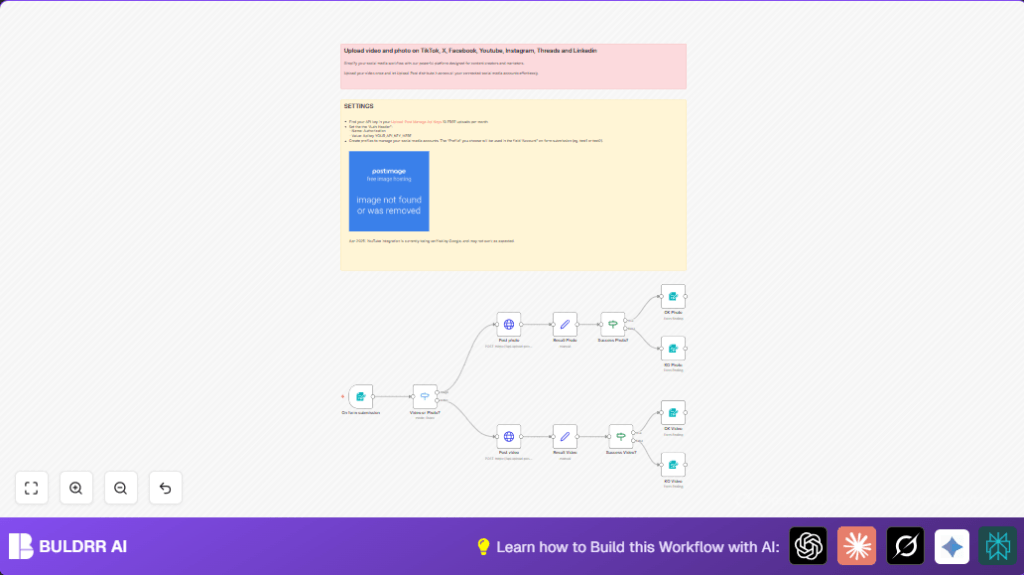
This workflow named Social Media Publisher helps users post photos or videos to many social media platforms fast and easy. It solves the problem of wasting time by posting manually to Instagram, Facebook, TikTok, X, LinkedIn, and Threads. Users submit one form with info and a file, then the workflow sends the post to the right platform and tells them if it worked or not.
The workflow takes inputs via a web form, checks if the upload is a photo or video, then sends it to an API called Upload-Post.com. It handles different platforms and shows a success or error message after. This way, users save hours and reduce posting mistakes.
How It Works: Inputs, Processing, and Output
Inputs
- A filled form with platform choice, account name, caption, file upload (.jpg or .mp4), and optional Facebook page ID.
Processing Steps
- The form submission triggers the workflow.
- A Switch node checks the uploaded file type to route photos and videos separately.
- A HTTP Request node sends photo files to one API endpoint and video files to another.
- Set nodes parse the API response to get success status.
- If nodes check if the post was successful or not.
- Based on success or failure, Form Completion nodes display a confirmation or error message to the user.
Output
User gets instant feedback after submitting the form showing if the post was published or if there was an error.
Who Should Use This Workflow
Anyone who manages posts across many social media accounts and wants to stop copying and uploading manually should use this.
This is good for small business owners, marketers, or social content creators who want to save ten or more hours a week from posting.
Tools and Services Used
- n8n Automation Platform: Runs and manages the workflow.
- Upload-Post.com API: For sending photo and video posts to social platforms.
- Social Media Accounts: Instagram, Facebook, TikTok, X, LinkedIn, Threads connected via Upload-Post.
- Web Form: Collects user inputs and file uploads.
Beginner Step-by-Step: How to Use This Workflow in n8n for Production
Step 1: Import the Workflow
- Download the workflow file using the Download button on this page.
- Open your n8n editor.
- Go to File → Import from File and select the downloaded workflow.
Step 2: Configure the Workflow
- Add your Upload-Post.com API Key in the HTTP Request nodes using
HTTP Header Authwith headerAuthorization: Apikey YOUR_API_KEY_HERE. - Update any account names or platform IDs in the form if needed.
- Make sure the webhook URL generated by the Form Trigger node is accessible publicly or used in your website form.
Step 3: Test the Workflow
- Submit the form with a .jpg photo and a .mp4 video separately to check if posts are sent.
- Observe if the success or error completion message appears correctly.
Step 4: Activate the Workflow
- Click on the toggle Activate in the top right corner of your n8n editor to run in production.
Now, the form will let users post content to their chosen platforms without extra manual steps.
For full control of your environment, consider using self-host n8n.
Step Breakdown Inside the Workflow
- Form Trigger: Collects post info and file upload.
- Switch node: Checks if upload is photo or video by MIME type.
- HTTP Request nodes: Upload photo to
upload_photosendpoint, video touploadendpoint. - Set nodes: Extract success boolean from API response JSON.
- If nodes: Decide if success or failure paths branch to messages.
- Form Completion nodes: Show users “Congratulations!” or “Oops” with messages.
Customization Ideas
- Add more platforms by editing the Platform dropdown options in the form.
- Change the messages in Form Completion nodes for own brand voice.
- Allow more file types by updating MIME checks in the Switch node (like PNG images or MOV videos).
- Add scheduling by placing a Delay or Cron node before uploading.
- Use pipeline credentials and reference API keys so keys stay secure.
Troubleshooting Common Issues
- 401 Unauthorized: API key missing or wrong in HTTP Request authentication.
- File not uploading: MIME type not matched; check Switch node conditions and allowed upload types on the form.
- Success always false: Wrong JSON path in Set nodes; check API response structure carefully and fix expressions.
Pre-Production Checklist
- Check API key validity and remaining upload quota in Upload-Post.com.
- Submit test posts with sample images and videos.
- Confirm completion messages show success or error properly.
- Ensure platform and account names match what is configured in Upload-Post.
- Review all node connections before starting live use.
Deployment Guide
- Activate the workflow in n8n.
- Make sure the webhook from the form trigger is publicly reachable or embedded in website.
- Observe workflow logs to spot failed requests or errors soon.
- Add error handling or retries inside the workflow if many failures occur.
Summary of Benefits
✓ Save hours weekly by automating multi-platform posting.
✓ Reduce errors like missing or wrong posts.
✓ Get instant upload success or error feedback.
✓ Manage photos and videos together in one place.
✓ Customize to add more platforms or file types.
✓ Use easy form interface for all users.
Conclusion
This automated publishing workflow lets users upload photos and videos to several social media sites with one form. It reduces duplicate work and mistakes by sending posts via Upload-Post.com’s API. Users get quick status feedback and save lots of manual effort.
The design allows adding new platforms or files and scheduling posts. Using an easy import and activation method in n8n means anyone can start fast. Consider expanding with analytics or scheduling next.
