
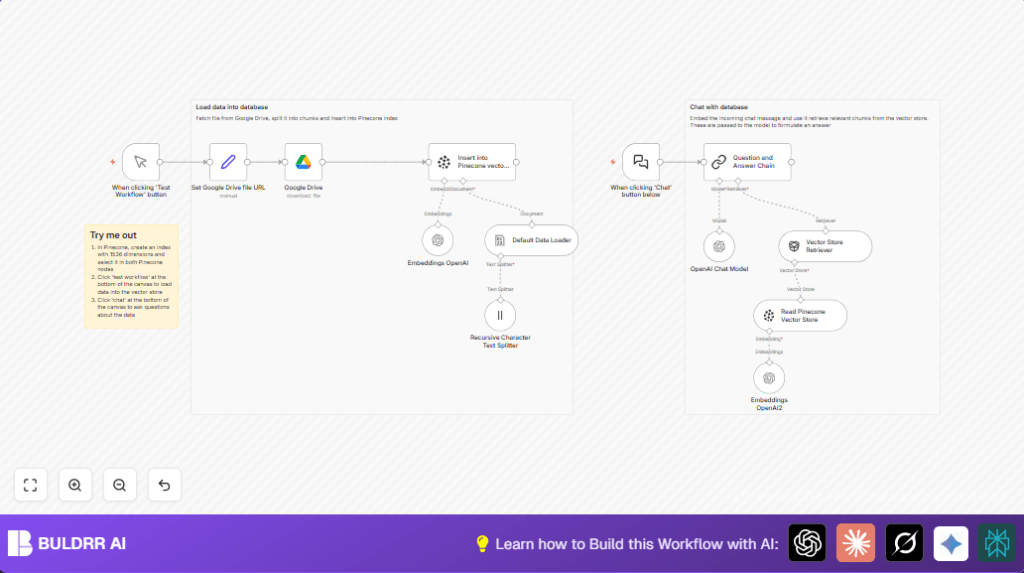

What This Workflow Does
This workflow grabs a document from Google Drive, splits it into small parts, turns those parts into vectors, stores them in Pinecone, and lets users ask questions that get instant answers from the document.
It solves the problem of spending many hours reading long technical files by providing quick and clear answers.
The result is faster, easier access to important information without reading everything manually.
Tools and Services Used
- Google Drive: Stores the original document files.
- n8n: Runs the automated workflow to process and query documents.
- OpenAI: Provides embedding and chat models for text vectorization and answer generation.
- Pinecone: Houses vector data for fast similarity search.
How the Workflow Works: Inputs, Processing, and Outputs
Inputs
- The Google Drive document URL is the main input.
- User questions come through the chat webhook.
Processing Steps
- The Google Drive node uses OAuth to download the file.
- The Recursive Character Text Splitter breaks the text into 3000-character chunks with 200 characters overlapping.
- Chunks are sent to OpenAI to create vector embeddings.
- Vectors go into the Pinecone index for storing and searching.
- When a question arrives, it is embedded, then Pinecone finds matching chunks.
- OpenAI chat model generates an answer based on those chunks.
Outputs
Answers to questions about the document are returned quickly and clearly through the chat webhook.
Beginner Step-by-Step: How to Use This Workflow in n8n for Production
Import the Workflow
- Use the Download button on this page to get the workflow file.
- Open n8n editor and select “Import from File” to load the downloaded workflow.
Configure Credentials and Variables
- Add your Google Drive API credentials under n8n Credentials with OAuth2 authentication.
- Add OpenAI API Key under OpenAI Credentials for embeddings and chat generation.
- Add Pinecone API Key and environment under Pinecone Credentials.
- Update the file URL in the Set Google Drive file URL node with the document you want to process.
- Check index name and namespace in Pinecone insertion nodes to match your Pinecone setup.
Run and Test the Workflow
- Run the manual trigger Test Workflow node once to load and index the document.
- Send a test question via the chat webhook URL you find in the When clicking ‘Chat’ button below node.
- Verify that answers return correctly.
Activate for Production
- Activate the workflow in n8n for continuous use.
- Consider scheduling the document load if new files arrive regularly.
- Optionally, check self-host n8n to run the workflow securely on your own server.
Customization Ideas
- Change chunk size and overlap in the Recursive Character Text Splitter node to balance detail with speed.
- Try newer OpenAI embedding models for better text understanding.
- Use other document storage nodes like OneDrive or Dropbox instead of Google Drive if needed.
- Adjust Pinecone namespace clearing to append new data or replace old data.
- Modify answer prompt templates in the question-answer nodes for different tones or formats.
Common Issues and Tips
Google Drive Authentication Errors
Usually caused by expired OAuth tokens or missing file read permissions.
Fix by reauthorizing credentials and checking scope permissions.
Pinecone Connection Failures
Often from wrong API keys, environment, or index names.
Double check Pinecone dashboard and credential inputs in n8n.
OpenAI API Limits Hit
Happens when usage exceeds free or paid quota.
Change chunk size to reduce calls or upgrade API plan.
Summary and Results
✓ Loads documents from Google Drive automatically.
✓ Splits text into chunks and converts to search vectors.
✓ Saves vectors in Pinecone to enable fast searching.
✓ Answers user questions instantly using OpenAI chat models.
✓ Cuts reading time from hours to seconds for document queries.
→ Enables better, quicker understanding of complex technical files.
→ Makes AI-powered research simple even for non-experts.
