
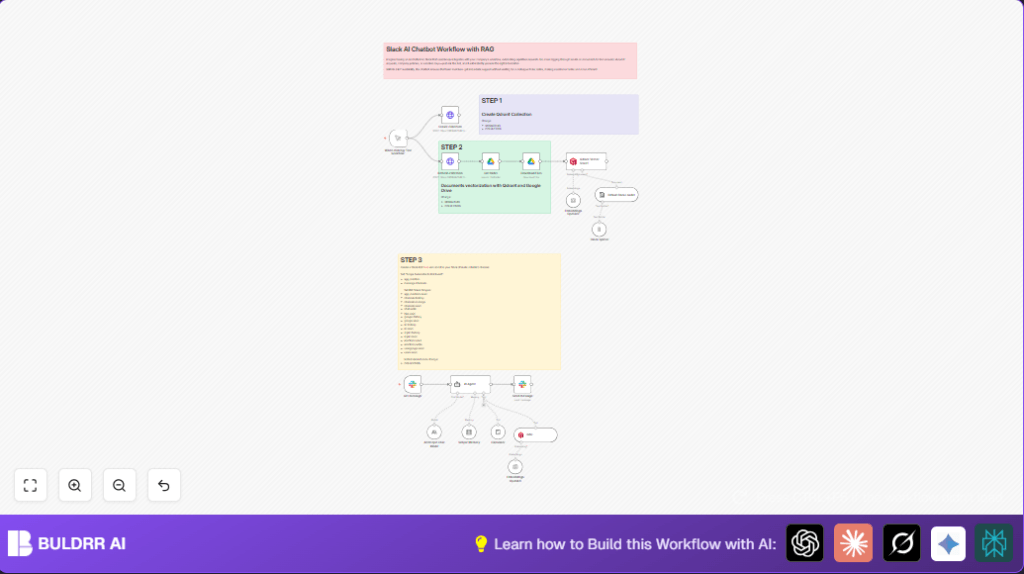

What This Automation Does
This workflow is a Slack AI chatbot. It answers employee questions quickly. It stops long manual searches. It uses company documents and AI to give correct replies inside Slack.
The workflow takes messages that mention the bot in Slack. It looks for information in Google Drive files. Then it uses AI models to create short answers with links to documents. It also remembers recent chat history. This helps staff get support anytime without waiting.
Inputs, Processing and Output
Inputs
- Slack messages: Employee questions mentioning the AI bot.
- Google Drive documents: Company policy files and other text documents.
- API keys: OpenAI, Anthropic, Qdrant credentials for AI and vector search.
Processing Steps
- Create or refresh the Qdrant vector collection to store document data.
- Download and convert Google Drive files to plain text.
- Split text into small chunks for AI processing.
- Generate vector embeddings of these chunks with OpenAI.
- Store embeddings in Qdrant for fast similarity search.
- Listen for Slack mentions with the Slack Trigger node.
- Pass user questions to the AI Agent node with a prompt to find info in Qdrant.
- Use Simple Memory to keep conversation context by channel and user.
- Run Anthropic language model as backup for answer quality.
- Send AI answers back as Slack replies using the Send message node.
Output
Quick and accurate Slack message replies with cited company knowledge.
Why This Workflow Exists
Many companies waste hours answering employee questions. People search many documents and emails. This wastes time and causes delays. Wrong info spreads and frustrates staff.
This automation solves that by giving fast, trustworthy answers inside Slack. It uses AI with real company info. It works anytime without needing a human to respond.
Beginner Step-by-Step: How to Use This Workflow in n8n
Step 1: Import the Workflow
- Download the workflow file using the Download button on this page.
- Open your n8n editor.
- Click the menu and select “Import from File.”
- Choose the downloaded file and import it.
Step 2: Configure Credentials and Settings
- Add your Slack API Key in the Slack Trigger and Send message nodes.
- Add your Google Drive OAuth2 credentials for file access.
- Add your Qdrant API URL and API Key in HTTP Request nodes for collection management.
- Enter your OpenAI API key in the Embeddings OpenAI2 node.
- Add your Anthropic API key in the Anthropic Chat Model node.
- Update Slack channel IDs and Google Drive folder IDs in relevant nodes to match your workspace.
Step 3: Test the Workflow
- Run the HTTP Request nodes Create collection and Refresh collection manually to prepare Qdrant.
- Run the workflow once to download and index your Google Drive documents.
- Send a test mention to the AI bot in Slack.
- Check the workflow executions and Slack reply for correct answers.
Step 4: Activate for Production
- Toggle the workflow active switch to enable listening for Slack messages continuously.
- Keep monitoring executions for errors.
- Update document indexing when company files change.
If using self-host n8n or running n8n on server, consider self-host n8n for control and privacy.
Customization Suggestions
- Change Slack channel IDs in Slack Trigger and Send message nodes to control where the bot listens and replies.
- Adjust Simple Memory node settings to keep more or fewer past messages for chat context.
- Update Qdrant collection names and endpoints in HTTP Request nodes for linking to your own vector database.
- Replace OpenAI embeddings with other providers by changing embedding node and credentials.
- Add more Slack scopes if you want the bot to do advanced actions like uploading files or adding reactions.
Common Problems and Fixes
Slack messages do not trigger workflow
This happens if the Slack bot lacks required permissions or isn’t in the channel.
Make sure the bot has scopes like app_mentions:read and chat:write. Reinstall the app and invite it to the Slack channel.
No documents found in AI answers
This happens if Qdrant collection is empty or not set up.
Run the Create collection and Refresh collection nodes manually, then rerun document indexing.
OpenAI API is slow or errors
Check OpenAI usage limits or network connectivity.
Increase API quotas or retry later.
Pre-Production Checklist
- Check Slack bot token has all needed scopes and is active in targeted channels.
- Manually run HTTP Request nodes to create and clear Qdrant collection before indexing documents.
- Confirm Google Drive credentials work and files download correctly.
- Test sending Slack mentions and verify AI answers are correct.
- Backup Qdrant data and n8n workflow before going live.
Deployment Notes
Activate the workflow in n8n to run 24/7. Watch for errors inside the dashboard.
Regularly update Google Drive indexing after document changes. Adjust bot permissions if needed.
For more privacy and control, consider self-host n8n.
Summary
✓ Workflow answers employee questions fast inside Slack.
✓ Uses Google Drive documents and AI embeddings to find info.
✓ Saves time and reduces errors from manual searching.
✓ Keeps conversation context for ongoing chats.
✓ Provides 24/7 help without humans answering.
✓ Easy to import, configure, test, and activate in n8n.
