
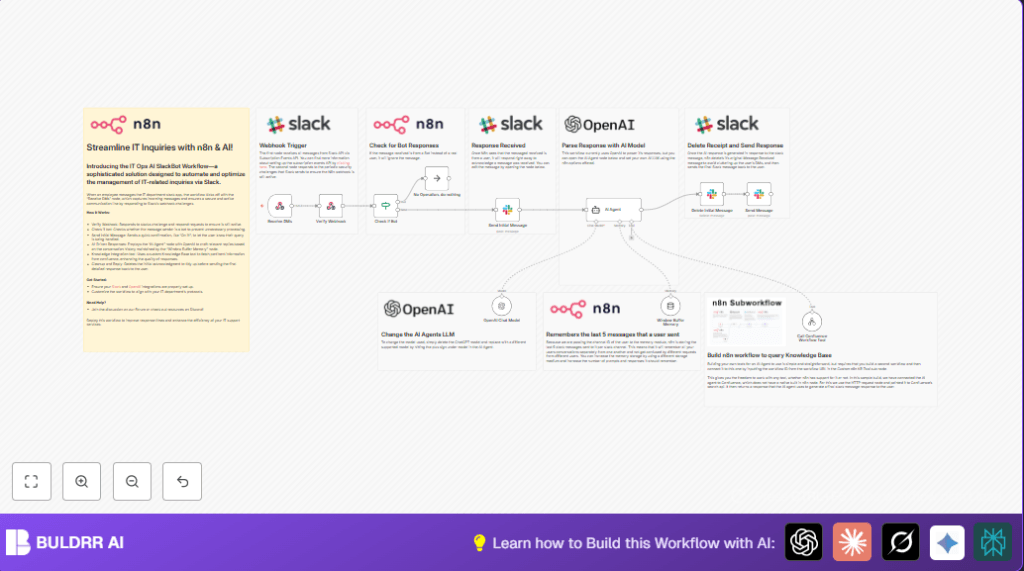

What This Workflow Does
This workflow listens to direct messages in Slack.
It reads user questions and uses AI to find the best answers from a company’s knowledge base.
It also keeps short chat history to help AI make smarter replies.
This saves time and gives fast support inside Slack DMs.
The workflow works by receiving Slack messages, sending a quick reply “On it!”, checking if the sender is a bot, searching Confluence for related articles, asking GPT-4 to make a useful reply, deleting the quick reply, then sending the final answer.
This stops people waiting long and less work for IT support staff.
Who Should Use This Workflow
IT support teams with many repetitive questions.
Companies using Slack for internal chats and Confluence for documents.
Anyone who wants faster answers to common IT issues without typing many replies.
Tools and Services Used
- Slack API: Receives and sends user messages inside Slack DMs.
- OpenAI GPT-4: Creates detailed AI answers from chat and document context.
- Confluence Knowledge Base Workflow: Finds relevant company articles based on questions.
- n8n Window Buffer Memory Node: Keeps last 10 messages for better chat understanding.
- n8n Workflow Tool Node: Calls the Confluence query workflow for document search.
Inputs, Processing Steps, and Outputs
Inputs
- Slack direct message text from users.
- Slack event data including channel ID and user ID.
Processing Steps
- Webhook node receives Slack message event.
- Respond to Webhook node replies to Slack URL verification request.
- If node checks if message sender is a bot and skips if true.
- Slack node sends initial “On it!” message as acknowledgement.
- Window Buffer Memory node stores the last 10 messages per channel to keep conversation history.
- Tool Workflow node calls the Confluence workflow to search knowledge base with keywords from the message text.
- AI Agent node connected to OpenAI GPT-4 processes the user text plus knowledge base results and conversation history, generating a formatted answer.
- Slack node deletes the initial acknowledgement message to keep Slack clean.
- Slack node sends the final AI-generated answer back to user, formatted for Slack chat.
Outputs
- Fast, helpful AI replies in Slack DMs with context.
- Reduced need for manual support responses.
Beginner Step-by-Step: How to Use This Workflow in n8n
Step 1: Import the Workflow
- Download the workflow file using the Download button on this page.
- Inside your n8n editor, click Import from File.
- Choose the downloaded workflow file and import it.
Step 2: Add Required Credentials and API Keys
- In n8n, go to Credentials and add your Slack API Key with bot permissions.
- Add your OpenAI API Key with access to GPT-4.
Step 3: Update IDs and Settings
- Check Slack channel IDs and ensure they are set to accept dynamic values from incoming events.
- Confirm the Confluence knowledge base workflow ID matches your installed version
Pxzc65WaCPn2yB5I. - Set any other fields like usernames, folder paths, or lookup tables to match your environment.
Step 4: Test the Workflow
- Send a direct message to your Slack bot to trigger the workflow.
- Watch the execution in n8n’s Execution List for success or errors.
Step 5: Activate for Production
- Toggle the workflow status to active to start processing live Slack messages.
If running on your own server, consider referencing self-host n8n for stable operation.
Customization Ideas
- Change the AI model in the OpenAI Chat Model node to save cost or experiment with other options.
- Adjust the Window Buffer Memory node to keep more or fewer messages for chat context.
- Edit the initial Slack acknowledgement text to match company culture or tone.
- Add tools to the AI Agent node to query additional data sources beyond Confluence.
- Update the Slack bot’s profile photo URL and name for brand consistency.
Troubleshooting Common Problems
- Workflow does not trigger on Slack messages.
Check if webhook URLs match and are publicly reachable. - AI Agent returns errors or no replies.
Verify OpenAI API keys are correct and that usage limits are not exceeded. - Slack message deletion fails.
Ensure bot has correct permissions and the message timestamp is accurate.
Pre-Production Checklist
- Verify Slack app has Event Subscriptions and correct bot scopes set.
- Run webhook tests externally (e.g., with curl) to confirm public access.
- Confirm OpenAI API keys work with GPT-4 model.
- Check Confluence knowledge base workflow returns relevant article data.
- Send test Slack DM and check that all messages appear and get deleted properly.
- Backup existing workflows before changes.
Deployment Guide
Turn the workflow active inside n8n to start.
Monitor executions for any failures.
Set notifications in n8n for errors if possible.
Keep OpenAI keys updated and review Confluence integration regularly.
Summary
✓ Saves time by automating Slack IT support messages.
✓ Uses AI with recent chat context and company documents for better answers.
✓ Keeps Slack clean by deleting temporary messages.
→ Faster responses to help employees and reduce manual work.
→ Simple to import, configure, and activate in n8n.
