

What This Automation Does
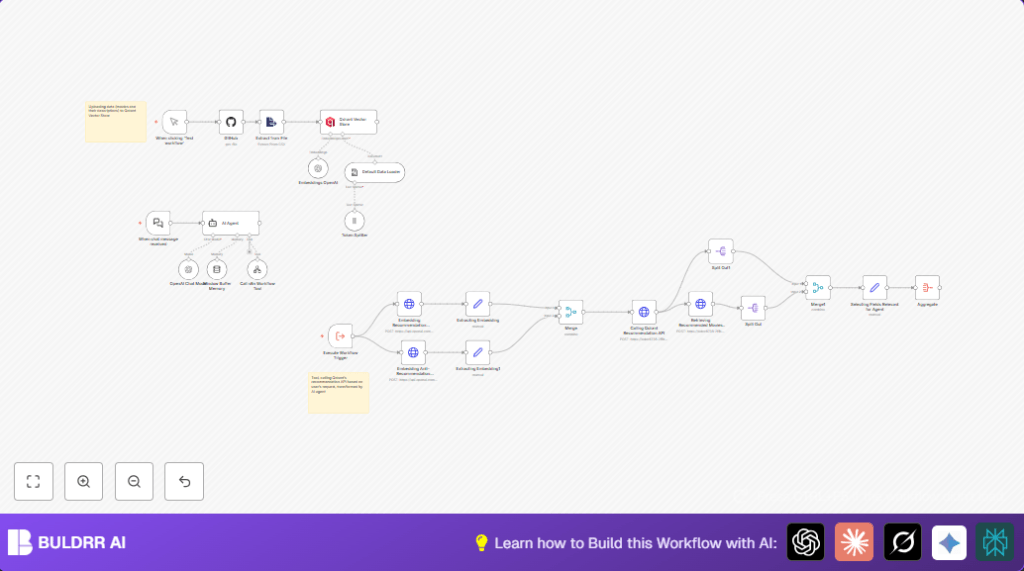
This workflow automates movie recommendations using n8n integrated with GitHub, Qdrant, and OpenAI.
It solves the problem of manual movie searching and mismatched suggestions.
The output is a chatbot that quickly gives personalized movie picks based on user likes and dislikes.
It fetches a Top 1000 IMDb movies list from GitHub, processes descriptions, creates embeddings with OpenAI, stores them in Qdrant, and uses similarity search for recommendations.
User chat inputs with examples of preferred and disliked movies guide the system.
The AI agent uses GPT-4o-mini to deliver well-written recommendations in chat.
How This Workflow Works: Inputs, Processing, and Outputs
Inputs
- CSV file of Top 1000 IMDb movies from GitHub
- User chat messages with movies they like or dislike
- OpenAI API keys for embeddings and chat model
- Qdrant API credentials for vector database access
Processing Steps
- Download and parse CSV to extract movie name, description, and year
- Split descriptions into tokens for embedding
- Generate vector embeddings for descriptions with OpenAI’s embedding model
- Upload vectors and metadata to Qdrant for indexing
- When users send chat messages, extract positive and negative movie examples
- Convert user input samples into embeddings for preferences and anti-preferences
- Query Qdrant recommendation API with these embeddings to find top 3 similar movies, excluding disliked traits
- Retrieve detailed data on recommended movies from Qdrant
- Prepare formatted data for AI agent to create a conversational response
- Use GPT-4o-mini chat model to polish the response and send back to user
Outputs
- Top 3 recommended movies matching user tastes
- Chatbot reply containing movie names, descriptions, release years, and reasons
Who Should Use This Workflow
Content creators who want fast, accurate movie recommendations without manual searching.
Small teams or hobbyists curious about combining AI embeddings, vector search, and chatbots in n8n.
Developers or automation fans seeking to build personalized recommendation systems without coding from scratch.
Tools and Services Used
- n8n Automation Platform: Hosts and runs the workflow
- GitHub API: Fetches movie dataset CSV
- OpenAI API: Generates embeddings and runs GPT-4o-mini chat model
- Qdrant Vector Database API: Stores and searches movie vector embeddings
Beginner Step-by-Step: How to Use This Workflow in n8n Production
1. Importing the Workflow
- Download the workflow file using the Download button on this page.
- Open the n8n editor where you want to run the workflow.
- Go to the menu and select “Import from File”.
- Choose the downloaded workflow file to add it to your n8n workflows.
2. Configure Credentials and Settings
- Open each node that needs API access, like GitHub, OpenAI, and Qdrant Vector Store.
- Enter your API Key or credentials in the credential manager for each service.
- Check nodes where IDs, emails, channels, folders, or table names appear and update them if needed.
- For example, verify that the GitHub repo name is mrscoopers/n8n_demo or change to your repo with the movies CSV.
3. Test the Workflow
- Find the Manual Trigger named “When clicking ‘Test workflow’”.
- Click Execute Workflow to start data ingestion and vector uploading.
- Watch execution progress to ensure no errors occur and movie data loads into Qdrant.
4. Activate for Production Use
- Once tests finish well, toggle the workflow to Active.
- Connect your chat platform to the When chat message received webhook node by copying its webhook URL.
- Deploy your chat client using the webhook URL so user messages reach this flow.
- Monitor workflow runs and logs via n8n to check smooth operation.
- Optionally, consider self-host n8n for better control or privacy.
Customization Ideas
- Change recommendation priorities by editing the system message in the AI Agent node.
- Use a different OpenAI embedding model in the Embeddings OpenAI node to try richer vector features.
- Switch out the GitHub CSV node source to your own movie dataset or connect a Google Sheets node to update dynamically.
- Adjust the name or structure of the Qdrant collection in the Qdrant Vector Store node to separate categories.
- Set the number of recommendations by changing the “limit” value in the Calling Qdrant Recommendation API node.
Troubleshooting Tips
401 Unauthorized from OpenAI API
Cause: Wrong or expired OpenAI API key in credentials.
Solution: Update the key in n8n credentials manager, test with a simple node call.
No Movie Recommendations Returned
Cause: Qdrant collection empty or data not loaded correctly.
Solution: Re-run the Manual Trigger node to fetch and upload movie data again.
Chat Trigger Not Responding
Cause: Webhook config incorrect or node not active.
Solution: Verify the When chat message received webhook node’s webhook ID and activation status.
Pre-Production Checklist
- Confirm all API credentials: GitHub, OpenAI, Qdrant are valid in n8n.
- Test manual data upload and check data appear in Qdrant.
- Run test chats using positive and negative movie examples to verify recommendations.
- Check webhook URLs and ensure they are reachable from chat clients.
- Backup the workflow JSON file before making big changes.
Deployment Guide
Switch the workflow status to Active inside n8n editor.
Connect the When chat message received webhook to the chat app you want to use.
Monitor workflow logs to track errors or API quota limits.
Optionally, for privacy or more control, run self-host n8n.
Summary
✓ Saves you time by automating movie data fetching and recommendation generation.
✓ Uses AI embeddings and vector search for better matching user preferences.
✓ Chatbot interface delivers personalized movie picks quickly and naturally.
→ Produces top 3 movie suggestions with descriptions tailored to user likes and dislikes.
→ Scales easily by updating movie datasets or tuning AI models.
