

What This Workflow Does
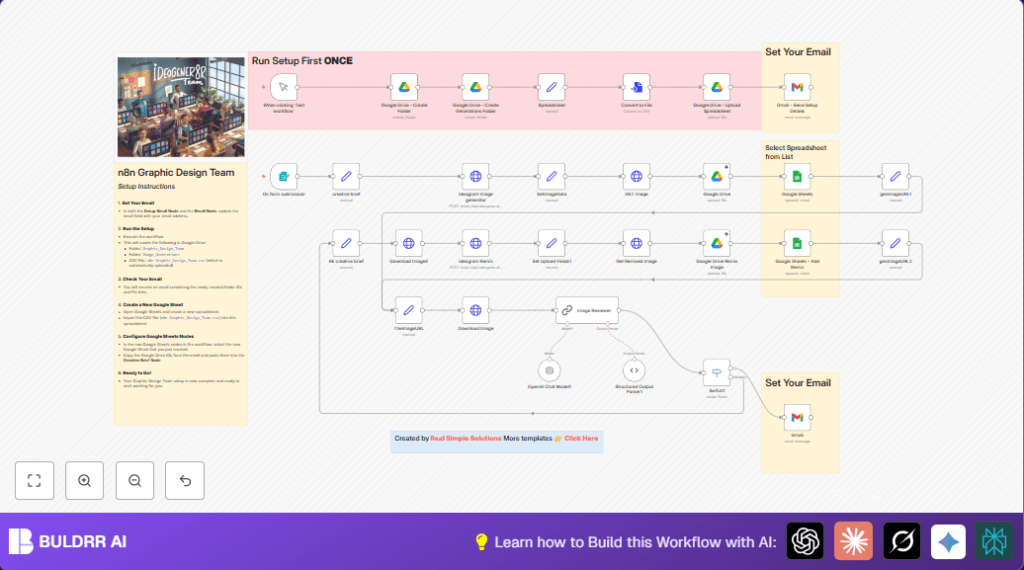
This workflow takes user image requests and automatically creates AI-generated pictures.
It solves problems of slow manual image creation and tracking by handling everything fast and organized.
The result is ready images stored in Google Drive, logged in Google Sheets, and a notified team by email.
Tools and Services Used
- Ideogram AI API: Generates and remixes images based on prompts.
- Google Drive: Stores all generated images securely.
- Google Sheets: Logs all image details and metadata for easy tracking.
- Gmail: Sends emails to update team members about new images.
- n8n Workflow Automation: Connects all services and manages the process.
Inputs, Processing, and Output
Inputs
- Image prompt and creative brief captured by a Form Trigger node.
- Style preferences, aspect ratio, model version, and other settings from the form.
Processing Steps
- The Set node formats the inputs into a structured JSON for the API.
- HTTP Request node sends the prompt to Ideogram API for image generation.
- Set node extracts vital data like image URL and metadata from the API response.
- HTTP Request node downloads the image binary for further use.
- LangChain Chain LLM node reviews image quality using GPT-4o and prepares recommendations.
- A Switch node decides next steps based on review: save, remix, or reject.
- Remix process uses Ideogram remix API and re-runs data extraction and download.
- Google Sheets node appends image details as new rows to keep records updated.
- Google Drive node uploads images into a chosen folder, named by timestamp and seed.
- Gmail node sends email notifications with links to images and spreadsheets.
Output
- Stored images in Google Drive folders.
- Updated Google Sheets records with image data and metadata.
- Emails notifying team of ready images.
Who Should Use This Workflow
This workflow is helpful for teams that need to generate many creative images fast.
If managing prompts, downloads, approvals, and records feels slow or messy, this can help you save hours.
Beginner Step-by-Step: How to Use in Production
Import Workflow into n8n
- Download this workflow file using the Download button on this page.
- Open the n8n editor where the workflow will run.
- Choose “Import from File” and select the downloaded workflow file.
Setup Credentials and IDs
- Add your Ideogram AI API Key in the HTTP Request nodes headers.
- Enter your Google Drive Folder ID in the Set node where the folder ID is stored.
- Configure Google Sheets document ID and sheet name in the Google Sheets node.
- Set correct recipient email addresses in the Gmail node.
Test and Activate
- Submit a test form with an image prompt to trigger the workflow.
- Check that images generate, upload to Drive, update Sheets, and emails send properly.
- If all works, activate the workflow trigger to run automatically for new form submissions.
Consider self-host n8n if hosting the workflow on your own server for more control.
Customization Ideas
- Change image style or AI model by adjusting
style_typeorimage_request.modelin the Set node. - Modify audience description to tune AI review feedback for different viewers.
- Add image files as attachments in the notification email within the Gmail node.
- Update Google Sheets columns to track new fields like remix status or timestamps.
- Adjust email recipient list to notify other team members or groups.
Troubleshooting
- 401 Unauthorized on Gmail node: Reconnect Gmail credentials and check Mail Send permissions.
- Image download returns empty: Check image URL extraction and make sure HTTP Request node returns binary data.
- Google Sheets row append fails: Verify sheet name, document ID, and column mapping in Google Sheets node.
- Ideogram API errors: Confirm API key validity and endpoint correctness.
Pre-Production Checklist
- Verify Ideogram API key works and the HTTP Request nodes reach the API.
- Confirm Google Drive folder and Google Sheets document IDs are correct and accessible.
- Test form submissions to check data flows correctly through the nodes.
- Check AI review outputs and remix logic through sample runs.
- Make sure Gmail node sends emails without errors.
Deployment Guide
After testing, activate the workflow trigger for form submissions.
Monitor executions in n8n dashboard, check logs for errors, and enable error notifications.
Regularly backup Google Sheets records to save data safety.
Summary
✓ Sends image prompts from form inputs to Ideogram AI API.
✓ Saves and tracks images in Google Drive and Google Sheets.
✓ Uses GPT-4 AI to review images and decide approval or remix.
✓ Notifies the team via Gmail when images are ready.
→ Saves hours by automating image creation and management.
→ Keeps image data organized and easy to access by the team.
