

What This Workflow Does
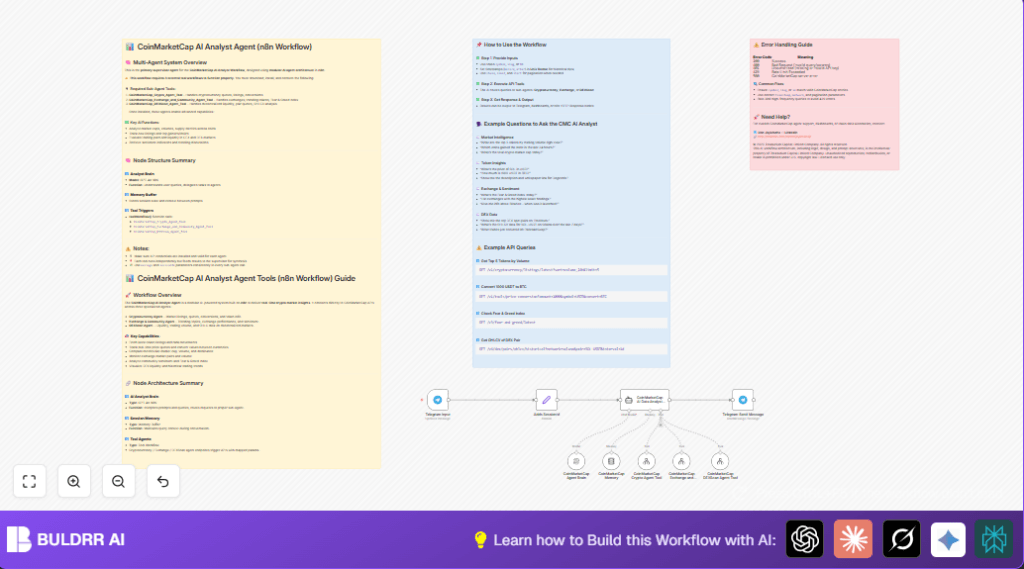
This workflow takes messages from Telegram users asking about cryptocurrencies.
It sends these questions to AI systems that use CoinMarketCap APIs to get live data about coins, exchanges, and decentralized exchanges.
Then it writes an easy-to-understand answer and sends it back on Telegram quickly.
The system keeps track of conversations so answers relate to previous questions.
This saves time and prevents errors from checking many websites manually.
Who Should Use This Workflow
This is made for cryptocurrency traders and analysts who want quick updates without searching many sites.
People using Telegram for chatting can get instant crypto info with less effort.
It helps those who find manual crypto data chasing slow and confusing.
Tools and Services Used
- Telegram Bot API: Receives user questions and sends answers.
- OpenAI GPT-4o Mini Model: Understands user messages and chooses data sources.
- CoinMarketCap API: Provides real-time market, exchange, and DEX data.
- n8n Automation Platform: Runs the workflow and connects all parts.
- LangChain Multi-Agent System: Divides tasks across specialized sub-agents.
Beginner Step-by-Step: How to Use This Workflow in n8n
Import Workflow
- Download the workflow JSON file using the Download button on this page.
- In the n8n editor, go to Workflows → Import from File.
- Select the downloaded JSON file to load the workflow.
Configure Credentials
- Open the Telegram Input node and add the Telegram Bot API Key.
- Open the CoinMarketCap AI Data Analyst Agent node and confirm the OpenAI API Key is set in the linked CoinMarketCap Agent Brain node.
- Ensure CoinMarketCap API Keys are filled in the respective sub-agent workflow nodes.
Check Identifiers and Parameters
- Review any chat ID or session ID fields to match your Telegram bot setup.
- Adjust any settings for your API plans such as rate limits if needed.
Test the Workflow
- Save and activate the workflow temporarily.
- Send a sample cryptocurrency question to the Telegram bot.
- Observe if a reply from the AI analyst comes back correctly.
Activate for Production
- If testing works fine, leave the workflow active in n8n.
- Monitor usage and API call limits to avoid blocking.
- Consider self-host n8n for better control and privacy.
Inputs, Processing Steps, and Outputs
Inputs
- User sends a crypto question via Telegram chat.
- Telegram Input node captures message and chat details.
- SessionId is created from chat ID for conversation tracking.
Processing Steps
- The AI Data Analyst Agent node uses the OpenAI GPT-4o Mini model to understand the question.
- The question is sent to three sub-agent tools for crypto market, exchange sentiment, and decentralized exchange data.
- Sub-agent workflows fetch live data from CoinMarketCap APIs.
- The AI combines all results into a clear, simple answer using session memory for context.
Outputs
- Telegram Send Message node posts the AI’s reply back to the user’s chat.
- Conversation memory stores session data for follow-up questions.
Customization Ideas
- Edit the AI System Message in the CoinMarketCap AI Data Analyst Agent to focus on specific crypto details.
- Change the Telegram reply format to add emojis or markdown styles for better readability.
- Add more toolWorkflow nodes to link new APIs or data sources.
- Adjust the memory buffer size in the CoinMarketCap Memory node to keep longer conversation history.
- Modify session ID generation in the Adds SessionId node to support groups or multi-user chats.
Common Problems and Fixes
Bad Request Errors from CoinMarketCap APIs
This happens when inputs like coin symbols are wrong or missing.
Check that all coin names or IDs follow CoinMarketCap’s exact format.
Telegram Messages Not Starting the Workflow
Ensure the Telegram Bot token in Telegram Input node is correct and has message permissions.
Verify the webhook URL is registered with Telegram properly.
AI Replies Lose Context
Make sure CoinMarketCap Memory is connected as ai_memory input to the AI agent node.
Try multiple follow-up questions to test context retention.
Pre-Production Checklist
- Confirm all API Keys for OpenAI, Telegram, and CoinMarketCap are entered and valid.
- Make sure the three sub-agent workflows are installed and linked in the toolWorkflow nodes.
- Send test questions via Telegram to verify trigger and response.
- Check that sample queries use correct coin symbols and IDs.
- Backup workflow configuration before production use.
Deployment Guide
Activate the workflow in n8n by switching to active mode.
Use n8n’s Executions tab to watch runs and detect errors early.
The workflow listens for Telegram messages continuously and responds fast.
Set API call limits or schedule query times to avoid hitting rate limits.
Summary of Benefits and Outcomes
✓ Get instant, clear crypto answers on Telegram without manual research.
✓ Save hours daily by automating multiple crypto data sources into one chat.
✓ Avoid errors from checking many websites and outdated info.
✓ Keep conversation context for better, smarter follow-up questions.
→ Use AI-powered analysis combining centralized and decentralized market data.
→ Run the automated workflow inside n8n with your APIs and Telegram bot.
