

What this workflow does
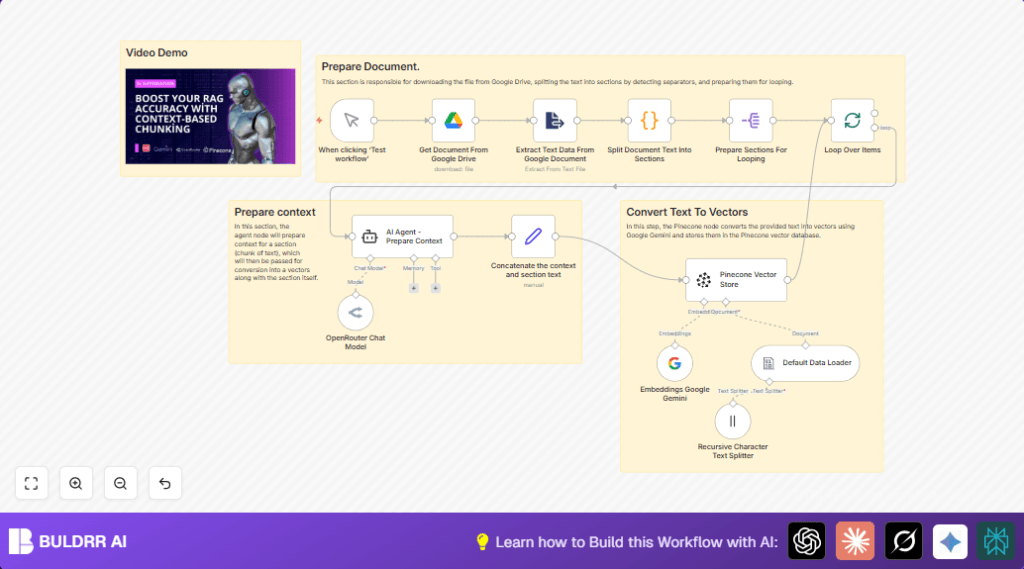
This workflow gets a Google Docs file, breaks its text into sections, then makes smart summaries and stores them as vectors for better searching.
It solves the problem of spending many hours doing this work by hand.
The result is faster and more relevant search answers for big documents.
Who should use this workflow
This is made for people who manage big Google Docs and want quicker, easier search results.
It fits teams who want to save time and reduce mistakes when preparing content for search.
You should have accounts and access for Google Drive, Google Gemini API, OpenRouter, Pinecone, and n8n automation.
No coding skills are needed but some setup of API keys is required.
Tools and services used
- Google Drive: Holds the original document.
- Google Gemini (PaLM) API: Creates vector embeddings from text.
- OpenRouter Chat Model: Creates short context summaries from each text chunk.
- Pinecone Vector Store: Stores and indexes vector data for search.
- n8n automation platform: Runs the workflow steps.
Workflow Inputs, Processing, and Output
Inputs
- Google Docs file ID to process.
- API credentials for Google Drive, Gemini, OpenRouter, and Pinecone.
Processing Steps
- Download the Google Docs file as plain text.
- Extract and clean the text data.
- Split the text into sections using a custom delimiter.
- Prepare each section individually for processing.
- Loop over each section one by one to avoid overload.
- Use OpenRouter Chat Model to create a short context summary for each chunk.
- Combine the context summary with its text chunk.
- Generate text embeddings with Google Gemini embedding model.
- Send embeddings to Pinecone vector index for storage.
Output
The workflow produces vector embeddings indexed inside Pinecone.
This improves speed and quality when searching the document content later.
Beginner step-by-step: How to build this in n8n
1. Import the workflow
- Download the workflow file using the Download button on this page.
- Go into the n8n editor, choose “Import from File” option.
- Select and upload the workflow file.
2. Configure the workflow
- Add all required credentials in n8n Credentials Manager:
Google Drive OAuth2, OpenRouter API Key, Google Gemini API Key, Pinecone API Key. - Update the Google Docs file ID in the Get Document From Google Drive node to the document to process.
- If needed, adjust prompt in the AI Agent node or chunking parameters.
3. Test the workflow
- Run the workflow once manually using the Manual Trigger node.
- Check if the document content downloads and processes without errors.
4. Activate for production
- Turn on the workflow by switching it to Active inside n8n.
- Optionally add scheduled triggers or webhooks to automate runs.
- Monitor workflow runs in n8n execution logs.
For smoother self hosting, see self-host n8n options.
Customization ideas
- Change the Google Docs file by updating the
fileIdin the Google Drive node. - Adjust the text splitting delimiter in the Split Document Text Into Sections node for different section sizes.
- Modify the AI prompt in the OpenRouter node to tailor the context summary for specific subjects.
- Switch to a different Google Gemini embedding model by changing model name in the embedding node.
- Increase batch size in the looping node to process multiple chunks at once if API limits allow.
Common issues and fixes
- Google Drive API auth fails: This means credentials are missing or expired. Fix by re-authenticating credentials in the Google Drive node.
- OpenRouter API errors: Check if API key is correct and internet is working. Update credentials in OpenRouter Chat Model node.
- Pinecone insertion fails: Verify API key and ensure the Pinecone index “context-rag-test” exists and has permission.
Summary
→ This workflow downloads Google Docs content and chops it into meaningful parts.
→ It adds AI-generated context summaries to each part.
→ Google Gemini creates embeddings from the text and context.
→ Vectors save into Pinecone for quick and relevant search.
→ Saves hours of manual work and makes search smarter and faster.
