
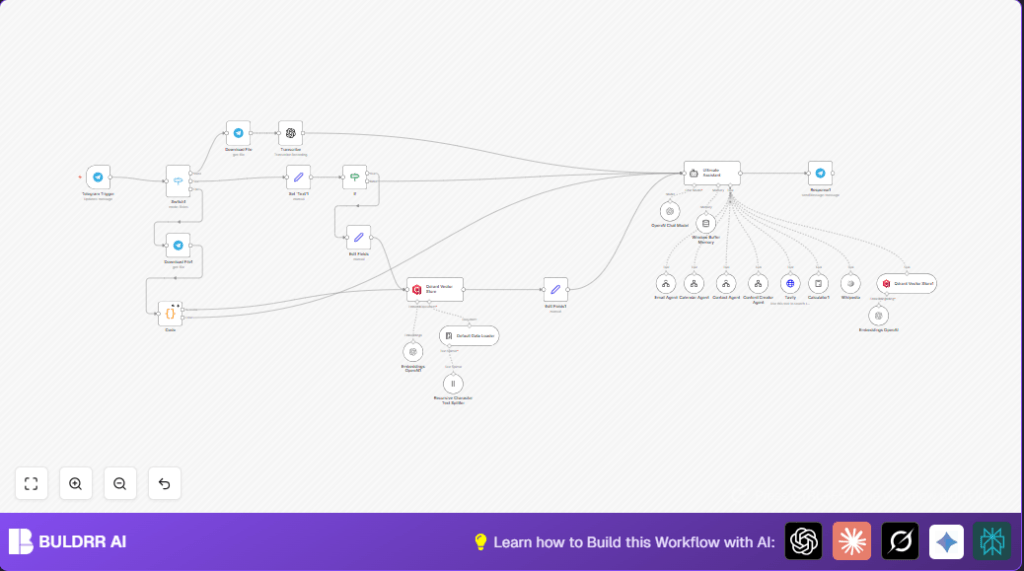

What This Workflow Does
This workflow helps busy parents manage daily tasks using Telegram messages and voice notes.
It turns voice messages into text, understands commands, and sends them to specialized tools for emails, calendars, contacts, content, web searching, or calculations.
It replies in Hebrew with friendly, calm messages.
It saves time and reduces mistakes by keeping family info and context in memory.
Tools and Services Used
- Telegram Bot API: Receives and sends user messages.
- OpenAI API: Transcribes voice, processes language, creates embeddings for memory.
- Qdrant API: Stores and retrieves family-specific context and memory.
- Tavily API: Provides web search capabilities.
- n8n Automation Platform: Runs the workflow and handles task delegation.
- Pre-built n8n Workflows: Specialized agents for email, calendar, contacts, and content creation.
How The Workflow Works (Input → Process → Output)
Input
- Telegram messages: text, voice notes, or documents.
Processing Steps
- Telegram Trigger node catches new messages or voice notes.
- Switch node detects if the message is voice, text, or file.
- Download File node retrieves voice or document files from Telegram.
- Transcribe node converts voice files to text using OpenAI.
- Set ‘Text’1 ensures the text content (from voice or text message) is ready for AI.
- If node looks for important family keywords to decide if the memory should update.
- Qdrant Vector Store node updates or retrieves family memory and context.
- Ultimate Assistant AI node reads the text, understands command intent, and picks the right agent.
- Calls to specialized agent workflows: Email, Calendar, Contacts, Content Creator.
- Calls Tavily API for web search and Calculator for math.
- Window Buffer Memory node stores recent conversation per chat.
- Telegram Response node sends warm, Hebrew replies back.
Output
- Text response in Hebrew matching user request.
- Organized emails, calendar events, contacts, web search results, or calculations done automatically.
Who Should Use This Workflow
Parents tired of switching apps to manage family tasks.
People who want to use simple Telegram messages to run email and calendar tasks.
Anyone wanting voice commands transcribed and handled automatically.
Users needing family-specific memory and context for smarter replies.
Beginner Step-by-Step: How to Use This Workflow in Production
Step 1: Import the Workflow
- Download the workflow file using the Download button on this page.
- Inside the n8n editor, choose “Import from File” and select the downloaded file.
Step 2: Configure Credentials and Settings
- Open each node needing API keys and add your Telegram Bot token, OpenAI API key, Qdrant API key, and Tavily API key.
- Check the specialized agent workflows have the correct IDs, emails, calendar folders, or database tables set.
- In the Ultimate Assistant node, verify any system prompts or language settings if you want to customize replies.
Step 3: Test the Workflow
- Send a test text or voice message from your Telegram to your bot.
- See if the transcription and reply happen correctly.
- Check logs for any errors.
Step 4: Activate the Workflow
- Turn the workflow status to “active” in n8n.
- Your bot is now ready to handle daily family tasks automatically.
For maximum data privacy and control, you can consider using self-host n8n on your server.
Common Issues and Edge Cases
- File download may fail if the Telegram Bot lacks permissions or wrong file IDs are used.
- The AI assistant might not delegate tasks if the system prompt is incomplete or misses instructions.
- Memory retrieval may return no context if Qdrant credentials or collection names are wrong.
- Voice transcription might be empty or error out if OpenAI API keys are invalid or if file data transfers are broken.
Possible Customizations
- Add new keywords in the If node regex to catch more family-related themes.
- Edit the system prompt in the Ultimate Assistant node to change assistant tone, add languages, or instructions.
- Include more specialized agent workflows, like grocery shopping or homework help.
- Adjust Qdrant vector store settings for more or less memory storage.
- Change the response language by updating prompts or system messages.
Summary of Workflow Benefits
✓ Saves busy parents 5+ hours every week.
✓ Reduces missed appointments and late messages.
✓ Organizes emails, calendar, contacts, and tasks through one Telegram bot.
✓ Uses voice transcription to allow hands-free commands.
✓ Keeps family-specific context to improve replies over time.
✓ Supports Hebrew language with a warm, calm style.