

What this workflow does
This workflow in n8n manages Telegram messages to switch between an AI chatbot and human agents smoothly.
It solves the problem of confusion and delay when changing from bot to human support during customer chats.
The workflow keeps track of each chat’s state using Redis and uses AI to collect customer details and handle conversations.
The result is faster replies, fewer errors, and a better customer experience.
Who should use this workflow?
Businesses who get many Telegram messages and want to mix AI and human customer support.
This helps when simple questions are answered by a bot but complex requests need a human agent.
Anyone running support with Telegram bots and wanting clear, organized handoffs should use this.
Tools and services used
- Telegram Bot API: Receives and sends messages from users.
- n8n workflow automation: Runs steps and logic to handle messages.
- Redis server: Stores chat session states and conversation history.
- OpenAI API with LangChain: AI agents extract customer info and answer queries.
How the workflow works: Inputs, processing, and output
Inputs
- New Telegram messages from customers
- Session data from Redis (state and chat memory)
- OpenAI responses for AI agents
Processing steps
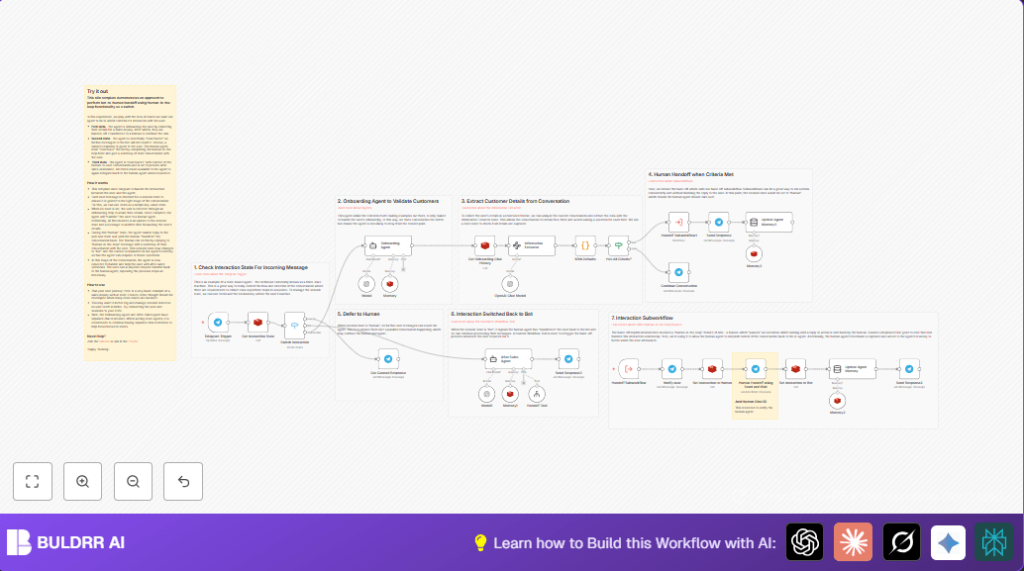
- Use Telegram Trigger node to get incoming messages
- Check Redis for conversation state (bot, human, onboarding) via Redis Get
- Route message with a Switch node:
- If “bot”, AI agent responds
- If “human”, block bot, wait for human agent reply
- If no state or onboarding, start onboarding flow
- Onboarding agent gathers name, address, reason for contact using LangChain Information Extractor
- Store and update session info in Redis with Redis Set
- When data complete, create a summary and send to human agent for handoff
- Notify user they speak to a human with Telegram sendAndWait
- Wait for human reply, then save updated state back to bot with Redis
- Keep human comments in AI memory to improve future bot responses
- Allow user to switch back to human with a tool subworkflow
- Send clear messages when switching or blocking input during handoff
Outputs
- Smooth conversation transition between AI bot and human agent
- Structured customer info collected automatically
- User notifications for clarity on handoffs
- Enriched AI agent memory for better follow-up replies
Beginner step-by-step: Using this workflow in n8n for production
Import the workflow
- Download the workflow file using the Download button on this page.
- Open your n8n editor where you want to add this.
- Click on “Import from File” and select the downloaded workflow.
Configure credentials and settings
- Set up your Telegram Bot API credential in the Telegram Trigger and Telegram nodes.
- Connect to your Redis server using the proper credentials in Redis nodes.
- Add your OpenAI API Key in LangChain agent nodes.
- If needed, update chat ID keys or Telegram channel IDs to match your environment.
Test and activate
- Run a test by sending a Telegram message to your bot and see if the workflow triggers.
- Check if onboarding collects customer data, and human handoff messages send correctly.
- Fix any errors or missing keys before going live.
- Activate the workflow to run continuously in production.
For self hosting n8n, consider this resource to run the editor and Redis yourself: self-host n8n.
Customizations
- Add more customer fields like phone or email by updating the Information Extractor schema.
- Swap Telegram nodes for Slack or WhatsApp if preferred.
- Change timeout periods for human agent replies in Telegram sendAndWait nodes.
- Connect to a CRM by adding HTTP Request or database nodes to log customer data.
- Edit system messages in Agent nodes to match your company tone and style.
Handling errors and edge cases
- If Redis Get returns no data, check the key pattern matches
handoff_{{chatId}}_stateexactly and Redis server is connected. - If human replies do not arrive, verify Telegram webhook URLs and that agents monitor messages properly.
- If AI keeps asking for same info, improve prompt templates in Information Extractor and make sure Redis chat history is clean.
- Be ready to add alerts or fallback processes if human response times are slow.
Summary of results
✓ Saves time by automating handoff between bot and humans.
✓ Collects customer info automatically during onboarding.
✓ Keeps full context of conversation for better replies.
✓ Sends clear messages so users know when help switches from bot to person.
→ Improves customer support speed and accuracy.
