

What This Automation Does
The Only Telegram Chatbot That Remembers Everything — Forever
Every other Telegram chatbot forgets you the moment you close the chat.
Ask it something today. Come back tomorrow. It has no idea who you
are, what you discussed, or what you asked before. You start over
every single time.
This chatbot doesn’t.
This workflow builds a Telegram AI chatbot with genuine long-term
memory — stored permanently in Google Docs, retrieved every session,
and updated automatically after every conversation.
Here’s what long-term memory actually means in practice:
→ Tell it your name and preferences on Day 1 — it remembers on Day 30
→ Share a project detail in one chat — reference it weeks later
→ Build up personal notes over time — the bot reads them before
every reply
→ Never repeat yourself again — context carries across every session
Two memory layers work together:
→ Window Buffer Memory — keeps track of the current conversation flow
→ Google Docs memory store — preserves everything permanently
across all sessions
Most chatbots have short-term memory. This one remembers everything. Forever.
Tools and Services Used
- n8n: The Automation platform where the workflow runs.
- OpenAI GPT-4o-mini: AI language model generating replies.
- LangChain Chat Trigger node: Captures incoming messages.
- LangChain AI Tools Agent node: Runs AI agent logic with memory and tools.
- Window Buffer Memory node: Keeps short-term chat context.
- Google Docs nodes: Reads and updates long-term memories and notes.
- Telegram Bot API: Receives user messages.
- Telegram node: Sends replies back to Telegram chats.
How This Differs from Other Telegram Chatbot Workflows
Buldrr has several Telegram chatbot workflows. Here’s exactly
where this one stands apart:
| Feature | Basic Telegram Bot | Session-Based Bot | This Workflow |
|---|---|---|---|
| Replies to messages | ✓ | ✓ | ✓ |
| Short-term session memory | ✗ | ✓ | ✓ |
| Memory across sessions | ✗ | ✗ | ✓ (Google Docs) |
| Stores personal notes per user | ✗ | ✗ | ✓ |
| Memory updates after each chat | ✗ | ✗ | ✓ (automatic) |
| Remembers across days/weeks | ✗ | ✗ | ✓ |
Use this workflow if you need a bot that grows smarter the
more someone uses it — building a persistent profile of
preferences, past conversations, and saved notes over time.
Use a session-based workflow if you only need context within
a single conversation and don’t need anything saved long-term.
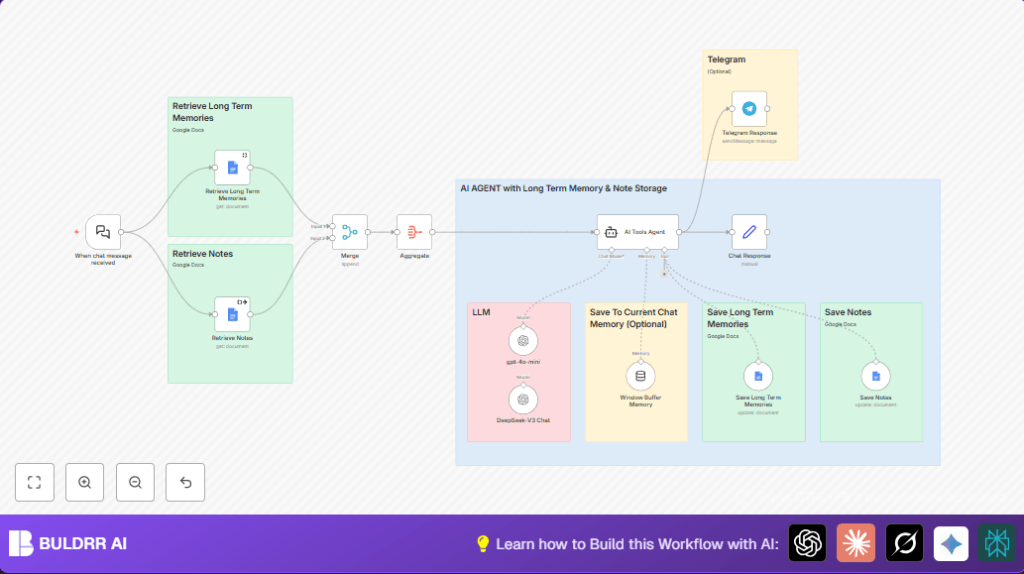
Inputs → Processing → Outputs Explained
Inputs
- User chat messages come in via the LangChain Chat Trigger node.
- Stored long-term memories are fetched from a Google Docs document.
- Previously saved notes are retrieved separately from another Google Docs document.
Processing Steps
- A Merge node combines memories and notes data to give the AI a full context.
- The Aggregate node groups this data for easy use by the AI Tools Agent.
- The AI Tools Agent node uses the chat input plus the retrieved memories and notes to create a relevant answer.
- The Window Buffer Memory node keeps track of recent messages to maintain conversation flow.
- After answering, updated memories and notes are written back to their Google Docs via respective Google Docs Tool nodes.
- An optional OpenAI GPT-4o-mini node produces fallback or enhanced chat replies.
Outputs
- Collected AI answers are sent back to users on Telegram using the Telegram node.
- A Set node formats the final response data for logging or further use.
Beginner Step-by-Step: How to Use This Workflow in n8n Production
Importing and Setup
- Download the workflow file using the Download button on this page.
- Open the n8n editor where the workflow will run.
- Click “Import from File” and select the downloaded workflow file.
- Add API credentials in n8n if missing, such as OpenAI API Key, Google Docs OAuth2, and Telegram bot credentials.
- Update any hardcoded IDs or URLs, like Google Doc URLs, folder IDs, or Telegram chat IDs.
- Check prompts or system messages in the AI nodes and copy-paste any code or URLs if provided.
Testing and Activation
- Send a test message through the input method (e.g., Telegram) to verify the workflow triggers properly.
- Look at the execution logs and ensure the AI generates answers and remembers previous info.
- Once testing succeeds, toggle the workflow status to “active” in n8n to start production use.
For secure, privacy-focused use of this workflow, consider self-host n8n on your own server.
Common Customizations
- Replace Google Docs nodes with Google Sheets or external databases by updating URLs and node settings.
- Make Telegram chat IDs dynamic by pulling them from incoming messages instead of fixed values.
- Edit the system prompt in AI Tools Agent to change chatbot tone or memory rules.
- Change how much recent chat is kept by adjusting the Window Buffer Memory node’s contextWindowLength setting.
- Add extra logging or error-catching nodes to track workflow status.
Troubleshooting Tips
- If Google Docs nodes return no data, check the document URLs and OAuth permissions.
- If messages don’t send in Telegram, verify the bot permissions and chat ID are correct.
- If the AI Tools Agent node gives no answer, confirm system prompt settings plus map chat input properly.
Pre-Production Checklist
- Verify Google Docs URLs and OAuth tokens are active.
- Test webhook triggers before going live.
- Check AI node generates good replies.
- Confirm Telegram node can send test messages.
- Ensure session memory preserves recent chat context.
Summary of Benefits and Outcomes
✓ Saves time by automating replies that remember past talks.
✓ Reduces repetitive questions and misunderstandings.
✓ Stores notes and memories securely in Google Docs.
✓ Works through Telegram for familiar user chatting.
✓ Easy to import, configure, and activate in n8n.
