
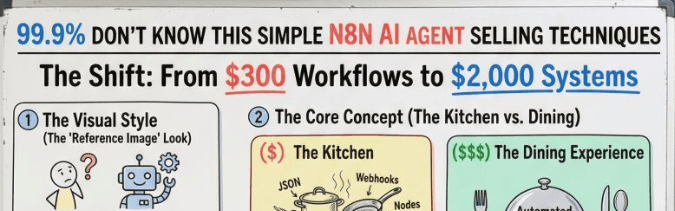
The Core Rule (memorize this)
Don’t sell automation. Sell outcomes.
Not “I can connect apps.”
But “I can stop lead leakage + increase revenue + reduce wasted hours.”
STEP 1) Pick a “Money Problem” (not a random workflow)
High-paying clients don’t pay for tasks.
They pay for business pain that costs money daily.
Best problems to sell:
✅ Lead leakage
✅ Slow response time
✅ Junk leads wasting sales time
✅ No follow-up system
✅ CRM is messy = deals lost
✅ Manual reporting = bad decisions
✅ No tracking = no visibility
Bad problems (low-ticket):
❌ “Send me an email when I get a form response”
❌ “Sync Notion to Sheets”
❌ “Save attachments automatically”
Those are $50–$200 jobs.
STEP 2) Turn the Problem into a “System Offer”
You’re not selling a workflow.
You’re selling a system with:
- Frontend (client-facing)
- Backend (automation brain)
- Visibility (dashboard + alerts)
- Reliability (error handling)
Example Offer Names (steal these)
- “Hot Lead Response System”
- “Inbound Lead Qualification Engine”
- “CRM Auto-Cleanup + Enrichment System”
- “Speed-to-Lead Automation Stack”
- “Sales Follow-up + Booking Machine”
STEP 3) Use the “Showroom + Factory” Stack
This is the main reason you’ll charge 5x–10x.
A) Frontend = Showroom (GoHighLevel / Web App)
This is what clients see and love:
- Forms
- Pipeline
- Tags
- Contact records
- Sales dashboards
- Team visibility
Clients pay more because it feels like a real product.
B) Backend = Factory (n8n)
This is your engine:
- API calls
- logic
- AI agents
- lead scoring
- enrichment
- routing
- retries
- webhooks
Your n8n stays hidden.
The client experiences a smooth “system”.
STEP 4) Build a “High-Ticket Flow” Template (Hot Lead System)
This is the easiest high-ticket offer to sell.
Goal:
Respond faster than competitors
and focus only on high-intent leads.
The full workflow map:
Lead Form (GHL) → n8n → AI Score → Routing → WhatsApp + Proposal + Alert → CRM Update
STEP 5) Define Lead Scoring (the part clients instantly understand)
You need a clear scoring model.
Example scoring inputs:
- Budget range
- Timeline (urgent = higher score)
- Company size
- Role (founder vs intern)
- Problem clarity
- Service match
- Location (optional)
Score output:
- 0–40 = cold lead
- 41–70 = warm lead
- 71–100 = hot lead
This is where you say:
“We stop your team from wasting time on junk leads.”
STEP 6) Build the 3-Minute Miracle (your sales hook)
This is what makes clients go: “damn, that’s fast.”
When lead score is high:
Within 3.5 minutes, the system triggers:
✅ WhatsApp message to the lead
✅ Proposal / offer doc generated
✅ Slack/WhatsApp alert to sales: “CALL NOW”
✅ CRM updated + tagged HOT
✅ Auto-booking link sent
This becomes your main selling line:
“We convert speed into revenue.”
STEP 7) Add the “Enterprise Features” that justify pricing
This is the difference between $300 workflow and $2,000+ system.
1) Error handling (non-negotiable)
- Error Trigger workflow
- Slack alert on failure
- Auto retry for temporary errors
2) Rate limiting
- Split In Batches
- Wait nodes
- Backoff retry logic
3) Secure credentials
- No hardcoded keys
- Use n8n credentials properly
- Environment variables if self-hosted
4) Human-in-the-loop approvals (premium)
Examples:
- If score is borderline → ask sales manager approval
- If proposal generated → send preview before sending
5) Logging + visibility
- Google Sheets log / Airtable log
- Dashboard: leads processed, hot leads found, response time
This is how you show ROI.
STEP 8) Make the Client Feel “In Control”
High-ticket clients pay for control + clarity, not tech.
Add these inside the showroom:
- “Today’s leads”
- “Hot leads this week”
- “Avg response time”
- “Deals won from automation”
Even if it’s simple, it looks powerful.
STEP 9) Package Deliverables Like a Pro (this increases trust)
Cheap freelancers deliver a JSON file.
High-ticket delivery looks like this:
What you deliver:
✅ Working system (frontend + backend)
✅ Setup doc (Notion / Google Doc)
✅ Loom walkthrough video
✅ Support window (7–14 days)
✅ Monitoring + alerts enabled
✅ “Dev vs Prod” version (optional but premium)
This alone can justify a big price jump.
STEP 10) Pricing Structure (simple + high-ticket)
Stop selling “workflow cost”.
Sell:
Setup Fee + Monthly Retainer
Setup fee: ₹75,000 – ₹1,50,000
Monthly retainer: ₹15,000 – ₹40,000
Retainer includes:
- fixes
- monitoring
- improvements
- adding new features
STEP 11) The Sales Script (what to say on calls)
Use this exact structure:
1) Diagnose
“Where do leads come from today?”
“What % are junk?”
“How fast do you respond?”
“How many hours/week wasted?”
2) Cost of problem
“If you get 100 leads/month and 80 are junk…
that’s 80 time-wasters.”
3) Promise the outcome
“I’ll build a system that qualifies leads automatically and alerts you only when it’s worth calling.”
4) Explain the system simply
“Frontend is your dashboard + forms.
Backend is n8n + AI scoring.
You get instant alerts + proposals.”
5) Close with speed + professionalism
“You’ll look like the fastest company in your niche.”
STEP 12) Your “Content Strategy” to attract these clients
You don’t need viral content.
You need content that screams:
“I build revenue systems.”
Post ideas:
- “Why most n8n workflows fail in production”
- “3 features that make automations reliable”
- “Hot lead system in 3 minutes (breakdown)”
- “Stop selling nodes, start selling systems”
Your Action Plan (Follow this in order)
Week 1: Build
- Create 1 “Hot Lead System” template
- Add scoring + WhatsApp + Slack alert
- Add error trigger + retry + logging
Week 2: Package
- Make a simple frontend dashboard (GHL)
- Record Loom demo
- Write onboarding doc
Week 3: Sell
- DM 20 agencies / coaches / service businesses
- Offer a “free lead flow audit”
- Pitch the system, not the workflow
