
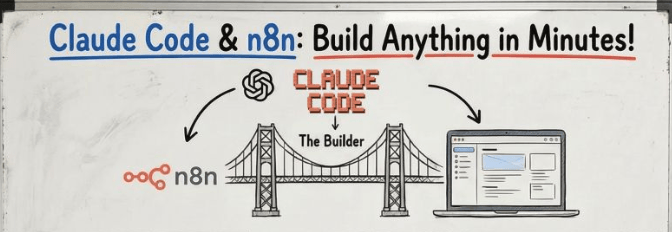
Turn Your n8n Workflow Into a Real App — No Backend Needed
Most developers assume turning a workflow into a real app
means setting up servers, writing backend APIs, managing
infrastructure, and deploying containers.
None of that is needed here.
Your n8n workflow IS the backend. Claude Code builds the
frontend. Vercel deploys it. GitHub handles versioning.
What you end up with isn’t a “workflow with a UI bolted on.”
It’s a real, deployable web app — with its own URL, a
professional interface users can actually interact with,
and a production-grade backend running in n8n.
No separate backend to write. No servers to manage.
No DevOps required.
n8n workflow + Claude Code + Vercel = real app, live on the web.
0) What you’re building (high level)
Goal
Turn this:
n8n workflow (works only inside n8n editor)
⬇️
Into this:
App-ready system (frontend + backend)
- Backend = n8n webhook workflow
- Frontend = web UI (Next.js / React)
- Deployment = Vercel
- Updates = push to GitHub → auto redeploy
What “Real App” Actually Means — Examples
The difference between a workflow and a real app is
who can use it and how they access it.
A workflow lives inside n8n — only you can trigger it.
A real app has a URL — anyone you share it with can use it.
Here are examples of n8n workflows turned into real apps
using this exact process:
→ AI Fitness Coach — User types their goals into a
web form. The n8n workflow processes it with GPT-4o
and returns a personalized workout plan. Deployed at
yourapp.vercel.app — no n8n access needed.
→ Lead Qualifier Tool — Sales team enters prospect
details into a simple web UI. n8n scores the lead,
checks CRM, and returns qualification status instantly.
→ Content Repurposer — Paste a blog URL into the app.
n8n scrapes it, rewrites it as tweets and LinkedIn posts,
returns everything formatted and ready to publish.
→ Internal Report Generator — Team members fill a form.
n8n pulls data from Google Sheets, formats a report with
OpenAI, and returns a downloadable document.
→ Customer FAQ Bot — Embedded chat widget on a website.
Every question hits your n8n webhook, gets answered by
an AI agent trained on your docs, and replies in-chat.
In every case: the logic lives in n8n, the interface
is a real web app, and no separate backend was written.
1) The core problem: why most n8n workflows aren’t “app-ready”
A workflow can work perfectly in n8n… but still fail as an app backend.
Common “not app-ready” issues
1) Trigger is wrong
- Form Trigger / Manual Trigger works in editor
- Frontend needs Webhook Trigger
2) Output is messy
- Frontend receives raw JSON blobs
- Needs a clean response shape like:
{ "output": "final message", "meta": {...} }3) Media breaks
- Images often come as base64
- You must decode/validate/convert before saving or sending
4) No error handling
- Workflow fails = user sees blank screen
- Needs:
- retries
- graceful fallback messages
- consistent error responses
5) Variables mismatch
- Node changes break mapping across workflow
- Needs “global refactor” updates safely
Claude Code’s job is to audit + patch all of this fast.
2) What you need before starting (minimum checklist)
Tools
- n8n (cloud or self-hosted)
- VS Code
- Claude Code (VS Code extension)
- GitHub account
- Vercel account
You should already have
- 1 working n8n workflow (even basic)
- A clear goal: “this workflow should be usable from a website/app”
3) Setup Claude Code properly (the clean way)
Step 3.1 — Create a project folder
Example:
fitness-coach-app/
Step 3.2 — Create
claude.md
(your control file)
Inside your folder, create:
Put this structure:
claude.md
template (copy-paste)
# Project: n8n Workflow → Production App

## Goal
Convert an existing n8n workflow into an app-ready backend + build a frontend UI.

## Requirements
- Replace editor triggers with a Webhook trigger
- Clean and standardize outputs
- Add robust error handling + retries
- Add session handling / memory if needed
- Generate a minimal professional frontend UI
- Test locally
- Deploy via GitHub → Vercel

## Output Format
Backend should return JSON like:
{
  "output": "string",
  "success": true/false,
  "debug": optional
}

## Security Rules
- Never hardcode API keys
- Use environment variables
- Keep MCP config private
This tells Claude Code exactly what “done” means.
4) Connect Claude Code to n8n + GitHub (MCP setup)
Claude Code becomes powerful when it can read + modify your systems.
You want these connections:
✅ n8n MCP server → so Claude can inspect workflows
✅ GitHub MCP server → so Claude can create repos + push code
Claude will usually generate a config like mcp.json.
Important rule:
mcp.json contains secrets/keys → never share it, never commit it.
5) Convert your n8n workflow into an app backend (most important part)
This is where most people fail.
Step 5.1 — Replace trigger: Manual/Form → Webhook
What to do in n8n
- Add Webhook Trigger
- Decide method:
- POST (recommended)
- Decide path:
- /fitness-coach or /api/coach
What Claude should ensure
{
  "message": "user text",
  "sessionId": "abc123"
}
Step 5.2 — Make the workflow return a clean response
Frontend apps need predictable output.
Standard response format (recommended)
Return something like:
{
  "success": true,
  "output": "Your workout plan is ready.",
  "sessionId": "abc123"
}
Fix: stop returning full node dumps
Don’t return 50 fields of random n8n data.
Step 5.3 — Add session memory (if it’s a chat/agent)
If your workflow is an AI agent/chat assistant, you need continuity.
Minimum memory approach
- Require sessionId
- Store conversation state:
- n8n Data Store / Redis / DB / Google Sheet (basic)
Claude’s job here
- Ensure:
- sessionId is created if missing
- session data is retrieved correctly
- session is updated after response
Step 5.4 — Add error handling + retries (non-negotiable)
Your workflow should not die on temporary API issues.
Add these patterns:
A) Retry on fail
- For OpenAI / HTTP / Scrapers
- Use retry logic or built-in retry settings
B) Wait node
- Add delays to avoid rate limits
C) Error branch
- If API fails:
- return {success:false, output:”Try again later”}
The “real” pro move
Create a separate workflow:
- Error Trigger workflow
- Sends alert to:
- Slack / Email / Telegram
So you know instantly when production breaks.
Step 5.5 — Handle base64 images (if your app sends images)
Frontends often send images as base64.
You must handle:
- base64 validation
- file type detection
- max size limit
- upload/storage step (S3 / Cloudinary / Drive)
Claude should implement:
- decode base64
- store it
- return a clean URL
6) Build the frontend app (Claude Code generates it fast)
Your frontend should do only 3 jobs:
Frontend responsibilities
- Collect user input
- Call webhook endpoint
- Display only the final output (not JSON garbage)
Step 6.1 — Define the API contract (frontend ↔ backend)
Request
{
  "message": "string",
  "sessionId": "string"
}
Response
{
  "success": true,
  "output": "string",
  "sessionId": "string"
}
If you keep this stable, everything becomes easy.
Step 6.2 — Fix “raw JSON showing” bug
This is super common.
Wrong
Frontend renders:
{"success":true,"output":"...","sessionId":"..."}
Correct
Frontend renders:
- Only data.output
Claude should update UI logic to display only:
✅ output
(optional) sessionId
(optional) loading state
Step 6.3 — Add “gamification” or extras only after it works
Example: points, streaks, badges.
Common bug
Points don’t persist.
Fix
Use:
- localStorage (simple)
- or DB (real product)
Claude should ensure:
- points update per message
- points persist after refresh
7) Test locally (don’t skip this)
Local test checklist
✅ Webhook URL is correct
✅ Frontend sends correct payload
✅ Backend returns clean JSON
✅ Errors don’t crash the UI
✅ Output is readable
✅ Session doesn’t reset randomly
8) Deploy to production (GitHub → Vercel)
Step 8.1 — Push to GitHub
Claude can:
- create a repo
- push the full codebase
Your repo should include:
- frontend app code
- README
- .env.example (no secrets)
Step 8.2 — Deploy to Vercel
Vercel flow
- Connect repo
- Deploy
- Get live URL
Step 8.3 — Fix environment variables (important)
Your deployed app must know the webhook URL.
Best practice
Set in Vercel env vars:
- N8N_WEBHOOK_URL=https://…
Then frontend calls:
- process.env.N8N_WEBHOOK_URL
Avoid
❌ hardcoding webhook URL in code
(it’s faster but less secure and harder to manage)
9) Security rules (don’t mess this up)
Keep secrets out of:
- frontend code
- GitHub repo
- screenshots
Always use:
✅ n8n Credentials Manager
✅ environment variables in Vercel
✅ MCP config stays local only
10) The repeatable workflow (your full system loop)
This is the loop you’ll use forever:
- Connect Claude Code → n8n + GitHub
- Optimize n8n workflow (webhook + clean output)
- Generate frontend
- Test locally
- Push to GitHub
- Deploy on Vercel
- Fix bugs → push → auto redeploy
11) “Production-ready” checklist (quick final audit)
Backend (n8n)
✅ Webhook trigger
✅ consistent response schema
✅ error handling
✅ retries + waits
✅ logs / alerts (error trigger workflow)
✅ safe credential handling
Frontend
✅ only displays output
✅ loading state
✅ handles errors gracefully
✅ env var webhook URL
✅ clean UI + responsive
Deployment
✅ GitHub connected
✅ Vercel env vars set
✅ redeploy works automatically
