
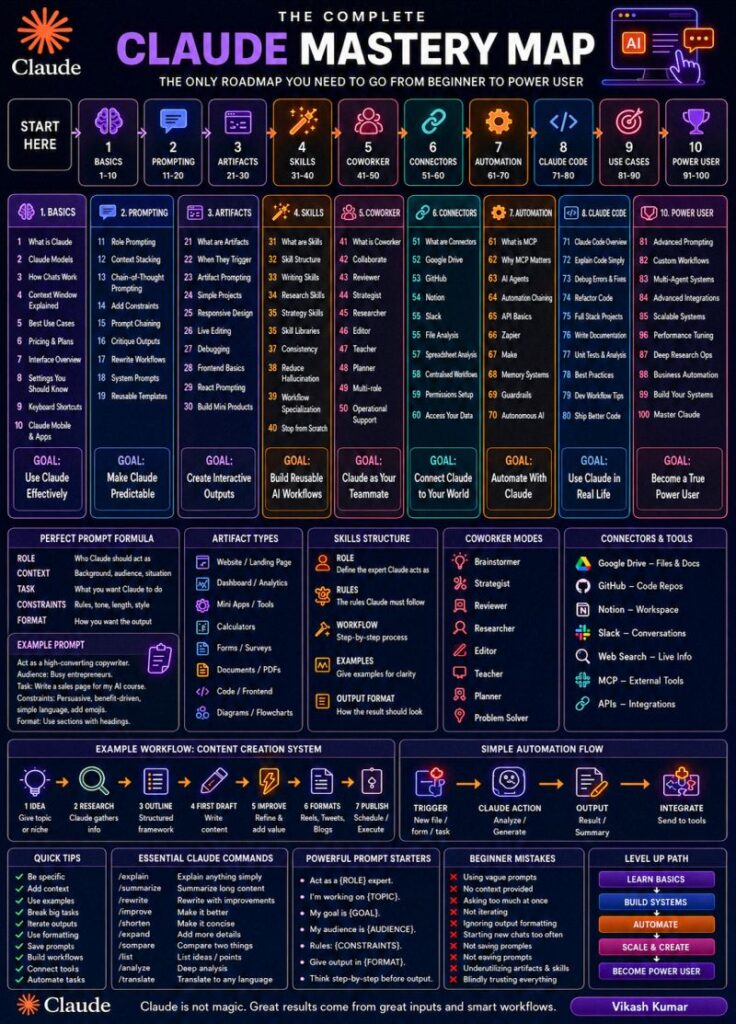
Claude AI Mastery Guide Updated 2026: The Complete Roadmap From Beginner to Power User

Updated: July 25, 2026

This Claude AI mastery guide breaks down everything you need to know about Claude, Anthropic’s AI assistant, into a 10-stage roadmap — from writing your first prompt to running multi-agent automation systems. Follow the stages in order and you’ll move from casual user to genuine Claude AI power user in months, not years.

What Is Claude AI?

Claude AI is a family of large language models built by Anthropic, designed to help with writing, coding, research, analysis and automation. Unlike a basic chatbot, modern Claude models can hold long conversations with large context windows, read and write files, search the web, run code, and take actions inside connected tools like Google Drive, Slack, GitHub and Notion. In 2026, Claude is used by individuals for writing and research, by developers through Claude Code, and by businesses for AI agents and workflow automation built with tools like n8n.

Why Most People Never Get Past Stage 2

Most Claude users open the chat, type a one-line question, get a decent-but-generic answer, and stop there — never realizing there’s a whole second half of the tool they haven’t touched. This guide exists to fix that. Each stage below builds on the one before it, so skipping ahead usually means missing the fundamentals that make the later stages actually work.

How This Claude AI Mastery Guide Is Structured

The roadmap is broken into 10 stages of 10 skills each (100 total), grouped from foundational to advanced: Basics, Prompting, Artifacts, Skills, Coworker Mode, Connectors, Automation, Claude Code, Use Cases, and Power User. Work through them in order — each stage assumes you already have the one before it.

Stage 1: Basics (Skills 1-10)

Goal: Use Claude Effectively

Before any advanced workflow, you need the fundamentals down: which Claude model you’re using, how context windows work, and which plan actually fits your use case. Skipping this stage is the single biggest reason beginners underestimate what Claude can do.

What you’ll learn:

  1. What Claude is and how it differs from a search engine
  2. Claude model differences (reasoning depth vs. speed vs. cost)
  3. How Claude conversations and memory work
  4. Context windows explained in plain terms
  5. Best use cases for Claude vs. other tools
  6. Pricing plans and what each tier unlocks
  7. Interface overview — chat, Projects, Artifacts panel
  8. Important settings most people never open
  9. Keyboard shortcuts that save real time
  10. Mobile and desktop apps, and when to use each

Quick tip: Claude’s top-tier model is built for complex, long reasoning tasks; the mid-tier model balances speed and intelligence for everyday work; the fastest, lightest model is best for simple, high-volume tasks. Check Anthropic’s current model list before choosing, since names and versions update regularly.

Outcome:

You understand when Claude should — and shouldn’t — be used.

Stage 2: Prompting (Skills 11-20)

Goal: Make Claude Predictable

Most people fail here because they write vague, one-line prompts and get vague, generic answers back. The fix isn’t a smarter model — it’s a better-structured prompt. This is the core of any real claude prompting guide, and it’s the single highest-leverage skill in this entire roadmap.

What you’ll learn:

  1. Role prompting — telling Claude who to act as
  2. Context stacking — giving Claude the background it needs
  3. Chain-of-thought prompting for complex reasoning
  4. Adding constraints so outputs stay usable
  5. Prompt chaining across multiple steps
  6. Critiquing Claude’s own outputs before you accept them
  7. Rewrite workflows for iterating on a draft
  8. System prompts for standing instructions
  9. Building reusable prompt templates
  10. Maintaining a personal prompt library

The Perfect Prompt Formula

Every reliable prompt contains five parts:

  • Role — who Claude should act as
  • Context — the background information it needs
  • Task — exactly what needs to be done
  • Constraints — rules and limitations to respect
  • Format — the expected output structure

Example

Role: Senior Content Strategist. Context: growing a B2B SaaS company. Task: create a LinkedIn post. Constraints: simple language, under 300 words. Format: Hook → Body → CTA.

Outcome:

Consistent, high-quality responses instead of a coin flip every time you prompt.

Stage 3: Artifacts (Skills 21-30)

Goal: Create Interactive Outputs

Claude Artifacts turn Claude from a text generator into a lightweight builder. Instead of describing a landing page or a calculator, you can ask Claude to build it, then view, edit and download it directly inside the chat — no separate coding environment required.

What you’ll learn:

  • What Artifacts are and how they differ from a normal reply
  • When Artifacts trigger automatically
  • How to prompt specifically for an Artifact
  • Building simple projects end-to-end
  • Responsive design inside Artifacts
  • Live editing and iterating on a build
  • Debugging when an Artifact breaks
  • Frontend basics (HTML/CSS/JS) enough to direct Claude
  • React prompting for more complex components
  • Turning an Artifact into a small, shippable product

You can build:

Landing pages, dashboards, calculators, forms, surveys, documents, PDFs, frontends and flowcharts — all inside the same conversation.

Outcome:

Claude becomes a builder, not just a chatbot.

Stage 4: Skills (Skills 31-40)

Goal: Build Reusable AI Workflows

Claude Skills are reusable systems Claude follows automatically, so you stop re-explaining your process every single time. A well-written Skill works like a mini employee handbook — whether it’s writing SEO content, auditing an Instagram account, or researching leads.

What you’ll learn:

  • What Skills are and how they differ from a saved prompt
  • Skill structure and required components
  • Writing your first Skill from a real workflow
  • Research Skills for repeatable information-gathering
  • Strategy Skills for planning and decision frameworks
  • Building a personal Skill library
  • Using Skills for output consistency across a team
  • Reducing hallucinations with tighter Skill instructions
  • Specializing Skills by workflow, not by topic
  • Building complex Skills from scratch

Every Skill Should Contain

  • Role — who Claude becomes for this task
  • Rules — instructions Claude must follow
  • Workflow — the step-by-step process
  • Examples — reference outputs to match
  • Output Format — the expected final structure

Real examples:

Content Creation Skill, Instagram Audit Skill, SEO Audit Skill, Meta Ads Analysis Skill, Lead Research Skill.

Outcome:

One-click reusable expertise instead of rebuilding context from zero every time.

Stage 5: Coworker Mode (Skills 41-50)

Goal: Claude Becomes Your Teammate

Instead of asking one-off questions, you start assigning Claude defined responsibilities — reviewer, strategist, researcher — and let it own that part of the work like a teammate would, not a search box you type into.

What you’ll learn:

  • What Coworker-style collaboration actually looks like
  • Structuring multi-turn collaboration workflows
  • Reviewer mode — catching mistakes before they ship
  • Strategist mode — building plans, not just answers
  • Researcher mode — gathering and organizing information
  • Editor mode — improving drafts without rewriting your voice
  • Teacher mode — using Claude to explain concepts back to you
  • Planner mode — building roadmaps and timelines
  • Running multi-role systems in one project
  • Using Claude for day-to-day operational support

Common Coworker roles:

Brainstormer (generates ideas), Strategist (creates plans), Reviewer (finds mistakes), Researcher (collects information), Editor (improves content), Teacher (explains concepts), Planner (builds roadmaps), Problem Solver (handles blockers).

Outcome:

Claude works alongside you instead of just answering you.

Stage 6: Connectors (Skills 51-60)

Goal: Connect Claude To Your World

Claude gets dramatically more useful once it can see your actual data instead of relying only on what you type. Connectors let Claude read from Google Drive, GitHub, Notion, Slack and other tools, grounding its answers in your real documents, code and conversations.

What you’ll learn:

  • What Connectors are and how they differ from file uploads
  • Connecting Google Drive for document-aware answers
  • Connecting GitHub for code-aware assistance
  • Connecting Notion for knowledge-base context
  • Connecting Slack for conversation-aware support
  • File analysis at scale across many documents
  • Spreadsheet analysis directly inside chat
  • Centralizing scattered workflows into one project
  • Permission setup so Claude only sees what it should
  • Managing data access as your usage grows

Connectors typically include:

Google Drive, GitHub, Notion, Slack, web search, MCP servers and direct APIs.

Outcome:

Claude accesses real information instead of relying only on what’s typed into the prompt.

Stage 7: Automation (Skills 61-70)

Goal: Automate With Claude

This is where Claude stops just answering and starts doing. Combined with n8n, Zapier, Make.com and the Model Context Protocol (Claude MCP), Claude can trigger real actions — updating a CRM, enriching a lead, generating a report — without a single manual click.

What you’ll learn:

  • MCP fundamentals — what the protocol actually does
  • Why MCP matters for connecting Claude to real tools
  • AI agents — how they differ from a single prompt
  • Automation chaining across multiple steps and tools
  • API basics enough to direct an automation build
  • Zapier integrations for no-code automation
  • Make.com for more complex visual automations
  • Memory systems so agents retain context over time
  • Guardrails that keep automations safe and predictable
  • Autonomous agents that run without step-by-step supervision

A Simple Automation Flow

Trigger → Claude Analysis → Output Generation → Tool Execution.

Real examples:

Lead enrichment, content automation, CRM updates, customer support, reporting workflows.

Outcome:

Work happens automatically, in the background, without you babysitting it.

Stage 8: Claude Code (Skills 71-80)

Goal: Use Claude In Real Development Work

Claude Code is Anthropic’s terminal-based coding agent, and it’s where most self-described power users spend their time in 2026. Instead of copy-pasting code between a chat window and your editor, Claude Code reads your repository, writes and edits files directly, runs commands, and debugs its own output.

What you’ll learn:

  • Claude Code overview and how it differs from chat
  • Code explanation for unfamiliar codebases
  • Debugging real errors with full repo context
  • Refactoring safely across multiple files
  • Building full-stack projects end-to-end
  • Writing documentation alongside the code
  • Reading and analyzing test results
  • Development best practices Claude follows automatically
  • Structuring a real development workflow around Claude Code
  • Shipping finished projects, not just prototypes

Use cases:

SaaS products, internal tools, AI agents, websites, dashboards, automations.

Outcome:

You build software without the traditional development bottlenecks.

Stage 9: Use Cases (Skills 81-90)

Goal: Scale Practical Applications

By this stage, you’re not experimenting anymore — you’re applying Claude AI use cases to real, recurring business problems: multi-agent systems, deep research pipelines, and workflows that used to take a team hours.

What you’ll learn:

  • Advanced prompting for ambiguous, high-stakes tasks
  • Designing custom workflows around a specific business process
  • Multi-agent systems where agents hand off work to each other
  • Advanced integrations across multiple connected tools
  • Building scalable systems that don’t break under real volume
  • Performance tuning for cost, speed and accuracy
  • Deep research operations across many sources
  • Business automation applied to a full department, not one task
  • Process optimization using Claude as the analyst
  • System design thinking, not just prompt writing

Outcome:

You move beyond experiments into production systems people actually rely on.

Stage 10: Power User (Skills 91-100)

Goal: Become A True Claude AI Power User

The final stage isn’t really a new skill — it’s a shift in mindset. A genuine Claude AI power user doesn’t ask better questions; they build systems, Skills and agents that keep working long after the original conversation ends.

What you’ll learn:

  • Advanced prompt architecture across long-running projects
  • Workflow orchestration across multiple tools and agents
  • Multi-agent coordination for complex, multi-step work
  • Enterprise integrations across an entire tech stack
  • System scaling as usage and complexity grow
  • Optimization techniques for cost and reliability
  • Deep research operations run end-to-end
  • Business automation frameworks you can reuse across clients
  • Building your own systems from scratch
  • Everything that goes into truly mastering Claude

Outcome:

You stop using tools and start building systems.

Example Content Creation Workflow With Claude

Here’s what a full content workflow looks like once you’ve moved through the stages above:

  1. Idea — choose a topic
  2. Research — gather information
  3. Outline — create the structure
  4. First Draft — write the content
  5. Improve — refine the messaging
  6. Format — adapt for the platform
  7. Publish — schedule and distribute

Essential Claude Commands

  • /explain → simplify a complex concept
  • /summarize → condense long information
  • /rewrite → improve existing writing
  • /improve → upgrade overall quality
  • /shorten → make a response more concise
  • /expand → add more depth and detail
  • /compare → compare two or more options
  • /list → turn information into a clean list
  • /analyze → run a deeper analysis
  • /translate → convert between languages

Beginner Mistakes To Avoid

  • Writing vague prompts with no real instruction
  • Giving no context and expecting a tailored answer
  • Asking for too much in a single prompt
  • Ignoring formatting and structure in requests
  • Starting a new chat too often instead of building context
  • Not saving prompts that worked well
  • Never building repeatable workflows
  • Underusing Skills for repetitive tasks
  • Blindly trusting outputs without reviewing them

Claude vs ChatGPT: Where Claude Pulls Ahead

Claude and ChatGPT overlap on the basics, but Claude tends to pull ahead on long-document reasoning, code-heavy work through Claude Code, and staying consistent across long Projects. For a full side-by-side on real tasks, see our detailed breakdown in Claude vs ChatGPT in 2026: I Tested Both on the Same 10 Real Tasks.

The Fastest Path To Claude AI Mastery

  • Month 1: Basics + Prompting
  • Month 2: Artifacts + Skills
  • Month 3: Coworker Mode + Connectors
  • Month 4: Automation + MCP
  • Month 5: Claude Code
  • Month 6+: Multi-Agent Systems + Advanced Workflows

Final Principle

Most users stay at the prompt level. Power users build Skills, systems, automations, agents and workflows. The goal was never to get better answers — the goal is to make Claude do more of the work for you.

Claude AI Mastery Guide: Frequently Asked Questions

What is Claude AI used for?

Claude AI is used for writing, research, coding, data analysis, customer support and business automation. Individuals use it for content and research; developers use Claude Code for full software projects; businesses use it to power AI agents and automated workflows built with tools like n8n.

How long does it take to master Claude AI?

Following this 10-stage roadmap, most people reach genuine power-user level in 4-6 months of consistent use — Basics and Prompting in month one, Automation and Claude Code by months four and five, and multi-agent systems from month six onward.

Is Claude AI free to use?

Claude offers a free plan with daily usage limits and access to a lighter model, alongside paid plans that unlock higher-tier models, larger usage limits, and features like Projects, Artifacts and Connectors. Check Anthropic’s pricing page for current plan details, since limits and tiers change over time.

What is the difference between Claude and ChatGPT?

Both are capable general-purpose AI assistants. Claude is generally regarded as stronger on long-document reasoning, coding through Claude Code, and staying consistent across long, multi-file Projects, while ChatGPT has a larger plugin and app ecosystem. The right choice depends on the specific task.

What are Claude Skills?

Claude Skills are reusable instruction sets that tell Claude exactly how to approach a repeated task — like writing SEO content or auditing an ad account — so you don’t have to re-explain your process every time you start a new conversation.

Can Claude AI write and run code?

Yes. Claude can write, explain, debug and refactor code directly in chat, and through Claude Code it can also read an entire repository, edit multiple files, run commands, and test its own changes from the terminal.

What is Claude Code?

Claude Code is Anthropic’s terminal-based coding agent. It works directly inside your codebase — reading files, making edits, running tests and fixing its own errors — instead of requiring you to copy code back and forth from a chat window.

Final Thoughts

Most people quit this roadmap somewhere around Stage 3 and never come back — not because Claude is hard to use, but because nobody laid out the full path from basic prompts to real automation. Work through these 10 stages in order, build the habit of turning repeated tasks into Skills, and by Stage 7 you’ll already be doing things with Claude that most users never discover.

If you’d rather have this built for you — Skills, Connectors, automations and Claude Code workflows set up around your actual business — that’s exactly what BULDRR AI builds for clients across India, the US, Europe, Dubai and Australia.

This Claude AI mastery guide breaks down everything you need to know about Claude, Anthropic’s AI assistant, into a 10-stage roadmap — from writing your first prompt to running multi-agent automation systems. Follow the stages in order and you’ll move from casual user to genuine Claude AI power user in months, not years.

What Is Claude AI?

Claude AI is a family of large language models built by Anthropic, designed to help with writing, coding, research, analysis and automation. Unlike a basic chatbot, modern Claude models can hold long conversations with large context windows, read and write files, search the web, run code, and take actions inside connected tools like Google Drive, Slack, GitHub and Notion. In 2026, Claude is used by individuals for writing and research, by developers through Claude Code, and by businesses for AI agents and workflow automation built with tools like n8n.

Why Most People Never Get Past Stage 2

Most Claude users open the chat, type a one-line question, get a decent-but-generic answer, and stop there — never realizing there’s a whole second half of the tool they haven’t touched. This guide exists to fix that. Each stage below builds on the one before it, so skipping ahead usually means missing the fundamentals that make the later stages actually work.

How This Claude AI Mastery Guide Is Structured

The roadmap is broken into 10 stages of 10 skills each (100 total), grouped from foundational to advanced: Basics, Prompting, Artifacts, Skills, Coworker Mode, Connectors, Automation, Claude Code, Use Cases, and Power User. Work through them in order — each stage assumes you already have the one before it.

Stage 1: Basics (Skills 1-10)

Goal: Use Claude Effectively

Before any advanced workflow, you need the fundamentals down: which Claude model you’re using, how context windows work, and which plan actually fits your use case. Skipping this stage is the single biggest reason beginners underestimate what Claude can do.

What you’ll learn:

  1. What Claude is and how it differs from a search engine
  2. Claude model differences (reasoning depth vs. speed vs. cost)
  3. How Claude conversations and memory work
  4. Context windows explained in plain terms
  5. Best use cases for Claude vs. other tools
  6. Pricing plans and what each tier unlocks
  7. Interface overview — chat, Projects, Artifacts panel
  8. Important settings most people never open
  9. Keyboard shortcuts that save real time
  10. Mobile and desktop apps, and when to use each

Quick tip: Claude’s top-tier model is built for complex, long reasoning tasks; the mid-tier model balances speed and intelligence for everyday work; the fastest, lightest model is best for simple, high-volume tasks. Check Anthropic’s current model list before choosing, since names and versions update regularly.

Outcome:

You understand when Claude should — and shouldn’t — be used.

Stage 2: Prompting (Skills 11-20)

Goal: Make Claude Predictable

Most people fail here because they write vague, one-line prompts and get vague, generic answers back. The fix isn’t a smarter model — it’s a better-structured prompt. This is the core of any real claude prompting guide, and it’s the single highest-leverage skill in this entire roadmap.

What you’ll learn:

  1. Role prompting — telling Claude who to act as
  2. Context stacking — giving Claude the background it needs
  3. Chain-of-thought prompting for complex reasoning
  4. Adding constraints so outputs stay usable
  5. Prompt chaining across multiple steps
  6. Critiquing Claude’s own outputs before you accept them
  7. Rewrite workflows for iterating on a draft
  8. System prompts for standing instructions
  9. Building reusable prompt templates
  10. Maintaining a personal prompt library

The Perfect Prompt Formula

Every reliable prompt contains five parts:

  • Role — who Claude should act as
  • Context — the background information it needs
  • Task — exactly what needs to be done
  • Constraints — rules and limitations to respect
  • Format — the expected output structure

Example

Role: Senior Content Strategist. Context: growing a B2B SaaS company. Task: create a LinkedIn post. Constraints: simple language, under 300 words. Format: Hook → Body → CTA.

Outcome:

Consistent, high-quality responses instead of a coin flip every time you prompt.

Stage 3: Artifacts (Skills 21-30)

Goal: Create Interactive Outputs

Claude Artifacts turn Claude from a text generator into a lightweight builder. Instead of describing a landing page or a calculator, you can ask Claude to build it, then view, edit and download it directly inside the chat — no separate coding environment required.

What you’ll learn:

  • What Artifacts are and how they differ from a normal reply
  • When Artifacts trigger automatically
  • How to prompt specifically for an Artifact
  • Building simple projects end-to-end
  • Responsive design inside Artifacts
  • Live editing and iterating on a build
  • Debugging when an Artifact breaks
  • Frontend basics (HTML/CSS/JS) enough to direct Claude
  • React prompting for more complex components
  • Turning an Artifact into a small, shippable product

You can build:

Landing pages, dashboards, calculators, forms, surveys, documents, PDFs, frontends and flowcharts — all inside the same conversation.

Outcome:

Claude becomes a builder, not just a chatbot.

Stage 4: Skills (Skills 31-40)

Goal: Build Reusable AI Workflows

Claude Skills are reusable systems Claude follows automatically, so you stop re-explaining your process every single time. A well-written Skill works like a mini employee handbook — whether it’s writing SEO content, auditing an Instagram account, or researching leads.

What you’ll learn:

  • What Skills are and how they differ from a saved prompt
  • Skill structure and required components
  • Writing your first Skill from a real workflow
  • Research Skills for repeatable information-gathering
  • Strategy Skills for planning and decision frameworks
  • Building a personal Skill library
  • Using Skills for output consistency across a team
  • Reducing hallucinations with tighter Skill instructions
  • Specializing Skills by workflow, not by topic
  • Building complex Skills from scratch

Every Skill Should Contain

  • Role — who Claude becomes for this task
  • Rules — instructions Claude must follow
  • Workflow — the step-by-step process
  • Examples — reference outputs to match
  • Output Format — the expected final structure

Real examples:

Content Creation Skill, Instagram Audit Skill, SEO Audit Skill, Meta Ads Analysis Skill, Lead Research Skill.

Outcome:

One-click reusable expertise instead of rebuilding context from zero every time.

Stage 5: Coworker Mode (Skills 41-50)

Goal: Claude Becomes Your Teammate

Instead of asking one-off questions, you start assigning Claude defined responsibilities — reviewer, strategist, researcher — and let it own that part of the work like a teammate would, not a search box you type into.

What you’ll learn:

  • What Coworker-style collaboration actually looks like
  • Structuring multi-turn collaboration workflows
  • Reviewer mode — catching mistakes before they ship
  • Strategist mode — building plans, not just answers
  • Researcher mode — gathering and organizing information
  • Editor mode — improving drafts without rewriting your voice
  • Teacher mode — using Claude to explain concepts back to you
  • Planner mode — building roadmaps and timelines
  • Running multi-role systems in one project
  • Using Claude for day-to-day operational support

Common Coworker roles:

Brainstormer (generates ideas), Strategist (creates plans), Reviewer (finds mistakes), Researcher (collects information), Editor (improves content), Teacher (explains concepts), Planner (builds roadmaps), Problem Solver (handles blockers).

Outcome:

Claude works alongside you instead of just answering you.

Stage 6: Connectors (Skills 51-60)

Goal: Connect Claude To Your World

Claude gets dramatically more useful once it can see your actual data instead of relying only on what you type. Connectors let Claude read from Google Drive, GitHub, Notion, Slack and other tools, grounding its answers in your real documents, code and conversations.

What you’ll learn:

  • What Connectors are and how they differ from file uploads
  • Connecting Google Drive for document-aware answers
  • Connecting GitHub for code-aware assistance
  • Connecting Notion for knowledge-base context
  • Connecting Slack for conversation-aware support
  • File analysis at scale across many documents
  • Spreadsheet analysis directly inside chat
  • Centralizing scattered workflows into one project
  • Permission setup so Claude only sees what it should
  • Managing data access as your usage grows

Connectors typically include:

Google Drive, GitHub, Notion, Slack, web search, MCP servers and direct APIs.

Outcome:

Claude accesses real information instead of relying only on what’s typed into the prompt.

Stage 7: Automation (Skills 61-70)

Goal: Automate With Claude

This is where Claude stops just answering and starts doing. Combined with n8n, Zapier, Make.com and the Model Context Protocol (Claude MCP), Claude can trigger real actions — updating a CRM, enriching a lead, generating a report — without a single manual click.

What you’ll learn:

  • MCP fundamentals — what the protocol actually does
  • Why MCP matters for connecting Claude to real tools
  • AI agents — how they differ from a single prompt
  • Automation chaining across multiple steps and tools
  • API basics enough to direct an automation build
  • Zapier integrations for no-code automation
  • Make.com for more complex visual automations
  • Memory systems so agents retain context over time
  • Guardrails that keep automations safe and predictable
  • Autonomous agents that run without step-by-step supervision

A Simple Automation Flow

Trigger → Claude Analysis → Output Generation → Tool Execution.

Real examples:

Lead enrichment, content automation, CRM updates, customer support, reporting workflows.

Outcome:

Work happens automatically, in the background, without you babysitting it.

Stage 8: Claude Code (Skills 71-80)

Goal: Use Claude In Real Development Work

Claude Code is Anthropic’s terminal-based coding agent, and it’s where most self-described power users spend their time in 2026. Instead of copy-pasting code between a chat window and your editor, Claude Code reads your repository, writes and edits files directly, runs commands, and debugs its own output.

What you’ll learn:

  • Claude Code overview and how it differs from chat
  • Code explanation for unfamiliar codebases
  • Debugging real errors with full repo context
  • Refactoring safely across multiple files
  • Building full-stack projects end-to-end
  • Writing documentation alongside the code
  • Reading and analyzing test results
  • Development best practices Claude follows automatically
  • Structuring a real development workflow around Claude Code
  • Shipping finished projects, not just prototypes

Use cases:

SaaS products, internal tools, AI agents, websites, dashboards, automations.

Outcome:

You build software without the traditional development bottlenecks.

Stage 9: Use Cases (Skills 81-90)

Goal: Scale Practical Applications

By this stage, you’re not experimenting anymore — you’re applying Claude AI use cases to real, recurring business problems: multi-agent systems, deep research pipelines, and workflows that used to take a team hours.

What you’ll learn:

  • Advanced prompting for ambiguous, high-stakes tasks
  • Designing custom workflows around a specific business process
  • Multi-agent systems where agents hand off work to each other
  • Advanced integrations across multiple connected tools
  • Building scalable systems that don’t break under real volume
  • Performance tuning for cost, speed and accuracy
  • Deep research operations across many sources
  • Business automation applied to a full department, not one task
  • Process optimization using Claude as the analyst
  • System design thinking, not just prompt writing

Outcome:

You move beyond experiments into production systems people actually rely on.

Stage 10: Power User (Skills 91-100)

Goal: Become A True Claude AI Power User

The final stage isn’t really a new skill — it’s a shift in mindset. A genuine Claude AI power user doesn’t ask better questions; they build systems, Skills and agents that keep working long after the original conversation ends.

What you’ll learn:

  • Advanced prompt architecture across long-running projects
  • Workflow orchestration across multiple tools and agents
  • Multi-agent coordination for complex, multi-step work
  • Enterprise integrations across an entire tech stack
  • System scaling as usage and complexity grow
  • Optimization techniques for cost and reliability
  • Deep research operations run end-to-end
  • Business automation frameworks you can reuse across clients
  • Building your own systems from scratch
  • Everything that goes into truly mastering Claude

Outcome:

You stop using tools and start building systems.

Example Content Creation Workflow With Claude

Here’s what a full content workflow looks like once you’ve moved through the stages above:

  1. Idea — choose a topic
  2. Research — gather information
  3. Outline — create the structure
  4. First Draft — write the content
  5. Improve — refine the messaging
  6. Format — adapt for the platform
  7. Publish — schedule and distribute

Essential Claude Commands

  • /explain → simplify a complex concept
  • /summarize → condense long information
  • /rewrite → improve existing writing
  • /improve → upgrade overall quality
  • /shorten → make a response more concise
  • /expand → add more depth and detail
  • /compare → compare two or more options
  • /list → turn information into a clean list
  • /analyze → run a deeper analysis
  • /translate → convert between languages

Beginner Mistakes To Avoid

  • Writing vague prompts with no real instruction
  • Giving no context and expecting a tailored answer
  • Asking for too much in a single prompt
  • Ignoring formatting and structure in requests
  • Starting a new chat too often instead of building context
  • Not saving prompts that worked well
  • Never building repeatable workflows
  • Underusing Skills for repetitive tasks
  • Blindly trusting outputs without reviewing them

Claude vs ChatGPT: Where Claude Pulls Ahead

Claude and ChatGPT overlap on the basics, but Claude tends to pull ahead on long-document reasoning, code-heavy work through Claude Code, and staying consistent across long Projects. For a full side-by-side on real tasks, see our detailed breakdown in Claude vs ChatGPT in 2026: I Tested Both on the Same 10 Real Tasks.

The Fastest Path To Claude AI Mastery

  • Month 1: Basics + Prompting
  • Month 2: Artifacts + Skills
  • Month 3: Coworker Mode + Connectors
  • Month 4: Automation + MCP
  • Month 5: Claude Code
  • Month 6+: Multi-Agent Systems + Advanced Workflows

Final Principle

Most users stay at the prompt level. Power users build Skills, systems, automations, agents and workflows. The goal was never to get better answers — the goal is to make Claude do more of the work for you.

Claude AI Mastery Guide: Frequently Asked Questions

What is Claude AI used for?

Claude AI is used for writing, research, coding, data analysis, customer support and business automation. Individuals use it for content and research; developers use Claude Code for full software projects; businesses use it to power AI agents and automated workflows built with tools like n8n.

How long does it take to master Claude AI?

Following this 10-stage roadmap, most people reach genuine power-user level in 4-6 months of consistent use — Basics and Prompting in month one, Automation and Claude Code by months four and five, and multi-agent systems from month six onward.

Is Claude AI free to use?

Claude offers a free plan with daily usage limits and access to a lighter model, alongside paid plans that unlock higher-tier models, larger usage limits, and features like Projects, Artifacts and Connectors. Check Anthropic’s pricing page for current plan details, since limits and tiers change over time.

What is the difference between Claude and ChatGPT?

Both are capable general-purpose AI assistants. Claude is generally regarded as stronger on long-document reasoning, coding through Claude Code, and staying consistent across long, multi-file Projects, while ChatGPT has a larger plugin and app ecosystem. The right choice depends on the specific task.

What are Claude Skills?

Claude Skills are reusable instruction sets that tell Claude exactly how to approach a repeated task — like writing SEO content or auditing an ad account — so you don’t have to re-explain your process every time you start a new conversation.

Can Claude AI write and run code?

Yes. Claude can write, explain, debug and refactor code directly in chat, and through Claude Code it can also read an entire repository, edit multiple files, run commands, and test its own changes from the terminal.

What is Claude Code?

Claude Code is Anthropic’s terminal-based coding agent. It works directly inside your codebase — reading files, making edits, running tests and fixing its own errors — instead of requiring you to copy code back and forth from a chat window.

Final Thoughts

Most people quit this roadmap somewhere around Stage 3 and never come back — not because Claude is hard to use, but because nobody laid out the full path from basic prompts to real automation. Work through these 10 stages in order, build the habit of turning repeated tasks into Skills, and by Stage 7 you’ll already be doing things with Claude that most users never discover.

If you’d rather have this built for you — Skills, Connectors, automations and Claude Code workflows set up around your actual business — that’s exactly what BULDRR AI builds for clients across India, the US, Europe, Dubai and Australia.

Author
Written By
Vikash Kumar
Building AI agents, n8n workflows and end-to-end automation for 30+ Brands across India, the US, Europe, Dubai & Australia. 7+ years of Experience saving founders real hours every week - no code required.
Ask more Questions about this Blog with AI:

Our AI Articles

Learn from our AI Articles to excel in your profession ;)

Automating the Contact List Cleanup You’ve Been Putting Off

A CRM full of duplicate contacts isn't just messy, it costs real money in wasted outreach and confused service calls....

Automating Contracts and Proposals So You Stop Retyping the Same Fields

Automated contract and proposal generation pulls client details straight from your CRM into a pre-approved template, cutting a 20-40 minute...

One Trigger, Three Channels: Automating Alerts So Nothing Gets Missed

Missed alerts are a routing problem, not a tooling one. See how n8n + Claude fan out one trigger to...

Automating the Review Request Most Businesses Forget to Send

Vintage halftone duotone illustration of a figure releasing a glowing asterisk-shaped lantern, representing automated review request workflow timing....

Why AI Keeps Quoting Reddit Instead of Your Website

Reddit shows up constantly in ChatGPT and AI Overview answers. See why AI trusts forums over business sites, and what...

Why AI Search Gets Confused When You Have Five Locations (And How to Fix It)

Why AI search tools sometimes recommend one location and skip another, and how inconsistent NAP data and templated location pages...

Automating the Monday Report Nobody Wants to Build by Hand

How to automate the weekly business report - pulling sales, cash, ad spend, and support numbers from separate tools into...

Getting Cited by AI When You Don’t Have a Storefront to Point To

How service-area businesses without a storefront should set up their Google Business Profile and website to earn AI search citations,...

What Is OpenRouter? The Complete Beginner’s Guide (2026)

OpenRouter gives beginners one simple way to access hundreds of AI models with a single API key. Here's what it...

Jacksonville SEO Consultant vs. Agency: Which Fits a Small Business

SEO consultant vs agency: compare cost, services, expertise, and scalability to find the right fit for your business and marketing...

Calendar Booking Automation for Jacksonville Service Businesses (Stop Playing Phone Tag)

Calendar booking automation helps Jacksonville service businesses reduce no-shows, automate reminders, enable self-service rescheduling, and stop losing jobs to missed...

Small Business SEO Cost in Jacksonville, FL: Real Numbers

Jacksonville SEO pricing guide showing local SEO costs, packages, hourly rates, and services for small businesses....
1:1 Free Strategy Session
Your competitors are already automating. Are you still paying for it manually?

Do you want to adopt AI Automation?

Every hour your team does repetitive work, you're burning real money.
While you wait, faster businesses are cutting costs and moving quicker.
AI and automations aren't the future anymore — they're the present.

Book a live 1-on-1 session where we show you exactly which of your daily tasks can be automated — and what it’s costing you not to.