

What This Automation Does ⚙️
This workflow connects to GitHub to find info about issues and comments fast.
It solves the problem of spending too much time checking issues and making mistakes by hand.
You get quick, clear answers about issues and can easily add comments from one place.
The workflow listens to commands from a chat-like MCP client and uses GitHub API safely.
It sends back only the useful info, without extra clutter, so you can use it without confusion.
How This Workflow Works
Inputs
- Commands from MCP client: Operation type (like get issues or add comment), repository name, issue number, and comment text.
Processing Steps
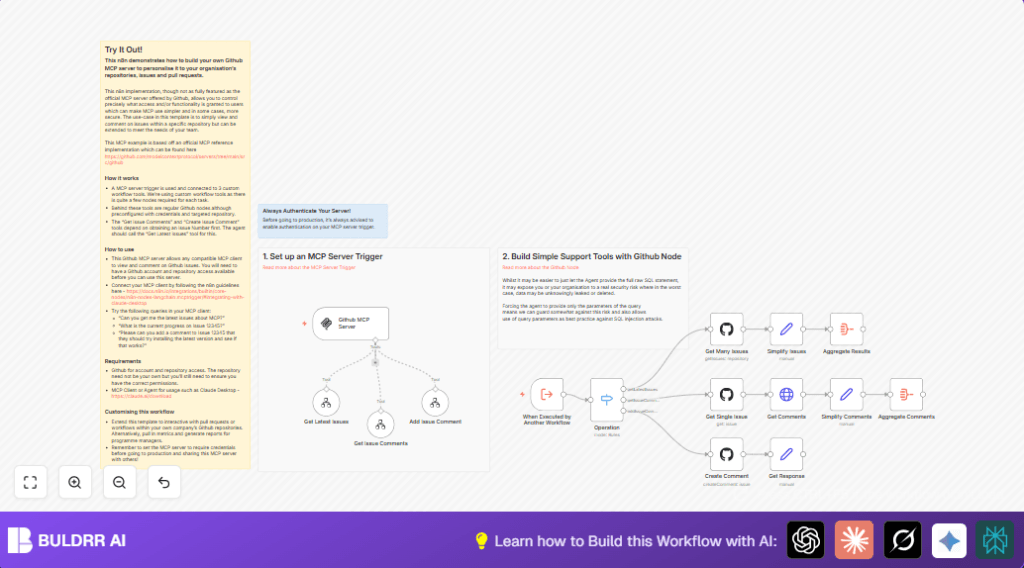
- Step 1: n8n-nodes-langchain.mcpTrigger node catches commands from MCP clients at a special webhook.
- Step 2: Execute Workflow Trigger node gets the JSON command data.
- Step 3: Switch Node reads the operation field and routes to tools.
- Step 4a – Get Latest Issues Tool: GitHub Node fetches latest ten issues, Set Node selects key info, Aggregate Node returns a clean list.
- Step 4b – Get Issue Comments Tool: GitHub Node fetches single issue, HTTP Request Node gets comments, Set Node simplifies data, Aggregate Node packages for output.
- Step 4c – Add Issue Comment Tool: GitHub Node posts new comment using repo, issue number, and text; followed by a Set Node confirming success.
Outputs
- Clean, easy to read JSON info about latest issues or comments.
- Simple acknowledgment messages after adding a comment.
Who Should Use This Workflow
People or teams who manage many GitHub issues and want to save time.
Those who want to avoid mistakes from copying info manually between GitHub and chat.
Anyone who uses MCP clients like Claude Desktop to talk to GitHub issues and comments.
Tools and Services Used
- n8n: Workflow automation platform that runs the solution.
- GitHub API: Provides access to issue and comment data securely.
- MCP Client (e.g., Claude Desktop): Sends commands and shows responses conversationally.
Beginner Step-by-Step: How to Use This Workflow in Production Inside n8n
Import Workflow
- Open the n8n editor.
- Download the workflow file using the Download button on this page.
- Click the menu and select Import from File.
- Choose the workflow file and load it into n8n.
Configure Credentials
- Go to Credentials in n8n.
- Add your GitHub API Key under GitHub API.
- Make sure the key has repo access permissions.
- Update any repository names used inside the workflow, like setting them to your
owner/repo.
Test Workflow
- Send a test command from your MCP client to the webhook URL.
- Check if the workflow triggers and returns the expected results.
Activate for Production
- Toggle the main n8n-nodes-langchain.mcpTrigger node ON.
- Confirm the webhook URL is accessible to your MCP client.
- Consider adding authentication to the trigger for security in production.
- If desired, set up logging inside n8n to catch any errors.
For users wanting more control over uptime and data, self-host n8n is a helpful way to run this workflow securely on your own server.
Customization Ideas ✏️
- You can add pull request support by copying the comment tool and changing GitHub API endpoints.
- Add extra data fields like labels or reactions by changing the Set Node settings.
- Secure the MCP Server Trigger node with authentication to stop unwanted access.
- Change how many issues fetch in the GitHub node to fit repo activity.
Troubleshooting ????
- 401 Unauthorized Error: Check GitHub API Key is correct and has repo permissions.
- Switch Node Not Routing: Make sure
operationtext matches exactly including uppercase/lowercase. - No Comments from HTTP Request: Verify GitHub credentials are attached to the HTTP Request node.
Pre-Production Checklist ✅
- Confirm GitHub API Key is active with necessary repo permissions.
- Run tests on each child workflow separately to check output quality.
- Trigger the main workflow from MCP client commands and verify response.
- Enable error logging in n8n for quick troubleshooting.
- Add authentication on the MCP trigger node before going live.
Deployment Guide
Turn on the n8n-nodes-langchain.mcpTrigger node to start accepting MCP client requests.
Watch n8n’s execution logs to see how many requests pass and fix any failures.
Replay failed runs inside n8n to retry and debug.
Hosting on your own server is an option for full control. Check self-host n8n if interested.
Summary
✓ Saves user many hours by automating issue and comment handling from GitHub.
✓ Reduces mistakes by linking actions directly to GitHub via API.
→ Provides clean, concise issue and comment info through a chat client.
→ Lets user add comments easily without leaving the chat interface.
✓ Modular workflow with clear routing for different operations.
✓ Secure by requiring GitHub API Keys and optional trigger authentication.
