

What This Workflow Does
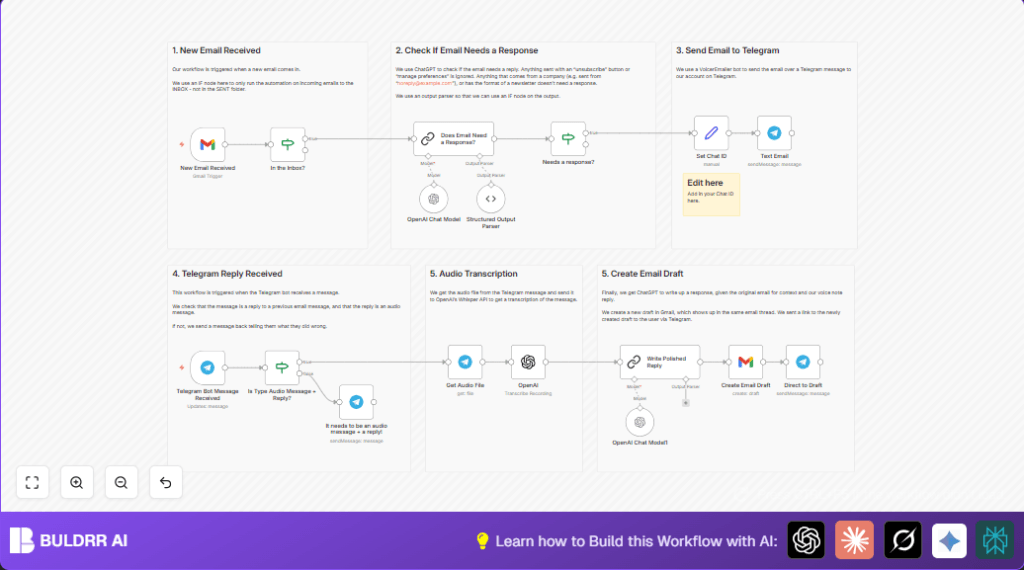
This workflow listens for new emails arriving in the Gmail inbox.
It uses AI to check if an email needs a reply or not.
If a reply is needed, it sends email info to a Telegram chat.
The user replies by sending a voice message in Telegram.
The voice audio gets transcribed to text using AI.
Another AI step rewrites the transcribed text into a professional email reply.
The reply is saved as a draft in the original Gmail thread.
The workflow sends a Telegram message with a link to that draft.
This saves time and lets the user respond to emails hands-free on the phone.
Who Should Use This Workflow
This workflow is for people who get many emails and want to reply faster.
It helps users who prefer speaking replies instead of typing.
It suits professionals who want to check and reply to important emails remotely.
It is also good for users who want smart AI help to write polished replies.
Tools and Services Used
- Gmail: To watch incoming emails and create drafts.
- Telegram Bot API: To send email alerts and receive voice replies.
- OpenAI GPT-3.5/4 Chat Model: To decide if emails need replies and polish transcriptions.
- OpenAI Whisper Model: To transcribe voice messages to text.
- n8n Automation Platform: To connect and control all services and processes.
How the Workflow Works: Inputs, Process, Output
Inputs
- New incoming Gmail emails labeled INBOX.
- Voice reply messages sent in Telegram to the bot.
Process
- Check if email is in inbox folder.
- Use AI chat model to classify if email needs a reply (yes or no).
- If reply needed, post email details to Telegram chat.
- When a Telegram voice reply is received, check it is a proper voice message reply.
- Download the voice audio file from Telegram.
- Use Whisper AI model to transcribe audio into text.
- Use AI chat model to rewrite transcription into a polished email reply.
- Create a draft reply email in the original Gmail thread.
- Send a Telegram message with the polished reply text and link to the draft email.
Output
- A draft email reply saved in Gmail.
- Telegram messages with email alerts and draft links.
Beginner Step-by-Step: How to Use This Workflow in n8n
Step 1: Import the Workflow
- Download the workflow file using the Download button on this page.
- Open n8n editor and use “Import from File” to load the workflow.
Step 2: Add API Keys and Credentials
- Add Gmail OAuth2 credentials with permissions to read emails and create drafts.
- Add Telegram Bot API credentials to send and receive bot messages.
- Add OpenAI API key with access to chat and audio transcription models.
Step 3: Set IDs and Parameters
- Update the Telegram chat ID in the Set node to your personal chat or group ID.
- Check that Gmail settings watch the INBOX folder.
Step 4: Test the Workflow
- Send an email to your Gmail inbox.
- Check that the email alert appears in Telegram.
- Reply to the Telegram message with a voice note.
- Verify that a draft reply email is created in Gmail.
Step 5: Activate for Production
- Switch the workflow toggle to ON in n8n.
- Leave n8n running so the workflow listens continuously.
If self hosting n8n is preferred for privacy or control, see self-host n8n.
Customizations Ideas
- Change Telegram chat ID to send alerts elsewhere.
- Modify AI prompt to adjust how emails are judged for reply.
- Limit how much email text shows in Telegram alerts for clarity.
- Switch Gmail node from draft creation to automatic sending if desired.
- Update prompt for writing replies to change tone or message style.
Handling Errors and Edge Cases
If the AI does not return valid JSON, add or check the Structured Output Parser node after the GPT node.
If Telegram replies are not detected as voice messages or replies, adjust the node conditions and verify messages are correct voice replies.
Test all API keys and permissions before extended use to avoid quota or permission errors.
Summary
✓ Saves time by filtering emails that need replies.
✓ Lets users reply to emails by sending voice messages on Telegram.
✓ Uses AI to write polished, professional-looking email drafts.
✓ Links email alerts and replies all inside Telegram for convenience.
→ Provides a simple way to manage email responses hands-free and on the go.
