
(Why this model quietly changes how real work gets done)
Most people ignored GPT-5.2.
No hype.
No flashy demos.
No viral benchmark screenshots.
That’s a mistake.
GPT-5.2 isn’t about novelty.
It’s about capability density.
This guide is not here to hype a release.
It’s here to explain why GPT-5.2 materially changes how professionals work — and how to prompt it correctly.
By the end, you’ll understand:
- What actually changed in GPT-5.2
- Why it behaves differently than previous models
- How to feel the difference through real use cases
- The exact prompt structures that unlock its strengths
Section 1 — First-Day Reality Check (Is GPT-5.2 Actually Better?)
Most people treat this like “another point release.”
It’s not.
To understand GPT-5.2, you need to see the pattern OpenAI has followed for years.
The Intelligence Cycle OpenAI Keeps Repeating
OpenAI alternates between:
- New intelligence paradigms (slow + expensive)
- Optimization releases (fast + cheap)
Here’s the pattern:
- GPT-3
- New training
- New intelligence paradigm
- Slow and expensive
- GPT-3.5
- Same intelligence
- Faster and cheaper
- GPT-4
- New training
- New paradigm
- Slow and expensive
- GPT-4o
- Same intelligence
- Faster and cheaper
- GPT-4.5
- New training
- New paradigm
- Slow and expensive
- GPT-5
- Same intelligence
- Faster and cheaper
- GPT-5.2
- New training
- New paradigm
- Slow and expensive
This tells us something important:
GPT-5.2 is not an upgrade.
It’s the foundation.
GPT-6 will almost certainly be:
- Faster
- Cheaper
- Built on GPT-5.2’s intelligence
That’s why this release matters now, not later.
Section 2 — Why Benchmarks Finally Matter This Time
Whenever a new model drops, the first thing worth checking is what OpenAI chose to measure.
For GPT-5.2, the key phrase is:
“Economically valuable tasks.”
That’s not marketing language.
It means:
- Project management
- Strategy
- Writing internal docs
- Excel modeling
- Research synthesis
- Decision memos
According to expert human judges, GPT-5.2 performs at or above human expert level on these tasks.
This isn’t junior work anymore.
This is knowledge work — the same work done by:
- Operators
- Analysts
- Consultants
- Managers
- Founders
That’s the shift.
Section 3 — Memory Finally Works the Way You Expect
LLMs live and die by context.
Context = memory + understanding + accuracy.
GPT-5.2 makes a massive leap here.
What Changed:
- Context window: 256,000 tokens
- Information retention: ~98%
What does that mean in real terms?
You can upload:
- 700 pages of text
- Long PDFs
- Contracts
- Research papers
- Internal documentation
…and GPT-5.2 actually remembers them.
Previously:
- ~50% recall on 300 pages
- Less than 50% on 700 pages
That’s the difference between:
- A guessing machine
- And a dependable assistant
For lawyers, doctors, insurance teams, executives — this is enormous.
Section 4 — Vision Is No Longer a Gimmick
GPT-5.2 doesn’t just read text better.
It sees better.
OpenAI reports:
- ~22% improvement in vision understanding
In practice, this means:
- Screenshots make sense
- Dashboards are interpreted correctly
- Excel sheets are understood structurally
- PDFs don’t confuse the model
This is no longer “describe the image.”
It’s analyze the image.
Section 5 — How to Actually Feel the Difference (Real Use Cases)
Reading about improvements is boring.
Using them is not.
Here’s how GPT-5.2 shows its strength.
Case Study 1 — Forcing GPT-5.2 to Build a Real Excel File
This is where previous models collapsed.
Prompt (unchanged):
Build an Excel workbook (.xlsx) from the assumptions below.
Tabs:
- Inputs (assumptions + 3 scenarios: Base/Downside/Upside)
- Model (monthly for 12 months)
- Dashboard (3 charts + 6 KPIs)
Assumptions:
- Starting revenue: $120,000 MRR
- Growth: Base 8% MoM, Downside 4%, Upside 12%
- Churn: Base 3% MoM, Downside 5%, Upside 2%
- CAC: $35 per new subscriber
- ARPU: $6/mo
- Fixed costs: $45,000/mo
- Variable costs: 6% of revenue
Rules:
- No hard-coded numbers outside Inputs
- Show formulas clearly
- Output the .xlsx file
GPT-5.2:
- Generated a real spreadsheet
- Included formulas
- Maintained clean separation of assumptions
This is work-grade output, not a demo.
Case Study 2 — Auditing Long Documents for Contradictions
This uses the long-context advantage.
Prompt (unchanged):
I’m going to paste a long document.
Your job:
- Extract a 12-bullet factual summary. Each bullet must include an exact quote + source.
- List contradictions or unclear claims (at least 8). Quote both sides.
- Make a decision memo:
- What we know
- What we don’t know
- Risks (top 5)
- Next actions (top 7)
Rules:
- If missing, write “Not stated”
- Do not guess Ready? Say: “Paste it.”
This works because GPT-5.2:
- Doesn’t lose context halfway
- Doesn’t invent missing details
- Maintains consistency across sections
Case Study 3 — Diagnosing a Screenshot Like an Analyst
Vision + reasoning combined.
Prompt (unchanged):
I will upload ONE screenshot of a dashboard, analytics page, or UI.
Do this:
- Describe what I’m looking at (2 sentences)
- Extract 10 important numbers verbatim
- Diagnose 3 likely issues or opportunities
- Give a 7-step plan for what to check next
- Write a 5-line Slack update
Rules:
- Only use visible data
- Say “Can’t read” if unclear
- Ask max 3 clarifying questions
This was borderline impossible before.
Now it’s reliable.
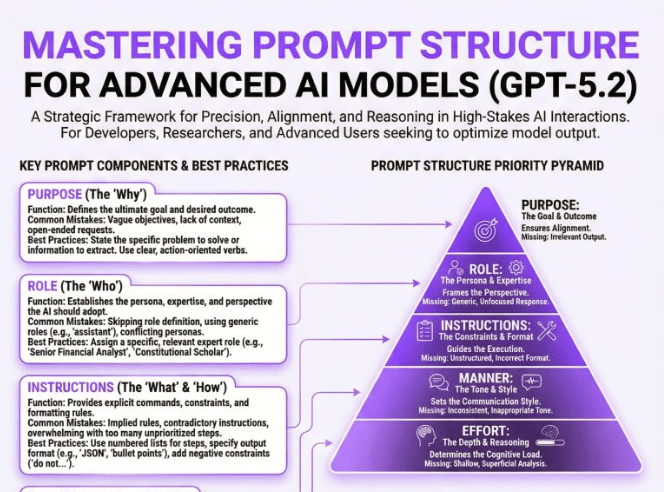
Section 6 — How to Prompt GPT-5.2 Properly (This Matters More Than Ever)
GPT-5.2 is less forgiving of sloppy prompts.
Here’s the structure that works:
- Define the end result
- Specify the thinking role
- Prepare context before dumping inputs
- Break work into explicit steps
- Add hard constraints
- Control the output format
- Limit clarification questions
This one change alone removes most bad outputs.
Section 7 — Why This Changes Work, Not Just AI
GPT-5.2 isn’t about replacing creativity.
It’s about:
- Compressing execution time
- Reducing cognitive load
- Making high-level work repeatable
This is the first version where:
- AI feels dependable
- Errors are predictable
- Output quality is consistent
That’s why this release matters.
Not because it’s new.
Because it finally works the way professionals need it to.
