
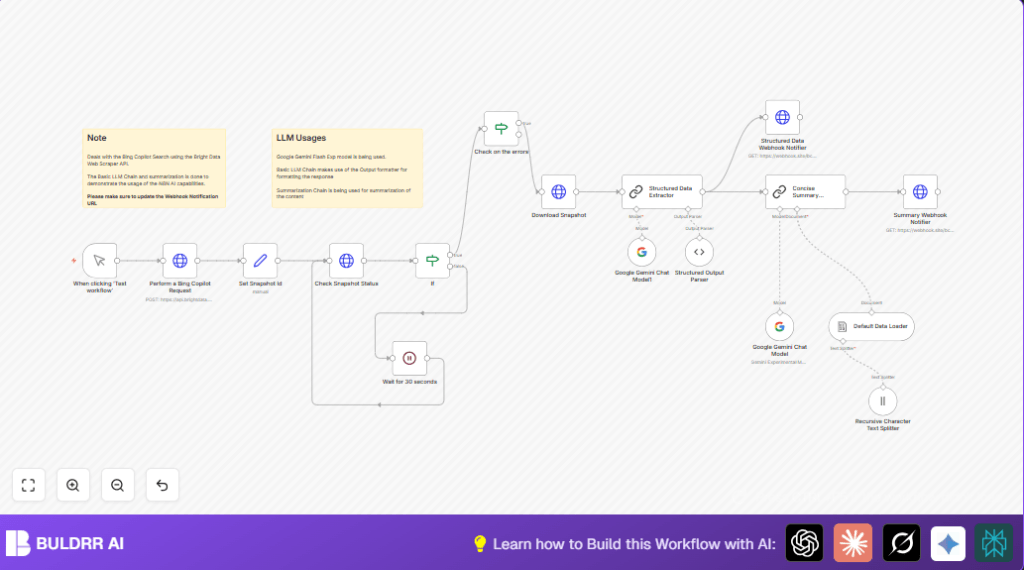

What This Automation Does
This workflow gets Bing Copilot search results using Bright Data API.
It waits till the data is ready, downloads it, then uses Google Gemini AI to pull out clear details.
The final output is easy summaries and organized info sent out via webhooks.
This removes hours of manual work and gives fast, useful insights.
Who Should Use This Workflow
This is for people who need quick, accurate Bing Copilot data for reports or decisions.
It helps analysts and marketers who want to save time and reduce errors.
Tools / Services Used
- Bright Data API: Fetches Bing Copilot search results.
- Google PaLM API with Google Gemini AI: Extracts and summarizes data.
- n8n Automation Platform: Runs API calls, waits, parses, and sends data.
- Webhook URLs: Receive structured data and summaries.
Inputs, Processing Steps, and Output Explained
Inputs
- Search query text to send to Bing Copilot through Bright Data.
- Bright Data API key and dataset IDs.
- Google PaLM API credentials for AI models.
- Webhook URLs to send results.
Processing Steps
- Trigger manual start of workflow.
- Send search prompt to Bright Data’s API.
- Get snapshot ID from response.
- Poll the snapshot status repeatedly until it is “ready”.
- Wait 30 seconds between polls to avoid API limits.
- Download full search data in JSON format.
- Use Google Gemini Chat Model to turn raw search results into structured JSON data.
- Summarize extracted data into a short, clear summary.
- Send structured data and summaries to webhook URLs.
Output
- Structured JSON with extracted search info like hotel names, addresses, descriptions.
- Concise text summary of search results.
- Webhooks receive this info for notifications or other uses.
Beginner Step-by-Step: How to Use This Workflow in n8n Production
Import Workflow
- Download this workflow file using the Download button on this page.
- In n8n editor, click the menu and choose “Import from File”.
- Select and upload the downloaded workflow file.
Configure Credentials and IDs
- Go to each HTTP Request node and add your Bright Data API key in HTTP header authentication.
- Set your Google PaLM API key in the Langchain Google Gemini nodes.
- Update any dataset IDs, prompt text, webhook URLs, or other IDs as needed.
Test and Activate
- Manually trigger the workflow in n8n by clicking “Execute Node” on the Manual Trigger node.
- Check output data and webhook delivery.
- Once testing is successful, activate the workflow.
- This workflow can then run automatically or be triggered when needed.
For optimal control and hosting, consider self-host n8n to manage your runs securely.
Customization Ideas
- Change the search prompt easily by editing the JSON inside the Perform a Bing Copilot Request node.
- Adjust the wait time in the Wait for 30 seconds node to fit API limits.
- Modify the structured output parser’s JSON schema to add fields like ratings or reviews.
- Switch AI models inside Langchain nodes by updating the modelName parameter.
- Update webhook URLs to connect to Slack, email, or database systems.
Common Issues and Fixes
- 401 Unauthorized error from Bright Data API means the API Key is missing or wrong.
Fix: Check HTTP header authentication credentials. - Snapshot stuck on “processing” means the data scraping is still running or API limit hit.
Fix: Increase wait time before polling again. - Errors from Google Gemini on structured output means schema is wrong.
Fix: Match the JSON structure in the parser exactly.
Pre-Production Checklist
- Confirm Bright Data API key is correct and active.
- Run manual tests to check snapshot ID is returned.
- Make sure webhook endpoints receive data during tests.
- Validate output structure and summary with small queries first.
- Back up the workflow config for safety.
Deployment Guide
After testing, toggle the workflow active in your n8n environment.
Schedule runs or trigger manually as needed.
Watch the execution logs for failures or slowdowns.
Set up alerts on your webhook receivers to monitor data flow.
Summary
✓ Saves hours by automating Bing Copilot data retrieval.
✓ Extracts clear structured data using Google Gemini.
✓ Creates short, easy summaries for faster understanding.
✓ Sends info automatically via webhooks to other apps.
✓ Requires simple setup and testing inside n8n.
