
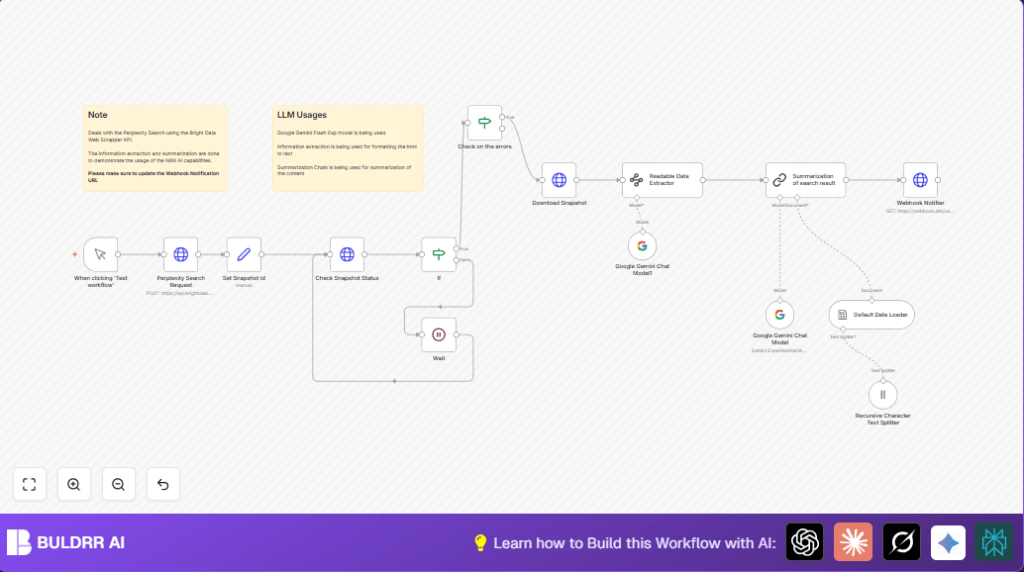

What this workflow does
This workflow automates web data searching, content extraction, and summarization using Perplexity AI with Bright Data and Google Gemini.
It solves the problem of handling complex raw web data that takes many hours to process manually.
The result is fast, clear summaries sent to a webhook for your team to use right away.
Who should use this workflow
Anyone needing to collect and read web data quickly without coding complex processes.
This is good for researchers, marketers, and analysts who want faster, smarter insights.
Tools and services used
- Bright Data: Provides API access to web data snapshots.
- Perplexity AI Search: Powers smart web search queries.
- Google Gemini AI: Extracts readable text and summarizes content.
- n8n Automation Platform: Builds and runs the workflow.
- Webhook service: Receives summarized data for alerts or integration.
Inputs, Processing, and Outputs
Inputs
- User query prompt for web search via Perplexity AI.
- Bright Data dataset ID and access credentials.
- Google Gemini API keys for extraction and summarization.
- Webhook URL to send summaries.
Processing steps
- Trigger a Perplexity search snapshot through Bright Data API.
- Save the snapshot_id to track the request.
- Check snapshot status repeatedly until it is ready.
- Download the snapshot JSON data when ready.
- Use Google Gemini Information Extractor to pull readable content from raw HTML.
- Split large text into chunks to keep context.
- Run Google Gemini Chat model to summarize chunks into concise notes.
- Send summarized notes to a configured webhook endpoint.
Outputs
- Summarized, easy-to-read insights from web data.
- Delivered as JSON via webhook for instant downstream use.
Beginner step-by-step: How to build this in n8n
Import the workflow
- Download the workflow file using the Download button on this page.
- Open the n8n editor you have access to.
- Use the Import from File option in n8n to load the workflow.
Configure Credentials
- Add your Bright Data API Key and dataset ID to the relevant HTTP Request nodes.
- Enter Google Gemini API credentials in the Chat Model and Information Extractor nodes.
- Set the webhook URL in the final HTTP Request node for receiving summaries.
Setup the search prompt
- Update the JSON body in the Perplexity Search Request node if a different query is needed.
Run and test
- Click the Manual Trigger node and then Execute Workflow to test.
- Check the outputs and webhook to confirm summary delivery.
Activate for production
- Toggle the workflow to Active at the top-right of n8n editor.
- Monitor executions and adjust wait times if needed to avoid API rate limits.
- If preferred, consider self-host n8n to control data and performance.
Common issues and tips
If the snapshot_id is not ready, the workflow retries after a 30-second wait.
If snapshot never becomes ready, check Bright Data account status and correct ID usage.
Google Gemini errors usually relate to API keys or usage limits; verify credentials and quota.
Customizations you can make
- Change the search question in the Perplexity Search JSON body to explore other topics.
- Adjust the wait time node to poll snapshot status faster or slower.
- Switch Google Gemini Chat nodes to other supported AI models as needed.
- Replace webhook URL with your own to integrate with other tools like Slack or email services.
Summary of benefits and results
✓ Saves many hours by automating web research and summary.
✓ Provides accurate, readable insights from complex web data.
✓ Delivers quick notifications through webhook integration.
✓ Easy to customize for different needs and workflows.
