

What This Workflow Does
This workflow takes a web page URL as input and turns it into a PDF file saved on your local computer.
It fixes the common problem of manually saving web pages as PDFs, which can take much time and cause errors.
After running this, you get a clean PDF document saved automatically, with no manual downloading or formatting issues.
Tools and Services Used
- n8n: Automation platform to set up and run the workflow.
- ConvertAPI: Service to convert web pages to PDF via API.
- Local File System: Location where PDF files are saved.
- HTTP Query Authentication Credential in n8n: Used to securely connect to ConvertAPI.
How the Workflow Works (Inputs → Process → Outputs)
Inputs
- A web page URL provided in the HTTP Request node.
Processing Steps
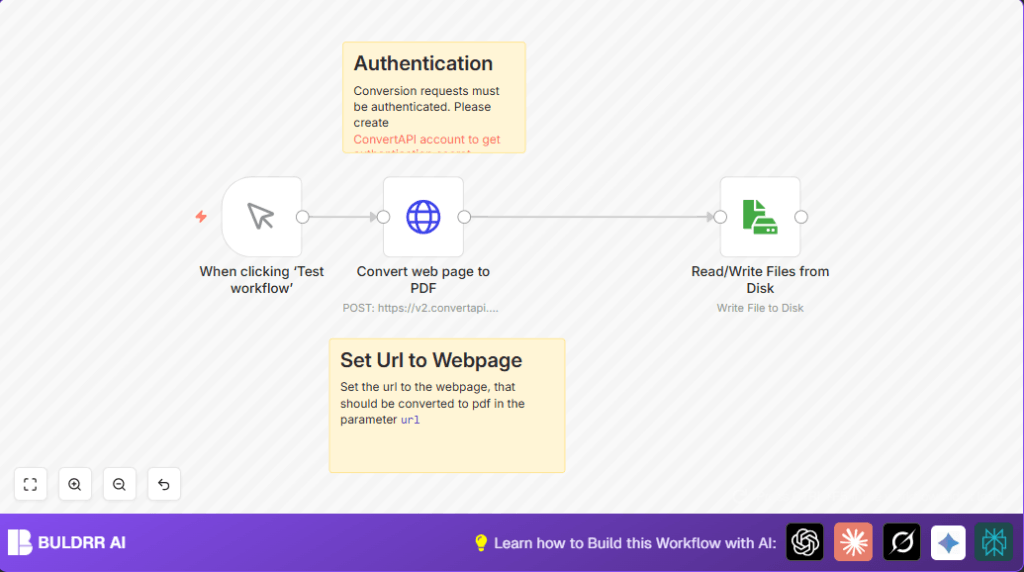
- The workflow starts when you manually trigger it using the Manual Trigger node.
- Then it sends the given URL in a POST request to ConvertAPI’s web-to-PDF endpoint using an HTTP Request node with authentication.
- The API converts the webpage to a PDF and returns the PDF data in binary form.
- The Read/Write Files from Disk node takes the binary data and writes it to a PDF file locally.
Outputs
- A PDF file named as specified (e.g., “document.pdf”) saved on your disk.
Who Should Use This Workflow
This workflow is made for anyone needing to save web content as PDFs often without manual work.
It helps content managers, compliance officers, and anyone who wants consistent PDF files from web pages.
The user benefits by saving time, avoiding errors, and automating a repetitive task.
Beginner Step-by-Step: How to Start Using This Workflow in n8n
Step 1: Import the Workflow
- Download the workflow file using the Download button on this page.
- Inside the n8n editor, click on the menu and choose “Import from File.”
- Select the downloaded workflow file and import it.
Step 2: Add Required Credentials and Configure Settings
- Add your ConvertAPI API Key through n8n credentials by creating or updating an HTTP Query Auth credential.
- In the HTTP Request node, confirm the URL parameter has the web page you want to convert. Change this URL if needed.
- In the Read/Write Files from Disk node, check the filename is as you want it, or update it.
Step 3: Test the Workflow
- Run the workflow manually using the Manual Trigger node’s Test button.
- Confirm a PDF file is saved correctly on your local disk.
Step 4: Activate for Production
- Activate the workflow in n8n once testing works.
- Use the manual trigger to run anytime or link another trigger for scheduled runs.
If you run self-host n8n, ensure file write permissions are set correctly for the disk node.
Customization Ideas
- Change the URL in the HTTP Request node to convert different web pages.
- Modify the filename in the disk write node to include timestamps for unique file names.
- Add more HTTP headers if API needs special headers for requests.
Common Problems and Fixes
401 Unauthorized Error in HTTP Request Node
The API Key is incorrect or missing.
Update the HTTP Query Auth credentials in n8n with the right ConvertAPI secret.
PDF File Not Saving to Disk
Check that the Read/Write Files from Disk node is using write operation.
Confirm the data property name matches exactly (usually “=data”).
Make sure n8n has permission to write to the folder on your computer.
Pre-Production Checklist
- Test the HTTP Request node to ensure ConvertAPI connection works.
- Test saving a sample file with the disk node.
- Check that the URL used in the HTTP Request node is reachable.
- Run the whole workflow once manually to confirm the PDF saves properly.
- Backup existing files if overwriting named PDF files.
Summary
✓ Saves time by automating web page to PDF conversion.
✓ Produces consistent, error-free PDF files every run.
✓ Uses ConvertAPI with valid authentication for secure conversion.
✓ Saves PDFs directly to local disk with simple filename control.
→ Allows easy edits to URL or filenames for different tasks.
→ Makes PDF saving automatic, removing manual steps.
