

What This Workflow Does
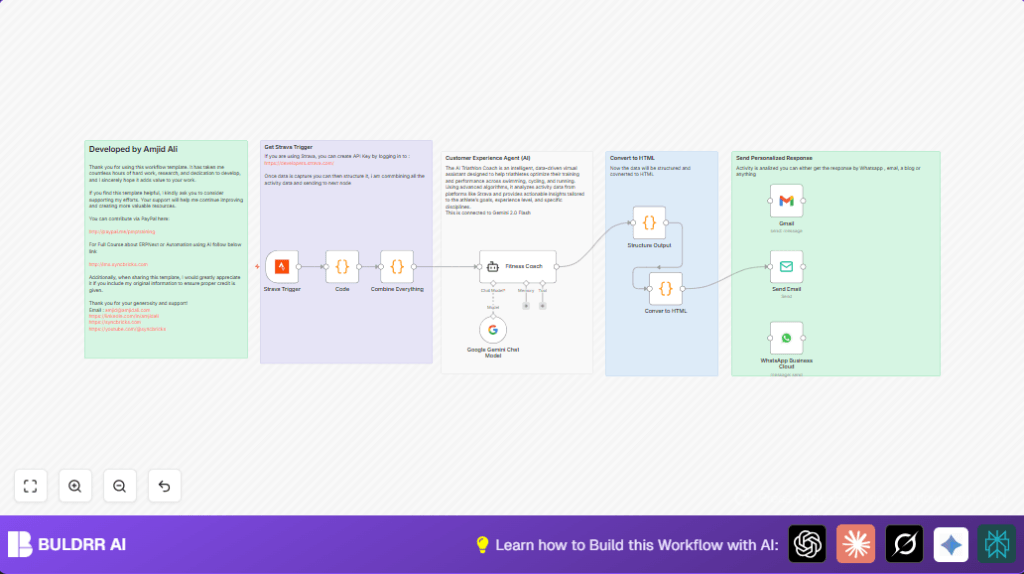
This workflow receives updates from Strava activities and turns complex fitness data into easy personal coaching advice.
It solves the problem of spending too much time reading hard-to-understand training stats.
The output is a clear, personalized email with training tips for running, swimming, and cycling.
Who Should Use This Workflow
This is good for triathletes and fitness fans who want simple help using their Strava data.
It works well for people without much tech experience who want advice to improve.
Tools and Services Used
- Strava OAuth2 API: Sends updates when workout activities change.
- Google PaLM API (Google Gemini Chat Model) via LangChain: Reads and analyzes the activity data.
- n8n Automation Platform: Runs the whole process and connects nodes.
- Gmail: Sends coaching emails to the athlete.
- Optional WhatsApp Business Cloud: Sends coaching messages on WhatsApp instead of email.
How This Workflow Works
Inputs
The workflow starts when Strava sends an update about an activity.
It includes detailed nested JSON data on pace, heart rate, cadence, elevation, swimming metrics, and more.
Processing Steps
- First, a Code node flattens the nested JSON into a clear text format for AI understanding.
- Then the Google Gemini Chat model, accessed through LangChain in Google Gemini Chat Model node, acts as a trained triathlon coach.
- The AI reads the activity data and creates personalized feedback, including what is good and what to improve.
- A second Code node breaks the AI’s text response into structured parts like headings, bullet points, and paragraphs for better formatting.
- Another Code node turns the structured parts into clean HTML suitable for email.
- Finally, the Gmail node sends this coaching advice to the athlete’s email.
Output
The final result is an easy-to-read email that helps the athlete understand their training data.
It saves hours of manual data review and keeps the athlete motivated with clear next steps.
Beginner Step-by-Step: How to Use This Workflow in n8n
Step 1: Download and Import
- Download the workflow file using the Download button on this page.
- Inside the n8n editor, click on “Import from File” and select the downloaded workflow.
Step 2: Add Credentials
- Add your Strava OAuth2 API credentials in the Strava Trigger node.
- Add your Google PaLM API key in the Google Gemini Chat Model node.
- Add Gmail OAuth2 credentials in the Gmail node.
- If using WhatsApp, add WhatsApp Business Cloud credentials to the WhatsApp Business Cloud node.
Step 3: Update Settings
- Update athlete emails in the Gmail node to the correct recipient.
- Check for any IDs, channels, or folders used in the workflow and update them as needed.
- If required, copy and paste any code snippets or prompt text exactly from the provided workflow description inside the respective Code nodes.
Step 4: Test Workflow
- Run one test by simulating a Strava activity update or manually triggering the workflow.
- Verify the email or message is received with coaching content correctly formatted.
Step 5: Activate for Production
- Switch the workflow toggle ON to enable it.
- Monitor executions in n8n to catch any errors early.
- If using your own server for privacy, check out self-host n8n for setup help.
Customization Ideas
- Change coaching focus in the AI prompt for specific sports like only swimming or cycling.
- Send coaching emails to multiple athletes by changing email fields.
- Add more data fields in the flattening code to include weather or temperature metrics.
- Use both Gmail and WhatsApp nodes for multi-channel coaching delivery.
- Adjust Strava Trigger to run on new activities instead of updates by changing event settings.
Troubleshooting Common Issues
- Issue: No data from Strava Trigger.
Cause: Wrong Strava OAuth2 credentials or missing webhook.
Fix: Check API keys and webhook setup in Strava developer portal. - Issue: Google Gemini API fails to authenticate.
Cause: Invalid or expired Google PaLM API key.
Fix: Verify API key and billing status in Google Cloud. - Issue: Gmail fails to send emails.
Cause: OAuth credentials missing permissions.
Fix: Re-authorize Gmail credentials with send permissions. - Issue: HTML output is empty or wrong.
Cause: Coding errors in formatting nodes.
Fix: Copy and paste code exactly and check node links.
Pre-Production Checklist
- Confirm Strava OAuth2 keys are valid and webhooks work.
- Test flattening code with sample data for readability.
- Check Google Gemini API with a test call.
- Send a test email via the Gmail node.
- Do a full workflow test and verify email coaching output.
- Back up workflow JSON and credentials securely.
Deployment Notes
After testing, activate the workflow by toggling it ON.
Use n8n’s logs to watch for failures.
Update emails or API keys as needed before full live use.
Be aware of rate limits from Strava webhooks and Google API quotas.
Summary of Results
✓ The workflow automates expert triathlon coaching from Strava updates.
✓ It turns raw activity data into simple, easy advice emails.
✓ Saves users hours by removing manual review of stats.
✓ Helps users focus on training with clear improvement steps.
✓ Can be customized for multiple sports and messaging channels.
