
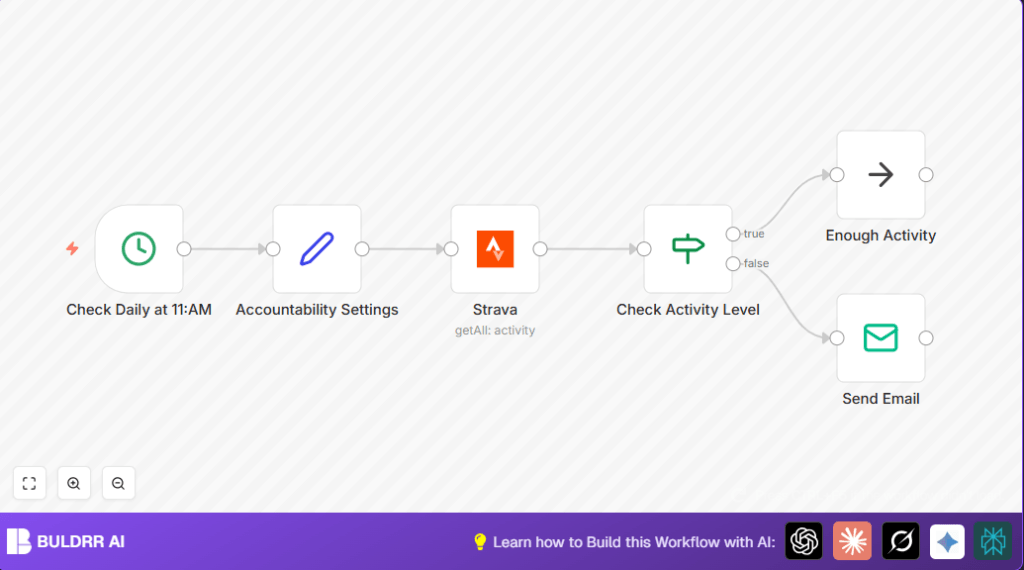

What This Automation Does
This workflow runs once every day at 11:00 AM to check physical activities recorded in Strava.
It looks at all recent activities and finds how long the user has moved.
If the total moving time is less than 30 minutes, it sends a simple email to the user’s accountability partners asking them to encourage more activity.
If the moving time is enough, it stops without sending emails.
The email comes from the user’s own address so it feels friendly and real.
This automates the reminder process and helps keep motivation up without any manual work.
Why Use This Workflow
Users who want regular motivation to stay active can use this workflow.
It solves the problem of forgetting to update friends or partners about low activity.
It makes sure the support team knows fast when motivation is needed.
This helps reduce long breaks without exercise and keeps fitness goals on track.
No technical skills needed to keep the account team in the loop.
Tools and Services Used
- Strava API with OAuth2: To securely get daily activity data.
- Email SMTP Service: To send notification emails directly from user’s email.
- n8n Automation Platform: To build and run the daily automated checks and messages.
Inputs, Processing, and Outputs
Inputs
- User’s daily activities from Strava API.
- Configuration data like minimum moving time and partner emails from Set node.
Processing Steps
- Trigger the workflow daily at 11:00 AM.
- Fetch all recent activities using Strava OAuth2 credentials.
- Check if the moving_time in activities meets or exceeds 1800 seconds (30 min).
- Conditional branch: continue if enough activity, else prepare email.
- Send email with personalized message to partners if activity is below threshold.
Output
- No action when activity is sufficient.
- Email notifications sent to partners when activity is low.
Beginner Step-by-step: Using this Workflow in n8n
Step 1: Import Workflow
- Download the workflow file using the Download button on this page.
- Inside the n8n editor, click on “Import from File”.
- Select the downloaded workflow JSON file and import it.
Step 2: Update Credentials and Config
- Add your Strava OAuth2 credentials in the credential manager.
- Add your email SMTP credentials in n8n for sending emails.
- Open the Accountability Settings Set node and update the moving time threshold if desired.
- Change partner email addresses and your own name and email to match your info.
Step 3: Test the Workflow
- Run the workflow manually once to see if it fetches data and sends emails correctly.
- Adjust the threshold temporarily to simulate low activity if needed.
Step 4: Activate for Production
- Turn on the workflow’s active toggle in the top right corner.
- If using self-host n8n, ensure the server runs reliably to trigger at 11:00 AM daily.
- Check the execution logs often at first to confirm daily runs are successful.
Customization Ideas
- Change activity time threshold in Accountability Settings Set node from 1800 to higher or lower seconds.
- Add more partner emails by adding extra string fields in the same Set node and update email To field accordingly.
- Rewrite the encouragement email text in the Send Email node for your preferred tone.
- Expand notifications by adding Slack or SMS nodes using custom integration.
Common Issues and Fixes
Invalid OAuth2 Credentials in Strava Node
This happens when the OAuth token is expired or lacks permissions.
Fix by reauthorizing Strava credentials in n8n with proper scopes to read activities.
Email Not Sending
Usually caused by wrong SMTP credentials or network blocks.
Test SMTP login outside n8n and reenter correct info and open network firewall if needed.
Pre-Production Checklist
- Confirm Strava OAuth2 credentials correctly authorized with activity scope.
- Run the workflow manually to ensure it triggers and gets data.
- Verify email addresses in settings node and test email sending.
- Temporarily lower threshold to test sending email on low activity.
Deployment Guide
Activate the workflow toggle to run automatically every day at 11:00 AM.
Watch executions initially to see if runs succeed.
If using self-host n8n, check server uptime and reachability at expected trigger times.
Adjust log retention if needed for troubleshooting or record-keeping.
Summary of Benefits
✓ Saves time by removing manual activity checks and emails.
✓ Sends timely notifications to encourage physical activity.
✓ Uses trusted email from own address for better engagement.
✓ Easy to adjust threshold and partners.
✓ Can expand with messaging integrations.
→ Keeps motivation active and fitness goals on track with less effort.
