

What This Workflow Does
This n8n workflow automates fetching, sorting, and reporting of n8n community leaderboard stats.
It solves the problem of manual, error-prone data collection about creators and workflows.
The result is a daily detailed Markdown report sent by email, saved on Google Drive, and optionally shared on Telegram.
The workflow finds top creators and workflows based on unique weekly activity.
Who Should Use This Workflow
Community managers tracking n8n creators and popular workflows will find this useful.
It is for users who want to save hours each day by automating data retrieval, sorting, and reporting.
People managing community growth and engagement can get reliable stats without manual work.
Tools and Services Used
- GitHub Raw JSON URLs: Source data for creators and workflows stats.
- OpenAI API (GPT-4o-mini): Generates the detailed Markdown report.
- Google Gemini API: Creates a concise list of top workflows.
- Google Drive API: Saves reports as Markdown files.
- Gmail OAuth2: Sends email reports with proper formatting.
- Telegram Bot API (optional): Sends workflow highlights via chat.
Inputs → Processing → Outputs
Inputs
- Raw JSON data files of creators and workflows fetched daily via HTTP requests from GitHub.
- API credentials for OpenAI, Google Gemini, Google Drive, Gmail, and Telegram.
- Configuration values such as dates, URLs, filenames, and email addresses.
Processing Steps
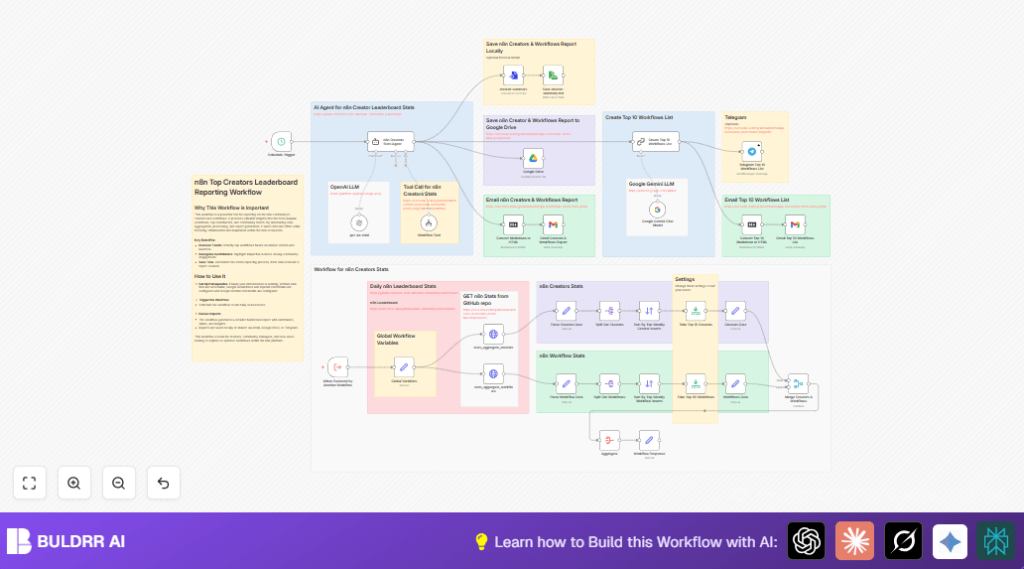
- JSON data is parsed to extract arrays of creators and workflows.
- Each item is split out for individual processing.
- Creators and workflows are sorted by unique weekly inserters to find top performers.
- Limits are applied to keep only the top 10 creators and top 50 workflows.
- Data fields for creators and workflows are normalized and merged by usernames.
- The merged data is aggregated into a single JSON object to prepare for AI summarization.
- OpenAI GPT-4o-mini generates a Markdown report describing top creators and workflows.
- The Markdown report is converted to HTML for email formatting.
- Google Drive receives a copy of the report file.
- Google Gemini AI generates a summarized top 10 workflows list in HTML.
- Emails with full reports and highlights are sent via Gmail.
- Optional Telegram message with top 10 workflows is sent.
Outputs
- Daily Markdown report saved locally and on Google Drive.
- HTML formatted email reports sent to configured recipient addresses.
- Optional Telegram chat messages with workflow highlights.
Beginner Step-by-Step: How to Use This Workflow in n8n
Step 1: Import the Workflow
- Download the workflow file using the Download button on this page.
- Open the n8n editor.
- Choose “Import from File” in n8n and select the downloaded workflow file.
Step 2: Configure Required Credentials and Settings
- Add your API Keys and OAuth2 credentials for OpenAI, Google Gemini, Google Drive, Gmail, and optionally Telegram.
- Update any IDs, folder paths, email addresses, or chat IDs in nodes where needed.
- Check the Global Variables node to confirm the GitHub JSON URLs and filenames are correct.
Step 3: Test the Workflow
- Manually trigger the workflow once inside n8n.
- Watch execution to ensure no errors occur and outputs are generated.
- Verify the Markdown report is saved locally and on Google Drive.
- Confirm email reports are received by the set recipients.
Step 4: Activate for Production
- Enable the Schedule Trigger node or other triggers as needed.
- Check scheduled runs work correctly and continue to produce reports.
- Optionally, use self-host n8n to run this workflow on a private server.
Customization Ideas
- Add more creator and workflow metrics in parsing nodes for richer reports.
- Change the schedule to run hourly, daily, or weekly by editing the Schedule Trigger node.
- Edit email recipient lists in Gmail nodes to notify different stakeholders.
- Change the local save path for the Markdown report to network drives or team folders.
- Activate and configure the Telegram node to get community alerts for new top workflows.
Common Edge Cases and Failures
HTTP request failures (404) usually happen if GitHub URLs or filenames are wrong.
Verify URLs in the Global Variables node by opening them in a browser.
Empty or partial reports from AI nodes can happen if API keys are invalid or usage limits exceeded.
Check keys and aggregated data completeness.
Emails not sent or received often relate to invalid Gmail OAuth credentials or spam filtering.
Reauthorize Gmail access and check spam folders.
Summary of Benefits and Outcomes
✓ Saves hours of manual work daily by automating data fetching and reporting.
✓ Reports top creators and workflows clearly with AI-generated summaries.
✓ Sends polished reports via email and saves copies on Google Drive.
✓ Supports Telegram alerts for quick community updates.
✓ Easy to import and configure in n8n with required credentials.
