

What this workflow does
This workflow helps a shoe and accessories store answer customer chat questions automatically.
It solves problems like slow replies, repetitive questions, and hard product searches.
The workflow quickly finds product details or store info and replies fast to customers.
This saves time and makes customers happier.
Tools and services used
- n8n platform: Runs the automated workflow.
- OpenAI API: Analyzes chat text to find intent and create replies.
- WooCommerce API: Searches store products using filters like SKU, keywords, and prices.
- Google Drive: Stores documents about store info for answers.
- Qdrant vector database: Does vector search on documents to find relevant info.
Inputs, processing steps, and outputs
Inputs
- Customer chat message from chat platform.
- API credentials for OpenAI, WooCommerce, Google Drive, and Qdrant.
- Store info documents uploaded on Google Drive.
- WooCommerce product database accessible via API.
Processing Steps
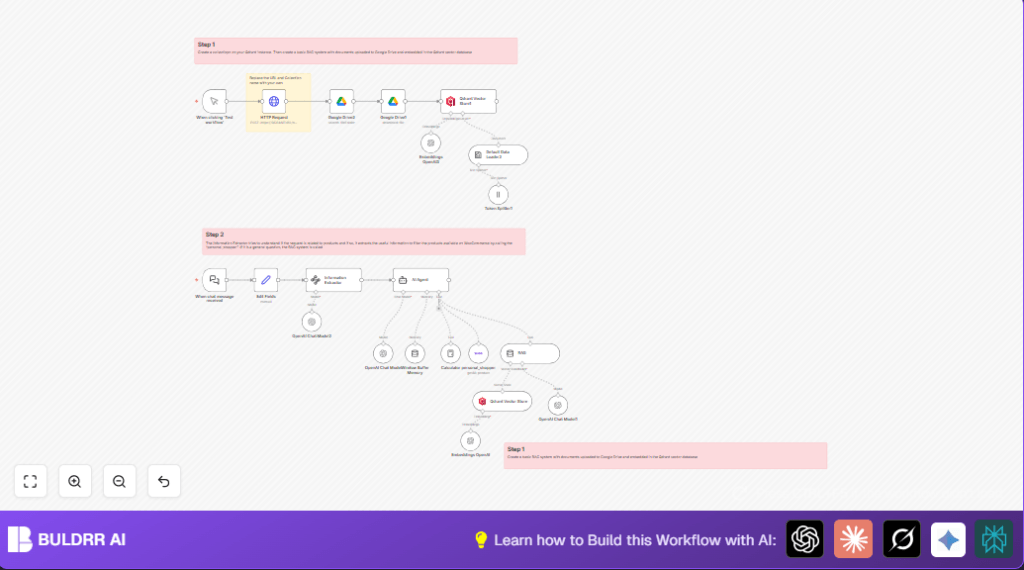
- The Webhook node receives new chat messages.
- The Information Extractor (LangChain Node) checks if the customer wants product info and extracts details like keywords, price range, SKU, and category.
- The Edit Fields node saves session ID and chat input for context.
- The AI Agent (LangChain Agent node) decides if the question is about products or store info.
- If it is product related, the personal_shopper (WooCommerce Tool node) searches WooCommerce products using the extracted parameters.
- If it is about store details, the RAG (LangChain VectorStore Tool node) and Qdrant Vector Store node find answers in indexed Google Drive documents via vector search.
- The Window Buffer Memory (LangChain Memory BufferWindow node) keeps recent chat history to keep context during multi-turn conversations.
- Multiple OpenAI Chat Model (LangChain LMChatOpenAI nodes) generate natural language replies and handle conversation memory and embeddings.
- The Embeddings OpenAI (LangChain EmbeddingsOpenAI node) creates vectors from documents stored in Google Drive for vector search.
Outputs
- Structured chat response with product recommendations or store info.
- Faster replies that save time and improve customer satisfaction.
- Maintained conversation context for better user experience.
Who should use this workflow
Store owners with WooCommerce shops and busy customer chats.
Teams wanting instant product info and store answers in chat.
Users needing to automate manual, repetitive customer support tasks.
Beginner step-by-step: How to use this workflow in n8n
1. Importing the workflow
- Download the workflow file using the Download button on this page.
- Open your n8n editor.
- Use the Import from File option to upload the workflow.
2. Setting up credentials
- Add your API Keys for OpenAI, WooCommerce, Google Drive, and Qdrant inside n8n credential settings.
- Update IDs, emails, channels, or folder paths if your store or documents use different ones.
3. Testing and activation
- Manually trigger the workflow to test if it works with sample chat messages.
- Check logs and node outputs for correct answers.
- Activate the workflow by switching it on for live customer chats.
Consider using self-host n8n if needing more control over hosting.
Customization ideas
- Change product categories in Information Extractor prompt to fit your WooCommerce catalog.
- Adjust filters in personal_shopper (WooCommerce Tool node) to include or remove price or stock filters.
- Add more documents about store policies or promotions to Google Drive to improve RAG answers.
- Modify OpenAI model settings like temperature or token limits to control response style.
- Adapt prompts for other languages for multi-language chats.
Handling common problems
No products found in WooCommerce search
Check if SKU, keywords, or prices come out right from the Information Extractor.
Use n8n debug mode to see extracted details.
Fix prompts or inputs as needed.
Irrelevant RAG answers
Confirm documents exist and are accessible on Google Drive.
Re-embed and re-index them in Qdrant.
Verify vector search setup in Qdrant Vector Store.
OpenAI API key errors or limits
Check if API keys are correct and active in n8n credentials.
Monitor usage limits in the OpenAI account.
Upgrade the plan if needed.
Summary and benefits
✓ Saves time by automating customer chat responses.
✓ Provides accurate product info from WooCommerce.
✓ Answers store questions quickly from knowledge base.
✓ Keeps conversation context for better chats.
✓ Easy to import and configure in n8n.
→ Faster support improves customer satisfaction.
→ Less manual work for store owners or staff.
