

What This Workflow Does
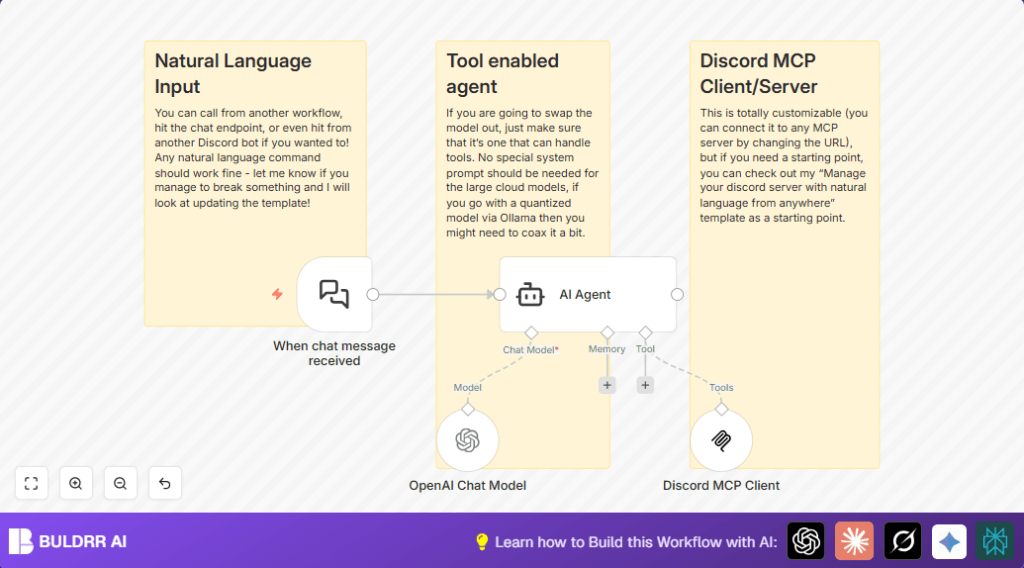
This workflow listens for new chat messages on a Discord MCP server.
It uses an AI agent powered by OpenAI GPT-4o to understand and respond to messages.
The workflow sends answers back to the Discord server automatically.
This saves time and reduces mistakes in moderating chats.
The system handles natural language questions and commands.
It connects to the MCP server through a client tool using a server event stream URL.
Who Should Use This Workflow
Use this workflow if you manage a busy Discord MCP server.
If manual chat moderation takes a lot of time, this helps automate responses.
It is for people who want smarter bots that understand normal language questions.
You also need access to n8n, OpenAI, and your Discord MCP server’s API settings.
Tools and Services Used
- n8n: Workflow automation platform.
- OpenAI GPT-4o: AI chat model that understands and generates text.
- Langchain Nodes: Nodes for connecting AI and chat triggers.
- Discord MCP Client Tool: Connects the workflow to Discord MCP server.
- Discord MCP Server SSE endpoint: Streams chat events to the workflow.
Inputs, Processing, and Outputs
Inputs
- New chat messages from the Discord MCP server via the Langchain chat trigger node.
Processing Steps
- The AI Agent node uses the OpenAI GPT-4o model to understand and interpret messages.
- The AI Agent routes commands and forms replies using the MCP Client node connected to the Discord server.
Outputs
- Automatic replies or command results sent back to the Discord MCP server chat in real-time.
Beginner Step-by-Step: How to Use This Workflow in n8n for Production
Step 1: Download and Import the Workflow
- Download the workflow file by clicking the “Download” button on this page.
- Open your n8n editor session.
- Use the menu option “Import from File” to load the downloaded workflow into n8n.
Step 2: Configure Required Settings
- Provide OpenAI API Key in the OpenAI Chat Model node’s credentials section.
- Enter the Discord MCP server’s SSE endpoint URL in the Discord MCP Client node parameters.
- Update webhook IDs or any specific channel, user IDs, or folder paths if prompted.
Step 3: Test the Workflow
- Trigger a message on your Discord MCP server to test if the workflow picks up chat messages.
- Check if the AI Agent node processes and replies appear correctly on Discord.
Step 4: Activate for Production
- Turn the workflow ON in n8n using the activate toggle.
- Monitor workflow executions and API usage in n8n dashboard to ensure smooth operation.
- If managing large traffic, consider scaling your n8n instance or upgrading OpenAI plan.
Consider using self-host n8n for better reliability in production.
Common Problems and Fixes
- Webhook not triggering: Check webhook URL and MCP server event streaming settings.
- AI Agent errors: Verify OpenAI API key and quota.
- Discord MCP Client connection failure: Confirm SSE endpoint URL and server availability.
Customization Ideas
- Change language model inside the OpenAI Chat Model node to other GPT-4 compatible models.
- Modify the MCP Client node SSE URL to connect to other Discord MCP servers.
- Add more tools in the AI Agent node options to support things like databases or third-party APIs.
Summary
✓ Saves time by automating chat moderation on Discord MCP servers.
✓ Understands natural language using OpenAI GPT-4o model.
✓ Sends real-time replies through MCP Client connection.
✓ Easy to deploy and customize inside n8n with minimal setup.
✓ Supports updates to AI model and server endpoints for flexible management.
