

What This Automation Does
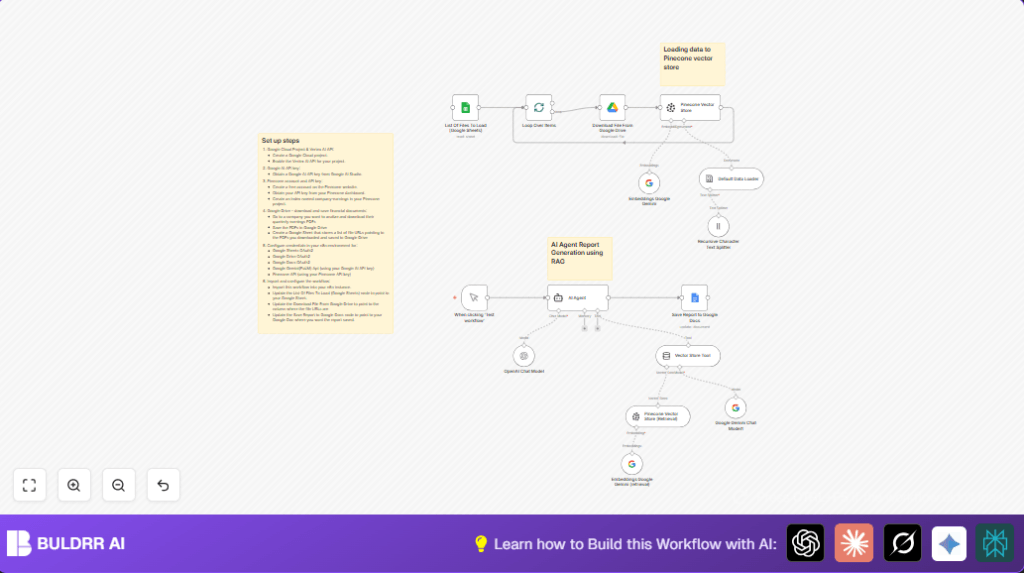
This workflow reads earnings report PDFs from Google Drive using links in Google Sheets.
It turns PDFs into text chunks, makes semantic embeddings with Google Gemini, and saves them in Pinecone.
When a user asks a question, it finds matching text and runs an AI analysis to make a clear report.
The final report goes into Google Docs for easy use and sharing.
This saves many hours of manual work by giving detailed financial reports fast and accurate.
Tools and Services Used
- Google Sheets: Holds links to earnings report PDFs.
- Google Drive: Stores the earnings report PDF files.
- Google Docs: Saves the AI generated reports.
- Google Gemini (PaLM) API: Creates semantic text embeddings and runs AI models.
- Pinecone API: Vector database for searching similar document parts.
- n8n Automation Platform: Runs and connects all nodes in one workflow.
Inputs, Process, and Output
Inputs
- List of PDF URLs in Google Sheets.
- Pooled earnings reports files in Google Drive.
Processing Steps
- Download each PDF from Google Drive.
- Convert PDF to plain text.
- Split text into smaller chunks.
- Create embeddings with Google Gemini.
- Save embeddings to Pinecone vector store.
- On query, use vector search to find related text chunks.
- Run AI agent with fetched data to generate analysis.
Output
- Formatted financial report for last three quarters saved in Google Docs.
Beginner Step-by-Step: How to Use This Workflow in n8n
Step 1: Import the Workflow
- Download the workflow file using the Download button on this page.
- Open n8n editor where the workflow will be run.
- Use the Import from File option in n8n to bring the downloaded workflow into the editor.
Step 2: Configure Credentials and IDs
- Add your Google Sheets, Drive, and Docs OAuth2 credentials inside n8n.
- Set up Google Gemini (PaLM) API key in the embedding and AI nodes.
- Enter your Pinecone API Key and ensure the index name matches, usually ‘company-earnings’.
- Update any placeholders such as Google Sheet IDs, Drive folder IDs, Docs URLs, or email addresses if the workflow uses those.
Step 3: Test the Workflow
- Manually trigger the workflow in n8n to test it.
- Check if PDFs download, text converts, embeddings create, and AI generates a report.
- Review the Google Doc for the generated report.
Step 4: Activate for Production
- Enable the workflow by turning it on inside n8n.
- Set any required schedules or webhook triggers for automatic run if needed.
- Monitor workflow runs and logs regularly.
If interested in more control over environment and data privacy, consider self-host n8n on your own server.
Customization Ideas
- Add more earnings reports in the Google Sheets watchlist to analyze more data.
- Change the AI system prompt to focus on other financial metrics like cash flow.
- Use different Google Gemini embedding models for different speeds or detail.
- Expand workflow to send the Google Docs report by email or Slack with extra nodes.
- Add charts manually in Google Docs using data from the report outputs.
Troubleshooting
Vector Store Insert Failed Due to Missing Index
Cause: Pinecone index named ‘company-earnings’ does not exist or is not accessible.
Solution: Create this index in Pinecone dashboard and check API key permissions.
Failed to Download File from Google Drive
Cause: File URL incorrect or OAuth2 user lacks permission.
Solution: Verify file URL correctness and ensure OAuth2 credentials have full access.
AI Agent Generates Incomplete or Irrelevant Reports
Cause: System prompt with missing or unclear details.
Solution: Improve AI system message with exact instructions and what financial areas to focus on.
Pre-Production Checklist
- Google Sheets contains all correct PDF URLs accessible to n8n credentials.
- All PDFs exist in Google Drive and have correct sharing settings.
- Pinecone index ‘company-earnings’ is created and reachable.
- Test Google Gemini embeddings on sample text to avoid API limits.
- Run manual trigger end-to-end and check Google Docs report.
- Backup Google Sheets and Google Docs regularly to prevent data loss.
Deployment Guide
Activate the workflow inside n8n and add all required API Keys and OAuth credentials.
Use manual trigger first to check the workflow works fully.
Set schedules or webhook triggers as needed to automate report generation later.
Watch logs to troubleshoot any failures and improve AI prompts or input data as necessary.
Summary of Workflow Benefits and Results
✓ Saves many hours of manual financial data processing.
✓ Generates accurate and detailed earnings report fast.
✓ Uses clear, human-like AI analysis with specific financial focus.
✓ Stores and searches text data efficiently with Pinecone vector DB.
✓ Outputs professional formatted reports inside Google Docs.
→ Streamlined earnings report analysis from PDF to report.
→ Reduces human errors by automating data extraction and summarization.
→ Flexible for multiple companies or broader financial documents.
