
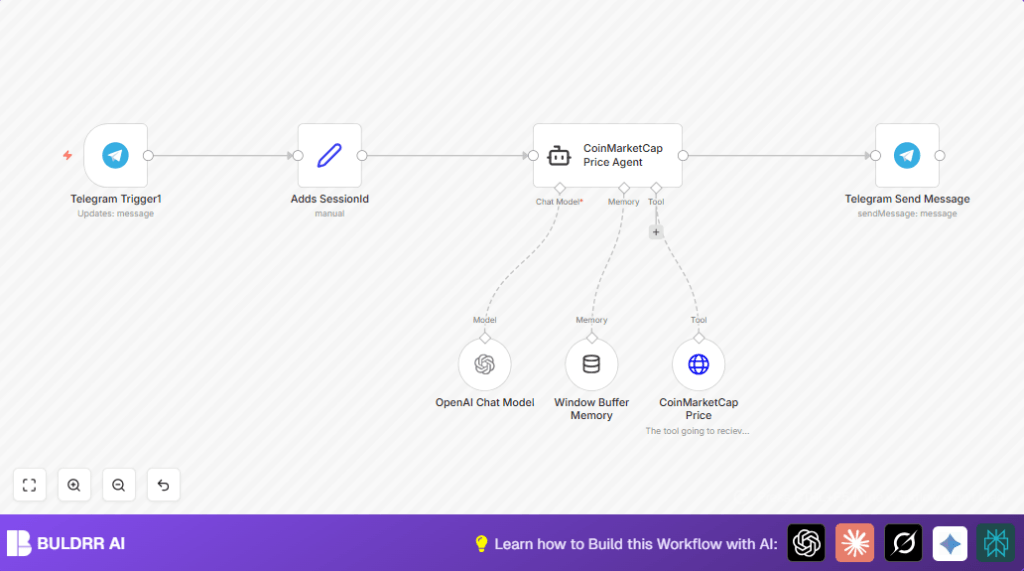

What This Workflow Does
This workflow listens to cryptocurrency price requests sent by users in a Telegram chat.
It uses an AI agent to understand the request and then gets real-time price data from CoinMarketCap’s API.
Finally, it sends the crypto price info back to the user on Telegram automatically.
Who Should Use This Workflow
Cryptocurrency traders or enthusiasts who want fast, accurate price updates inside Telegram chats.
Anyone tired of manually refreshing websites or switching apps to check crypto prices often.
Tools and Services Used
- Telegram Bot API: Receives messages and sends replies.
- OpenAI GPT-4o Mini model: Processes user requests in natural language.
- Langchain Agent: Acts as AI interpreter and tool orchestrator.
- CoinMarketCap API: Provides real-time cryptocurrency prices.
- n8n Platform: Orchestrates the automation nodes and workflow execution.
How the Workflow Works (Inputs → Process → Output)
Inputs
- User sends a crypto symbol like “BTC” or “ETH” as text to the Telegram Bot.
- Telegram Trigger listens to incoming messages.
Processing Steps
- Assign Session ID: A Set node adds sessionId based on Telegram chat ID to keep conversations separate.
- Langchain Agent: Receives the user message text and uses AI model (GPT-4o Mini) to understand the request.
- CoinMarketCap HTTP Request: The agent calls CoinMarketCap API with the symbol to get latest price info.
- Window Buffer Memory: Maintains a small chat history so AI responses can remember context.
- OpenAI Chat Model: Generates the price reply based on API data and conversation memory.
Output
- Sends the formatted price response back to the user in the same Telegram chat using Telegram Send Message node.
Beginner Step-by-Step: How to Use This Workflow in n8n
Import Workflow
- Download the workflow file using the Download button on this page.
- Open n8n editor and select “Import from File” to upload the workflow.
Configure Credentials and Settings
- Add Telegram Bot API credentials in Telegram Trigger and Telegram Send Message nodes.
- Add OpenAI API key in the OpenAI Chat Model node.
- Enter CoinMarketCap API Key in the HTTP Request node inside the Langchain agent’s tools section.
- Check and update chat IDs or session parameters if needed based on your Telegram bot setup.
Test and Activate
- Send test crypto symbol messages to your Telegram bot like “BTC” or “ETH”.
- Verify you get instant price replies back in Telegram chat.
- If test works well, activate the workflow toggle in n8n to run live.
You can consider self-host n8n for reliability and control if you expect steady use.
Customization Ideas
- Change the “convert” currency parameter in CoinMarketCap HTTP Request node to get prices in EUR or other fiat currencies.
- Support many Telegram users by using session IDs linked to each chat separately.
- Switch AI models by changing OpenAI node model from gpt-4o-mini to gpt-3.5-turbo or gpt-4o for wider options.
- Adjust reply message formatting in Telegram Send Message node to include timestamps or price change info if desired.
- Add more CoinMarketCap API endpoints in Langchain tools to provide volume, market cap, or other crypto data.
Edge Cases and Common Issues
Unauthorized 401 from CoinMarketCap API
Means API Key is missing or wrong. Fix by checking HTTP Request node’s header and API key settings.
Telegram messages not triggering workflow
Check Telegram Trigger credentials and confirm webhook is registered correctly. Make sure updates type is “message”.
AI agent sends empty or wrong replies
Check if input text is correctly mapped to {{$json.message.text}} and OpenAI Chat Model has correct GPT-4o Mini selected.
Summary of Results
✓ Fast and accurate crypto price replies inside Telegram chats
✓ Saves time by no longer visiting multiple websites
✓ Supports many users at once with session handling
✓ Easy to customize currency or AI model
→ Gives real-time market info instantly to help decide trading actions
