
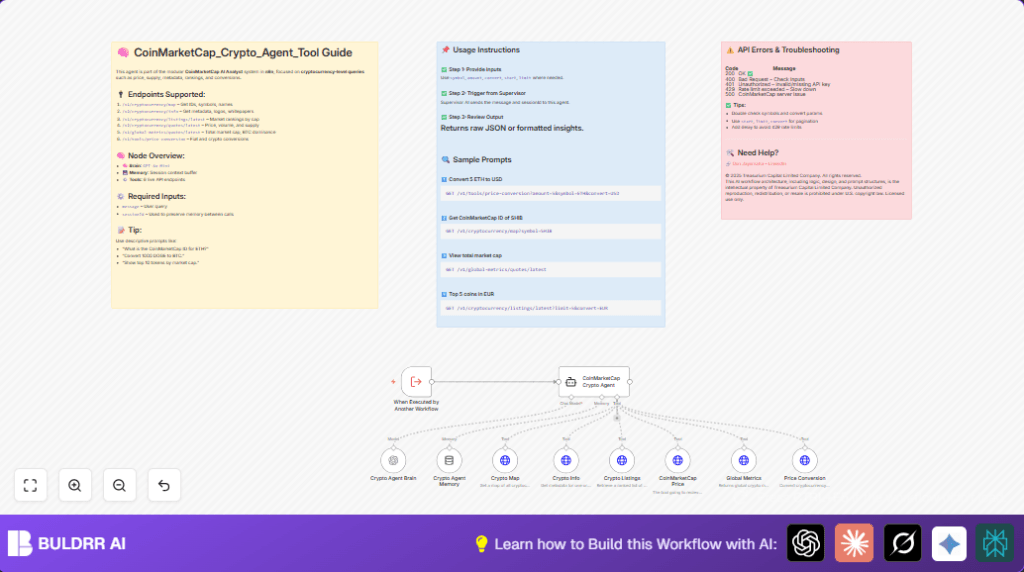

What This Automation Does ⚙️
This workflow listens for user questions about cryptocurrencies and uses AI commands to call CoinMarketCap APIs.
It answers questions like prices, coin info, rankings, and conversions without manual searching.
The user gets fast, clear data from real-time crypto market sources, saving time and avoiding mistakes.
The workflow works by receiving a message input and session ID.
Then an AI agent decides which API to use and fetches the exact data.
The memory node keeps track of past chat to keep answers relevant.
Tools & Services Used
- CoinMarketCap API Standard: For all cryptocurrency data calls.
- OpenAI API (GPT-4o Mini): Powers the AI language model for understanding queries.
- n8n Workflow Automation: Runs the workflow and manages nodes.
- CoinMarketCap Crypto Agent Node: AI agent to pick correct API tool by query.
- Memory Buffer Node: Keeps chat history for ongoing conversations.
- toolHttpRequest Nodes: Six API call nodes set to different CoinMarketCap endpoints.
Beginner Step-by-Step: How to Use This Workflow in n8n Production
Download and Import
- Click the Download button on this page to get the workflow file.
- Open your n8n editor where workflows are managed.
- Click “Import from File” and select the downloaded file.
Configure Credentials and Settings
- Open the workflow and locate the nodes needing credentials.
- Add your valid CoinMarketCap API Key to the corresponding credential node.
- Add your OpenAI API Key to the language model (GPT-4o Mini) node.
- If any nodes use specific IDs, emails, channels, or other config, update those values as needed.
Test the Workflow
- Trigger the workflow manually or with test data like:
{ "message": "What is the CoinMarketCap ID for ETH?", "sessionId": "session123" } - Check the output to verify correct real-time data is returned.
Activate for Production
- After testing, toggle the workflow to active within n8n.
- Set external triggers or supervisor workflows to call this crypto agent workflow.
- Optionally, monitor logs and API usage to manage limits.
- For reliable uptime consider running n8n on server or self-host n8n environment.
How the Workflow Works (Input → Process → Output)
Inputs
User sends a natural language question about crypto via external trigger.
Processing Steps
- The workflow trigger node receives inputs
messageandsessionId. - The CoinMarketCap Crypto Agent node uses the message text to pick the relevant API tool.
- The AI brain node powered by GPT-4o Mini processes the language understanding and response formulation.
- The memory buffer node keeps conversation history using
sessionIdto provide context. - Depending on the intent, one of six toolHttpRequest nodes makes a live CoinMarketCap API call.
- API responses flow back to the agent node to analyze and return precise answers.
Output
The workflow returns clear JSON data responding exactly to user queries.
Responses cover coin metadata, prices, ranks, conversions, and global metrics.
Multi-turn sessions maintain context and enhance answer relevance.
Common Issues and Fixes
- API Key Errors: Incorrect or missing CoinMarketCap API Key results in “Unauthorized” errors.
Check credentials and re-enter keys correctly. - Rate Limits: Too many API requests in short time lead to HTTP 429 errors.
Slow down requests or spread them using delays. - Agent Misunderstands Queries: Vague prompts cause wrong API tool calls.
Improve system prompt with detailed tool descriptions. - No Conversation Memory: Forgetting to connect memory node causes generic answers.
Ensure Crypto Agent Memory node is attached properly.
Customization Ideas ✏️
- Add extra CoinMarketCap API nodes to support historical or niche data.
- Modify the AI system prompt to include specific trading tactics or personal preferences.
- Increase memory node capacity to keep longer chat history for complex dialogues.
- Create alert nodes to notify users by email or chat when price targets are met.
- Swap GPT-4o Mini for a more advanced OpenAI model to improve language understanding.
Summary of Benefits ✓
✓ Saves hours previously spent on manual cryptocurrency data gathering.
✓ Provides fast, accurate, and relevant answers to crypto market queries.
✓ Keeps session memory to handle ongoing conversations naturally.
✓ Automates complex API interactions, reducing human error and delays.
✓ Enables non-technical users to access up-to-date crypto data through simple questions.
