

Crypto Price Alert Automation with Binance & Telegram in n8n

Track significant cryptocurrency price changes automatically with this n8n workflow. It fetches Binance data every 5 minutes and alerts you via Telegram for coins changing over 15%, saving you time and keeping you informed instantly.
scheduleTrigger
httpRequest
function
+4
Workflow Identifier: 1484
NODES in Use: Schedule Trigger, HTTP Request, Function, Aggregate, Code, Telegram, Sticky Note
Automate crypto price alerts with Binance and n8n

Press CTRL+F5 if the workflow didn't load.

Learn how to Build this Workflow with AI:

What This Workflow Does

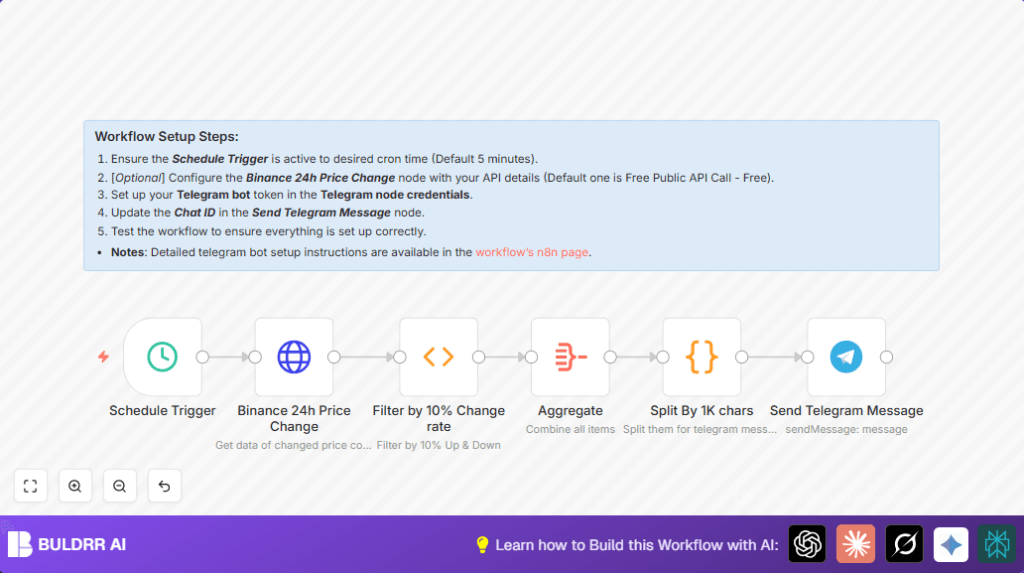
This workflow watches crypto coin prices taken from Binance’s public API every 5 minutes. It finds coins with price changes over 15% in the last 24 hours. Then, it sends alerts about those big changes directly to a Telegram group chat. This helps avoid missing sudden price moves without checking manually.

The result is fast and easy notifications for coins moving a lot, so the user can react quickly and save time.


Tools and Services Used

  • n8n automation platform: Runs and links all the workflow nodes.
  • Binance Public API: Provides raw 24-hour coin price change data without credentials.
  • Telegram Bot API: Sends alerts to a chosen Telegram group or chat.


How the Workflow Works: Inputs, Processing, and Output

Inputs

The workflow triggers every 5 minutes automatically from a Schedule Trigger node.

No manual input is required once active.

Processing Steps

  • Data is fetched from Binance’s endpoint https://api.binance.com/api/v1/ticker/24hr by an HTTP Request node.
  • A Function node filters coins with price change ±15% or more.
  • Filtered coins are sorted by highest price change percentage.
  • An Aggregate node groups all filtered coin notifications into one collection.
  • A Code node splits the message collection into chunks under 1000 characters for Telegram’s limit.
  • The Telegram node sends one chunked message at a time to the specified Telegram group chat.

Output

The user receives formatted Telegram messages listing coins with large 24-hour price moves and their last trade prices.

Messages are split properly to avoid errors due to Telegram message size.


Who Should Use This Workflow

This workflow fits anybody who watches cryptocurrencies and needs quick alerts on big price changes.

It is good for busy traders, investors, or analysts who cannot check prices constantly by hand.

The workflow reduces missed opportunities or late reactions from slow manual checking.


Beginner Step-by-Step: How to Use This Workflow in n8n

Step 1: Import Workflow

  1. Download the full workflow file using the Download button on this page.
  2. Inside the n8n editor, click “Import from File” and load the downloaded workflow.

Step 2: Configure Credentials and IDs

  1. Open each node that requires credentials, like the Telegram node, and add your Telegram bot token.
  2. Update the Telegram chat ID to the group or user ID where messages must go.

Step 3: Verify Other Settings

  1. Check the HTTP Request node URL is set to https://api.binance.com/api/v1/ticker/24hr as given.
  2. Review the Function node code to confirm the 15% price change filter is set as desired.

Step 4: Run and Test

  1. Execute the workflow manually once by clicking each node’s execute button to check if the data flows and messages are sent.
  2. Look for errors in the workflow output or Telegram messages.

Step 5: Activate for Production

  1. Activate the workflow so it runs every 5 minutes automatically.
  2. Monitor initial runs to make sure messages arrive on time.

For users running self-host n8n, ensure the server is running and public access is available for timely execution.


Customization Ideas

  • Change the price change filter percentage in Function node code to lower or raise alert sensitivity.
  • Modify message chunk size in the Code node to fit different messaging platform limits.
  • Duplicate the Telegram node to send alerts to multiple chats or users.
  • Replace public Binance API with authenticated APIs if private or more detailed data is needed.

Common Errors and How to Fix Them

  • Telegram messages not sent: Check Telegram bot token and chat ID. Make sure the bot is added to the target chat.
  • Empty or error data from Binance: Verify Binance API URL and network connection are correct.
  • Function node errors: Check JavaScript code syntax and the input data format from previous node.

Automate crypto price alerts with Binance and n8n

Visit through Desktop to Interact with the Workflow.

Frequently Asked Questions

The workflow uses Binance’s public API to get 24-hour coin price data and filters coins with at least ±15% change using a function node.
The Telegram node sends messages to a group or user chat showing coins with large price movements found in the workflow.
Yes, the percentage filter is set in the Function node’s JavaScript code and can be adjusted to any desired value.
No, this workflow uses Binance’s public API endpoint which does not require authentication or API keys.
Author
Written By
Vikash Kumar
Building AI agents, n8n workflows and end-to-end automation for 30+ Brands across India, the US, Europe, Dubai & Australia. 7+ years of Experience saving founders real hours every week - no code required.

Related Workflows

Automate Twist Channel Creation and Messaging with n8n

This workflow automates creating and updating a channel in Twist and sending a personalized message to specific users. It eliminates manual setup errors and saves time managing Twist communications.

Automate Ideogram Image Generation with Google Sheets & Gmail

This workflow automates graphic design image generation via Ideogram AI, storing image data in Google Sheets and Google Drive, with email alerts via Gmail. It saves designers hours by automating image creation, remixing, review, and record-keeping.

Automate IT Support with Slack and OpenAI in n8n

Streamline IT support by automating Slack message handling using n8n and OpenAI. This workflow handles Slack DMs, filters bots, queries a Confluence knowledge base, and delivers AI-generated responses, improving support efficiency and response time.

Automate Crypto Analysis with CoinMarketCap & n8n AI Agent

Discover how this unique n8n workflow leverages CoinMarketCap’s multi-agent AI to deliver precise, real-time cryptocurrency insights directly via Telegram. Manage crypto data analysis efficiently with automated multi-source API integration.

Automate Gumroad to Beehiiv Subscriber Sync with n8n

Learn how to automatically add new Gumroad sales customers as Beehiiv newsletter subscribers using n8n automation. This workflow saves time by syncing sales data to Google Sheets CRM and notifying your Telegram channel instantly.

Generate On-Brand Blog Articles Using n8n and OpenAI

This workflow automates the creation of on-brand blog articles by analyzing existing company content using n8n and OpenAI. It extracts article structures and brand voice to produce consistent draft articles, saving significant content creation time.
1:1 Free Strategy Session
Your competitors are already automating. Are you still paying for it manually?

Do you want to adopt AI Automation?

Every hour your team does repetitive work, you're burning real money.
While you wait, faster businesses are cutting costs and moving quicker.
AI and automations aren't the future anymore — they're the present.

Book a live 1-on-1 session where we show you exactly which of your daily tasks can be automated — and what it’s costing you not to.