
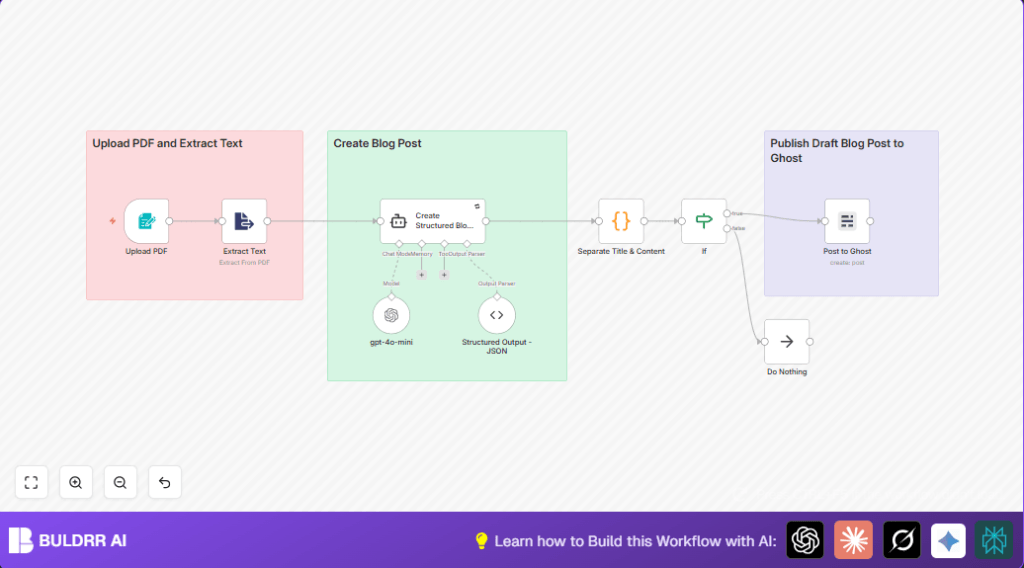

1. What This Workflow Does
This workflow takes a PDF file you upload through n8n and changes it into a blog post automatically.
The workflow extracts text from the PDF, uses an AI model to create a clear, SEO-friendly blog with chapters, and then sends it to Ghost CMS.
This helps avoid long manual work and mistakes with copying or formatting.
The final post appears as a draft on your Ghost website for you to review or publish.
The process works in steps: you give a PDF file as input, the workflow pulls out the text, the AI rewrites the text into a blog structure, and then the post is created inside Ghost.
If the title or content isn’t good, the workflow stops and does not publish.
This saves time and keeps blog posts consistent and readable.
2. Tools and Services Used
- n8n Workflow Platform: Runs the automation and connects all parts.
- Ghost CMS Admin API: Publishes blog drafts directly to the Ghost website.
- OpenAI GPT-4o-mini model: Turns extracted PDF text into a well-structured blog post.
- FormTrigger node: Receives the PDF file via a web form inside n8n.
- ExtractFromFile node: Extracts text from PDF binary files.
- Langchain Agent node: Enforces structured blog creation with formatting.
- Code node: Splits blog title and content, and checks quality.
- If node: Validates that title and content are not empty before publishing.
- No Operation node (NoOp): Stops workflow cleanly if errors happen.
This setup makes turning PDFs into blog drafts simple and automated.
3. Beginner Step-by-Step: How to Use This Workflow in n8n
Import and Setup
- Download the workflow using the Download button on this page.
- Open the n8n editor and import the workflow using the “Import from File” option.
- Add your OpenAI API Key in the credentials for the GPT-4o-mini node.
- Configure Ghost Admin API credentials for the Ghost node to allow post creation.
- If needed, update IDs, email addresses, or other connection details inside relevant nodes.
Test and Activation
- Run the workflow once by uploading a sample PDF at the provided form URL to confirm it works.
- Check the output in Ghost CMS for a new blog draft with correct title and content.
- If the test succeeds, activate the workflow to run automatically for real uploads.
- Optionally, set up alerts on errors using email or Slack nodes connected to the No Operation node.
If you host n8n yourself, consider self-host n8n for full control over data and uptime.
4. Workflow Inputs, Processing, and Outputs
Inputs
- PDF file uploaded via the FormTrigger node.
Processing Steps
- Text extraction from the PDF file by the ExtractFromFile node.
- Sending raw text to the GPT-4o-mini model through AI Language Model node for analysis.
- Using Langchain Agent node to generate a JSON-formatted blog post with
titleandcontent. - Splitting title and content in Code node, removing unneeded H1 tags, and confirming content is valid.
- Validation of non-empty title and content with the If node, stopping the workflow if check fails.
- Posting the blog draft to Ghost CMS via the Ghost node.
- Error handling by routing incomplete content cases to the No Operation node.
Outputs
- A complete blog post draft with title and SEO-friendly content on Ghost CMS, ready for publishing or editing.
5. Edge Cases and Failure Handling
- If the AI model doesn’t produce a title, the workflow catches this in the Code node and stops publishing.
- If the extracted content is empty or malformed, the If node prevents incomplete posts from reaching Ghost.
- PDFs that are scanned images or protected may yield no text, requiring OCR or text-based PDFs.
- Ghost API errors often happen if credentials lack permissions; check API key rights if no posts appear.
- The workflow stops quietly on incomplete data, but can be extended to notify by email or Slack.
6. Customization Ideas
- Change the blog length and style by editing the system prompt in the Langchain Agent node.
- Add a step to generate social media blurbs using the same AI after the main post is ready.
- Insert keyword extraction before publishing to auto-tag posts for better SEO.
- Include translation nodes to create multi-language blog versions.
- Expand the FormTrigger node to accept other file formats (e.g., DOCX) and update extraction steps accordingly.
7. Summary
✓ Automates PDF to blog post creation inside n8n.
✓ Uses AI to produce clear, SEO-ready blog drafts.
✓ Publishes drafts directly to Ghost CMS with error checks.
✓ Saves multiple hours compared to manual editing.
✓ Protects blog quality by validating title and content.
✓ Can be customized for length, language, or social media.
✓ Includes simple failure handling to avoid broken posts.
