

1. What This Workflow Does
This workflow takes PDF files uploaded by users and turns them into draft blog posts on WordPress automatically.
It solves the problem of spending many hours copying text, writing titles, formatting, and creating images from PDFs manually.
The final result is a ready-made blog draft with SEO-friendly content, images, and a human approval step before publishing.
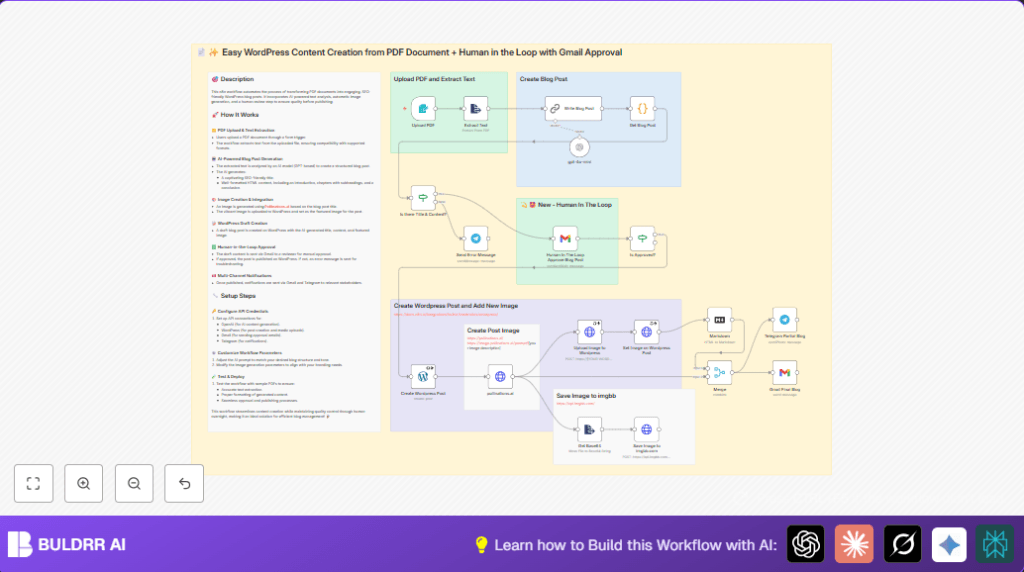
It accepts PDF input, extracts text, creates a structured blog post using AI, generates an image, uploads all to WordPress, waits for a review via Gmail, and then notifies stakeholders after publishing.
2. Who Should Use This Workflow
This automation is designed for content managers or bloggers who get regular PDF reports or documents that need turning into blog posts.
It is useful if manual transfer and formatting of PDFs take a lot of time and cause errors.
Users want faster blog production with AI help but also need a real person to approve content before going live.
3. Tools and Services Used
- n8n Automation: Runs the workflow and connects all services.
- OpenAI GPT-4o-mini and Langchain: Generates SEO-friendly blog text from PDF content.
- Pollinations.ai API: Makes blog title based images for featured posts.
- WordPress API: Uploads blogs and images as drafts with featured media.
- Gmail: Sends blog approval emails and waits for reviewer response.
- Telegram Bot API: Sends notifications on blog status updates.
4. Inputs, Processing, and Outputs
Input
The starting input is a single PDF file uploaded through a web form.
This file is accepted by the Form Trigger node designed specifically for PDFs.
Processing Steps
- Extract text from the uploaded PDF using Extract Text node.
- Send extracted text into Langchain Chain LLM node to create SEO-optimized blog content with a clear title, introduction, chapters, and conclusion in HTML.
- Use a Code node to parse the AI output and get the blog title separately.
- Check title and content for presence using an If node.
- If passed, send the blog draft by email for human approval via Gmail node.
- Wait for approval response to decide the next action.
- If approved, create a WordPress draft post with WordPress node containing blog title and content.
- Generate an image for the blog title by calling HTTP Request node with Pollinations.ai.
- Upload that image to WordPress media library using another HTTP Request node.
- Set the uploaded image as the featured media of the WordPress post.
- Convert HTML content to Markdown for Telegram notification.
- Send final notifications via Gmail and Telegram nodes to inform all stakeholders.
Output
Outputs include a WordPress draft blog post with images and SEO content, email approval workflow, and notifications when published.
All posts remain drafts until approved to ensure quality.
5. Beginner Step-by-Step: How to Use This Workflow in n8n
Download and Import Workflow
- Find and click the Download button on this page to get the workflow file.
- Open your n8n editor (you must be logged into your n8n environment).
- Use the Import from File option to upload the downloaded workflow.
Configure Credentials and Settings
- Add all required API Keys and credentials: OpenAI, WordPress, Gmail, Telegram, and Pollinations.
- Update reviewer email address inside the Human In The Loop Approve Blog Post Gmail node to your own reviewer’s email.
- If needed, change WordPress site URL in all WordPress-related nodes.
- Check the Pollinations.ai prompt URL for image style and customize if desired.
- Verify binary property names in the Extract Text node match form input.
Test and Activate
- Run the workflow once using a sample PDF upload to check extraction and creation of a draft post.
- Make sure email approval gets sent correctly and you receive the review request.
- Approve or reject manually to confirm the workflow acts correctly on responses.
- Once all tests pass, toggle the workflow to active in the n8n editor.
- Start using the system in production.
If self-hosting is preferred, consider self-host n8n for better control and security.
6. Customization Ideas
- Change reviewer email in Gmail approval node for different users.
- Modify AI prompt in Langchain Chain LLM node to add sections or change tone.
- Tweak Pollinations.ai image prompt URL to get different image styles.
- Set post status to “publish” directly if immediate live posts are needed.
- Add other notification services like Slack or Microsoft Teams.
7. Troubleshooting Common Problems
- Problem: PDF text extraction fails.
Cause: File type not PDF or wrong binary property name.
Fix: Make sure form accepts only .pdf and Extract Text uses correct binary. - Problem: Gmail approval email not sending.
Cause: Incorrect OAuth2 setup or API limits.
Fix: Recheck Gmail credentials and tokens. - Problem: WordPress media upload errors.
Cause: Wrong site URL or missing auth headers.
Fix: Update URLs and validate WordPress API keys.
8. Pre-Production Checklist
- Verify all API keys and credentials are correctly added.
- Test PDF upload and text extraction with sample files.
- Run workflow end-to-end and confirm draft creation in WordPress.
- Check Gmail approval emails send and workflow waits as expected.
- Test approval and rejection flow branches.
9. Deployment Guide
Activate the workflow in n8n by switching on the active button.
Monitor logs and set alerts for any errors.
Ensure the WordPress site and email servers are online.
For high volume, consider self-host n8n to avoid API limits and improve security.
10. Summary
✓ Saves many hours spent copying PDF info manually.
✓ Converts PDFs into complete, SEO-friendly WordPress blog drafts.
✓ Adds a human approval step to keep quality high.
✓ Automates image generation for blog posts.
✓ Sends clear notifications after publishing.
✓ Easy to use by importing and configuring in n8n.
✓ Works well with Gmail, WordPress, OpenAI, Telegram, and Pollinations AI.
Example AI Prompt from Langchain Node
This prompt tells AI to generate a blog post with specific sections and SEO friendly title.
Write a SEO-friendly blog post based on the following PDF content.
Generate a title under 10 words without colons.
Structure the blog with introduction (150-200 words), 6 to 8 chapters (300-400 words each), and conclusion (200-250 words).
Format the output fully in HTML tags.
Make the content engaging and easy to read.
Example Code Node Snippet to Extract Title
This code extracts the first <h1> tag content from AI HTML output.
const htmlContent = $input.first().json.text;
const titleRegex = /<h1>(.*?)<\/h1>/s;
const match = htmlContent.match(titleRegex);
const title = match ? match[1] : '';
return [{ json: { title: title, content: htmlContent } }];