

What this workflow does
This workflow connects with OpenSea API to get live data about NFTs.
It finds listings, offers, best prices, and order details for any NFT collection.
It saves time by automatically collecting data that traders usually check by hand.
Users get fast, updated info to spot good deals and high offers.
Who should use this workflow
This is for people who trade or collect NFTs and want quick access to OpenSea market data.
It suits traders who waste hours manually watching listings and offers on many collections.
Users needing real-time updates without checking multiple pages will benefit.
It fits both new and experienced NFT players who want better info and faster decisions.
Tools and services used
- OpenSea API: Gets NFT marketplace data like listings, offers, and orders.
- OpenAI API (gpt-4o-mini): Understands user messages and converts them into API queries.
- n8n workflow automation: Runs and manages the data flow and API calls.
Inputs, processing, and outputs
Inputs
User messages with commands or queries, like collection names or NFT IDs.
Session ID to keep conversation context during a chat.
Processing Steps
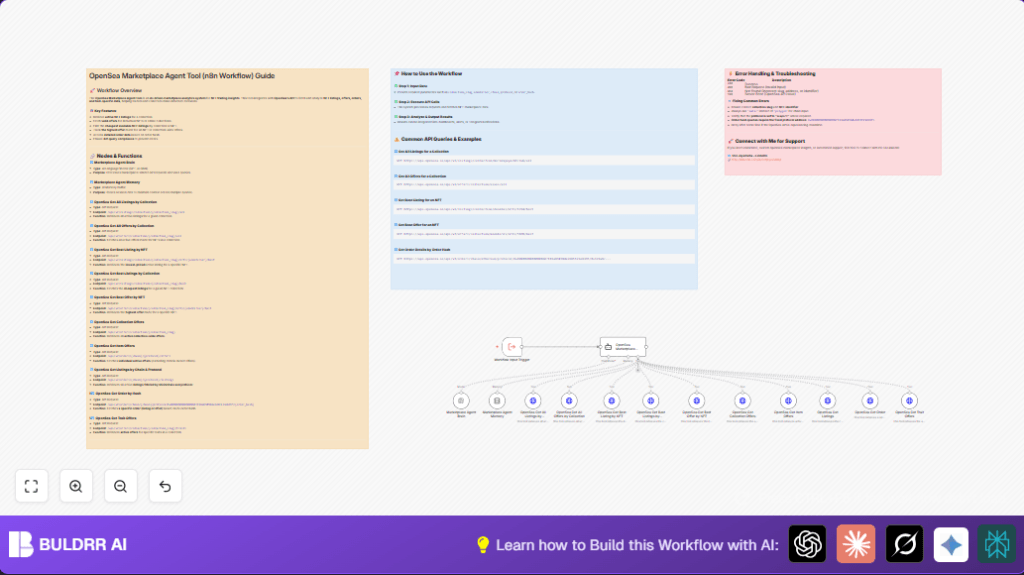
Webhook node starts the workflow with input messages.
Marketplace Agent Brain uses OpenAI GPT-4o Mini to understand user questions.
Marketplace Agent Memory keeps track of conversation history.
OpenSea Marketplace Agent picks the right OpenSea API tool to call.
Multiple HTTP Request nodes make calls to OpenSea API endpoints for listings, offers, or orders.
Outputs
JSON data showing active listings, best offers, lowest prices, and order details.
This data can be used in dashboards, reports, or alerts for trading decisions.
Beginner step-by-step: How to build this in n8n
Step 1: Import workflow
- Download the workflow file using the Download button on this page.
- Open the n8n editor.
- Click “Import from File” and select the downloaded workflow file.
Step 2: Add credentials
- Go to each HTTP Request node and add your OpenSea API key in the credential field.
- Open the Marketplace Agent Brain node and make sure your OpenAI API key is linked.
Step 3: Update parameters
- Check if any node requires specific collection slugs, NFT identifiers, or chain names. Update those values if you know them.
- Make sure chain parameters use correct values like “matic,” not “polygon.”
Step 4: Test and activate
- Run the workflow once with a sample message to confirm it works.
- If the outputs show correct data, activate the workflow to run automatically.
- Optionally set up notifications, dashboards, or other nodes to handle the results.
If self hosting n8n, use self-host n8n resources to help with setup.
Common issues and how to fix
- Wrong API parameters: Check collection slugs, NFT IDs, and chain names. Wrong inputs cause 400 or 404 errors.
- Authentication errors: Confirm OpenSea and OpenAI API keys are correct and active in credentials.
- Chat agent confusion: Ensure Marketplace Agent Memory and Brain nodes are linked to OpenSea Marketplace Agent. Check system prompt completeness.
Customization ideas
- Change the OpenAI model in Marketplace Agent Brain to a bigger or smaller one based on API quotas or speed needs.
- Adjust the number of listings or offers returned by modifying the
limitparameter in HTTP Request nodes. - Add new OpenSea API endpoints by copying HTTP nodes and changing URLs and parameters.
- Change the session memory window size in Marketplace Agent Memory for longer or shorter conversation context.
- Edit the system message in OpenSea Marketplace Agent to change tool rules or behavior.
Summary of results
✓ Saves hours by automating OpenSea market data collection.
✓ Provides fast answers to NFT listings, offers, and best prices.
✓ Helps users find good deals and make smarter trading choices.
→ Outputs structured JSON data ready for use in automation or reports.
