
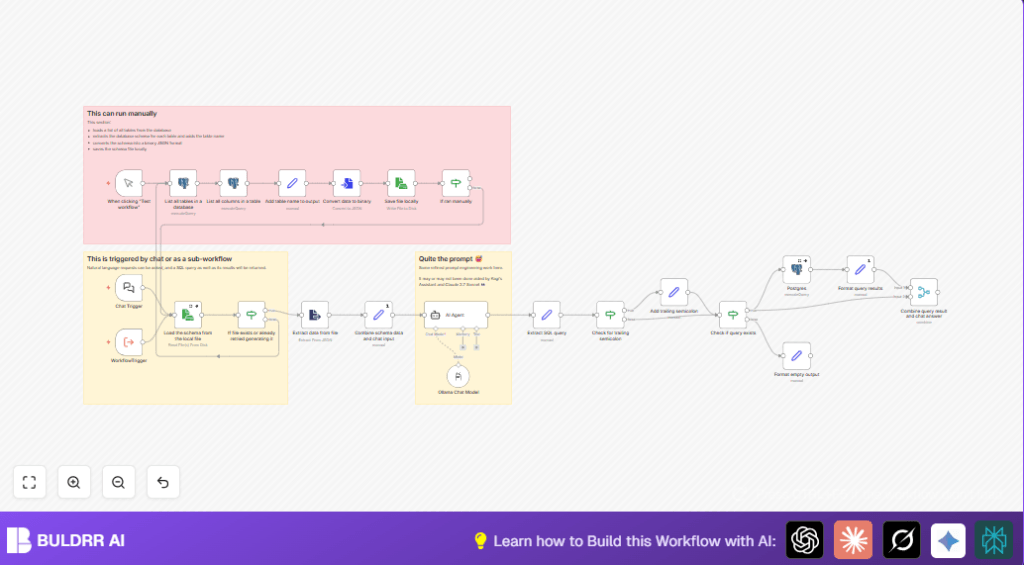

What this workflow does
This workflow turns plain English questions about email data into exact SQL queries for a PostgreSQL database.
It helps users get the right answers from email metadata without writing SQL manually.
You ask a question, the AI writes a query, runs it, and shows you results fast.
This saves time and stops mistakes in manual query writing.
Who should use this workflow
This is for people who work with email data but do not know SQL well.
If you ask questions like “Which emails mention the project?” but don’t want to write SQL, this helps.
It’s good for data analysts, managers, or anyone needing fast email info from databases.
Tools and services used
- n8n: Visual automation editor to run the workflow.
- PostgreSQL: Stores structured email metadata.
- Ollama AI: AI chat model “phi4-mini:latest” to convert questions to SQL.
- Local file system: Saves and loads database schema as JSON.
Inputs, Process, and Outputs
Inputs
- User types a natural language question about email data.
- PostgreSQL database schema is loaded from local JSON or queried live.
Processing Steps
- Workflow reads database tables and columns.
- Saves schema info in JSON file locally for faster use.
- On question input, it merges schema and question.
- AI node generates a SQL SELECT query matching the schema.
- Workflow extracts and validates the query syntax.
- If query is valid, it runs SQL on PostgreSQL.
- Results are formatted into readable text.
- The final answer combines SQL query results with AI explanations.
Outputs
- Accurate SQL query string matching user question.
- Formatted query results from the database.
- Combined AI chat response with query data.
Beginner step-by-step: How to use this workflow in n8n
Importing and setup
- Download the workflow file using the Download button on this page.
- Open the n8n editor where you want to use the workflow.
- Click “Import from File” and select the downloaded workflow.
- Add your PostgreSQL credentials in the PostgreSQL node.
- Enter your Ollama API Key in the Ollama Chat Model node and select model “phi4-mini:latest.
- If needed, update any table names, emails, or folder IDs used in the workflow to match your database.
Testing the workflow
- Run the workflow manually to check if it loads the database schema and saves the JSON file.
- Send a sample question via the Chat Trigger node input to see if it generates a SQL query.
- Check that the SQL query runs and returns results.
Activating for production
- Turn on the workflow by toggling it live in n8n.
- Make sure the webhook URL from the Chat Trigger node is reachable by your chat or API clients.
- If using self-host n8n, ensure network and permissions are set correctly.
Customization ideas
- Change schema queries to point at different database schemas or tables.
- Edit the AI Agent prompt to add more columns or change question handling.
- Change the result format node to output CSV or JSON instead of pipe-delimited text.
- Add caching by improving local JSON saving to avoid DB load every run.
- Modify the Chat Trigger webhook to connect with Slack or Teams.
Common problems and fixes
No SQL query generated
Sometimes the AI can’t make a query if the question is unclear or too broad.
Try asking more specific questions.
PostgreSQL connection errors
Usually wrong credentials or no access to the database.
Check your PostgreSQL credentials in n8n and test connections outside.
Missing schema JSON file
The file not saved or wrong path.
Re-run the manual schema loading steps. Check file permissions.
Summary of results
→ Quickly get correct SQL queries from plain English questions.
→ Run these queries automatically on PostgreSQL email metadata.
→ Save time and avoid manual SQL errors.
→ See formatted email data results combined with AI chat answers.
→ Use inside n8n with simple setup and testing.
