
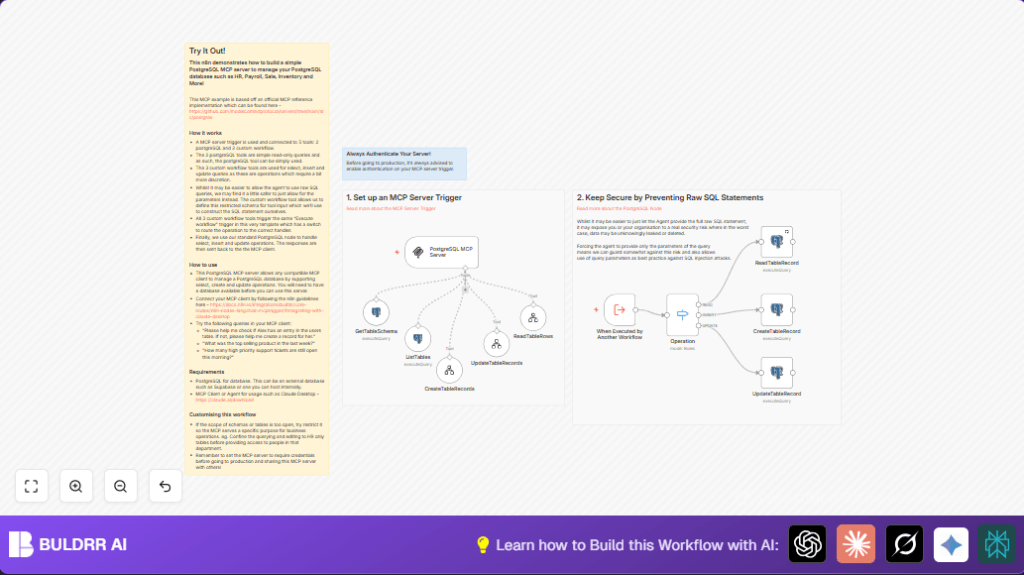

What This Workflow Does
This workflow securely manages PostgreSQL database operations inside n8n without running raw SQL from clients.
It stops risky SQL injection and makes inserting, reading, and updating table data safe and simple.
Users send requests, and the workflow handles them by running only parameterized queries.
Results are returned back to the user smoothly.
Who Should Use This Workflow
This is for anyone who needs to manage a PostgreSQL database securely from inside n8n.
It helps non-technical users or teams that worry about running unsafe SQL queries.
It also works well when different departments want easy and safe database access.
Tools and Services Used
- PostgreSQL Database: Stores your business data like HR, payroll, and sales.
- n8n Automation Platform: Runs the workflow that handles requests and talks to PostgreSQL.
- n8n-nodes-langchain.mcpTrigger node: Receives requests from compatible MCP clients.
- n8n-nodes-base.postgres node: Performs parameterized queries to the PostgreSQL database.
- n8n-nodes-base.executeWorkflowTrigger node: Calls sub workflows for insert, update, or read operations.
- MCP Client (e.g., Claude Desktop): Sends secure database requests to this workflow.
How This Workflow Works
Inputs
The workflow listens for incoming requests from MCP clients.
Requests specify which operation to do (read, insert, or update), the target table, and the data or conditions.
Processing Steps
The mcpTrigger node receives the request.
A Switch node checks the operation type.
Based on type, the workflow uses parameterized queries in PostgreSQL nodes to safely run the requested action.
Modular sub workflows handle inserting and updating to keep things organized.
Special queries list tables and describe columns securely for helping clients.
Outputs
The workflow sends the query results or confirmation messages back automatically to the MCP client.
This lets clients see query output or success messages without raw SQL exposure.
Beginner Step-by-Step: How to Use This Workflow in n8n
Step 1: Import the Workflow
- Download the workflow file using the Download button on this page.
- Open the n8n editor.
- Click “Import from File” and select the downloaded file.
Step 2: Configure Credentials
- Add your PostgreSQL credentials inside the PostgreSQL nodes.
- Update any table names, IDs, or other values in the workflow if your database uses different names.
- Set authentication for the mcpTrigger node if needed for security.
Step 3: Test the Workflow
- Run a test request from your MCP client (like Claude Desktop) to check reading or updating.
- Check if the workflow returns results correctly.
Step 4: Activate the Workflow
- Turn on the workflow in n8n to start handling real requests.
- Share the webhook URL with trusted MCP clients for production use.
Remember, if you self-host n8n, consider self-host n8n to keep full control.
Inputs and Outputs Explained
- Input: Operation type (read, insert, update), table name, data values, and conditions sent from MCP clients.
- Internal: Switch node routes requests without raw SQL.
- Output: Query results or operation confirmation messages sent back to MCP clients.
Edge Cases and Failure Handling
- If query parameters do not match placeholders, PostgreSQL node gives a syntax error.
Double-check parameter ordering. - MCP clients might fail to connect if webhook URL is wrong or firewall blocks access.
Verify URLs and firewall rules. - No response may happen if authentication on the mcpTrigger node is missing or incorrect.
Configure authentication properly.
Ideas for Customizing the Workflow
- Limit accessible tables by changing the SQL in the List Tables node to narrow down schemas.
- Turn on authentication on the MCP trigger node for better security.
- Add more CRUD operations like DELETE or UPSERT by creating new tool workflows and extending the switch routes.
Summary of Results You Get
✓ Secure database access via parameter-only queries
✓ Easy insert, read, and update operations without raw SQL
✓ Automatic responses back to MCP clients
✓ Safer workflows that reduce risk of injection or data leaks
✓ Cleaner team collaboration and reduced manual query errors
