

Automate Postgres Queries with n8n LangChain AI Agent

Discover a unique n8n workflow that integrates LangChain AI Agent with Postgres to respond to chat queries by executing dynamic SQL. This automation handles conversational AI-driven database queries efficiently, saving you hours of manual handling.
postgresTool
agent
lmChatOpenAi
+3
Workflow Identifier: 2034
NODES in Use: Sticky Note, When chat message received, Postgres, Simple Memory, AI Agent, OpenAI Chat Model
Automate Postgres queries with n8n and LangChain AI

Press CTRL+F5 if the workflow didn't load.

Learn how to Build this Workflow with AI:

What This Automation Does

This workflow answers chat questions by making SQL queries to a Postgres database automatically.
It stops manual querying and saves time.
Users get quick, accurate answers when they ask in chat.

Inputs come from chat messages.
The AI reads user questions, turns them into SQL commands, and runs those on your database.
The results get sent back as replies.
This cuts work for data teams and stops mistakes from hand-made queries.

Memory keeps chat history so the bot can answer follow-up questions naturally.


Tools and Services Used

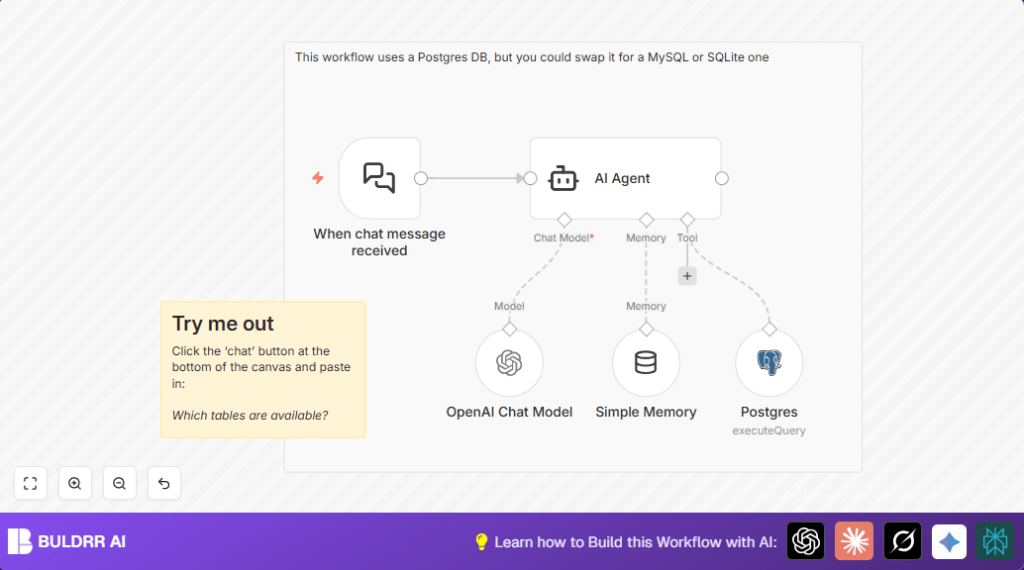
  • LangChain Chat Trigger: Starts workflow when chat messages come in.
  • LangChain AI Agent: Understands questions, remembers chats, and runs SQL.
  • OpenAI Chat Model (GPT-4o-mini): Turns words into SQL queries.
  • Postgres Node: Runs generated SQL commands.
  • LangChain Simple Memory Buffer: Saves past messages for context.

Beginner step-by-step: How to use this workflow in n8n

Import the Workflow

  1. Open your n8n editor.
  2. Use the Download button on this page to get the workflow file.
  3. Click “Import from File” inside n8n.
  4. Select the downloaded workflow file to load it.

Configure Credentials and IDs

  1. Add your Postgres database credentials in the Postgres node.
  2. Input your OpenAI API key inside the OpenAI Chat Model node.
  3. If needed, update any webhook IDs or channel names in the Chat Trigger node.
  4. Check SQL queries or any custom prompts if provided.

Test and Activate

  1. Send a test chat message using the chat client connected to your webhook.
  2. Verify the AI generates SQL on the fly and returns data correctly.
  3. Once tests pass, turn on the workflow toggle to enable it for production.
  4. If self hosting the workflow, consider using self-host n8n for public webhook access.

Inputs, Process, and Outputs

Inputs

  • User chat messages sent via LangChain interface.

Processing Steps

  • Chat Trigger node catches incoming chat.
  • AI Agent node processes natural language question.
  • AI creates SQL query based on question and database schema.
  • Postgres node runs the SQL.
  • Simple Memory node keeps track of conversation history.
  • AI Agent combines all to form a chat reply.

Outputs

  • Chat responses showing data pulled from the database.

Common Issues and How to Fix Them

  • No reply after sending message
    Check webhook URL is correct.
    Make sure n8n instance can receive external calls.
  • Errors running SQL queries
    Verify AI-generated SQL is correct and tables exist.
    Run queries manually for debugging.
  • Chatbot does not remember past messages
    Check if the Simple Memory node is linked to the AI Agent memory input.

Customization Ideas

  • Change Postgres node credentials and query style to support MySQL or SQLite.
  • Swap out the OpenAI Chat Model GPT model to a more advanced or cheaper one.
  • Adjust the Simple Memory node to keep less or more conversation to balance memory and speed.
  • Modify the Chat Trigger node to filter which users trigger the flow or add commands.

Summary

✓ Workflow turns chat questions into SQL queries automatically.
✓ Answers come quickly without expert help.
✓ Saves time and lowers errors in database querying.
✓ Keeps chat context for natural conversation.
✓ Works with Postgres and can switch to other databases.
✓ User-friendly setup by importing on n8n and entering keys.


Automate Postgres queries with n8n and LangChain AI

Visit through Desktop to Interact with the Workflow.

Frequently Asked Questions

Yes. Change the Postgres node credentials and adjust SQL syntax for MySQL or SQLite to make it work.
The workflow runs SELECT queries by default. Check generated queries manually before production to avoid errors.
Make sure the Simple Memory node is connected to the AI Agent node’s memory input to keep conversation context.
Download the workflow file, import it in n8n, add credentials, test the chat response, then activate the workflow toggle.

Promoted by BULDRR AI

Related Workflows

Automate Twist Channel Creation and Messaging with n8n

This workflow automates creating and updating a channel in Twist and sending a personalized message to specific users. It eliminates manual setup errors and saves time managing Twist communications.

Automate Ideogram Image Generation with Google Sheets & Gmail

This workflow automates graphic design image generation via Ideogram AI, storing image data in Google Sheets and Google Drive, with email alerts via Gmail. It saves designers hours by automating image creation, remixing, review, and record-keeping.

Automate IT Support with Slack and OpenAI in n8n

Streamline IT support by automating Slack message handling using n8n and OpenAI. This workflow handles Slack DMs, filters bots, queries a Confluence knowledge base, and delivers AI-generated responses, improving support efficiency and response time.

Automate Crypto Analysis with CoinMarketCap & n8n AI Agent

Discover how this unique n8n workflow leverages CoinMarketCap’s multi-agent AI to deliver precise, real-time cryptocurrency insights directly via Telegram. Manage crypto data analysis efficiently with automated multi-source API integration.

Automate Gumroad to Beehiiv Subscriber Sync with n8n

Learn how to automatically add new Gumroad sales customers as Beehiiv newsletter subscribers using n8n automation. This workflow saves time by syncing sales data to Google Sheets CRM and notifying your Telegram channel instantly.

Generate On-Brand Blog Articles Using n8n and OpenAI

This workflow automates the creation of on-brand blog articles by analyzing existing company content using n8n and OpenAI. It extracts article structures and brand voice to produce consistent draft articles, saving significant content creation time.
1:1 Free Strategy Session
Your competitors are already automating. Are you still paying for it manually?

Do you want to adopt AI Automation?

Every hour your team does repetitive work, you're burning real money.
While you wait, faster businesses are cutting costs and moving quicker.
AI and automations aren't the future anymore — they're the present.

Book a live 1-on-1 session where we show you exactly which of your daily tasks can be automated — and what it’s costing you not to.