Why Pay $20/month, When you can Self Host n8n @ $3.99 only

50+ InMails. Advanced Lead search. First 2 Users only

Promoted by BULDRR AI

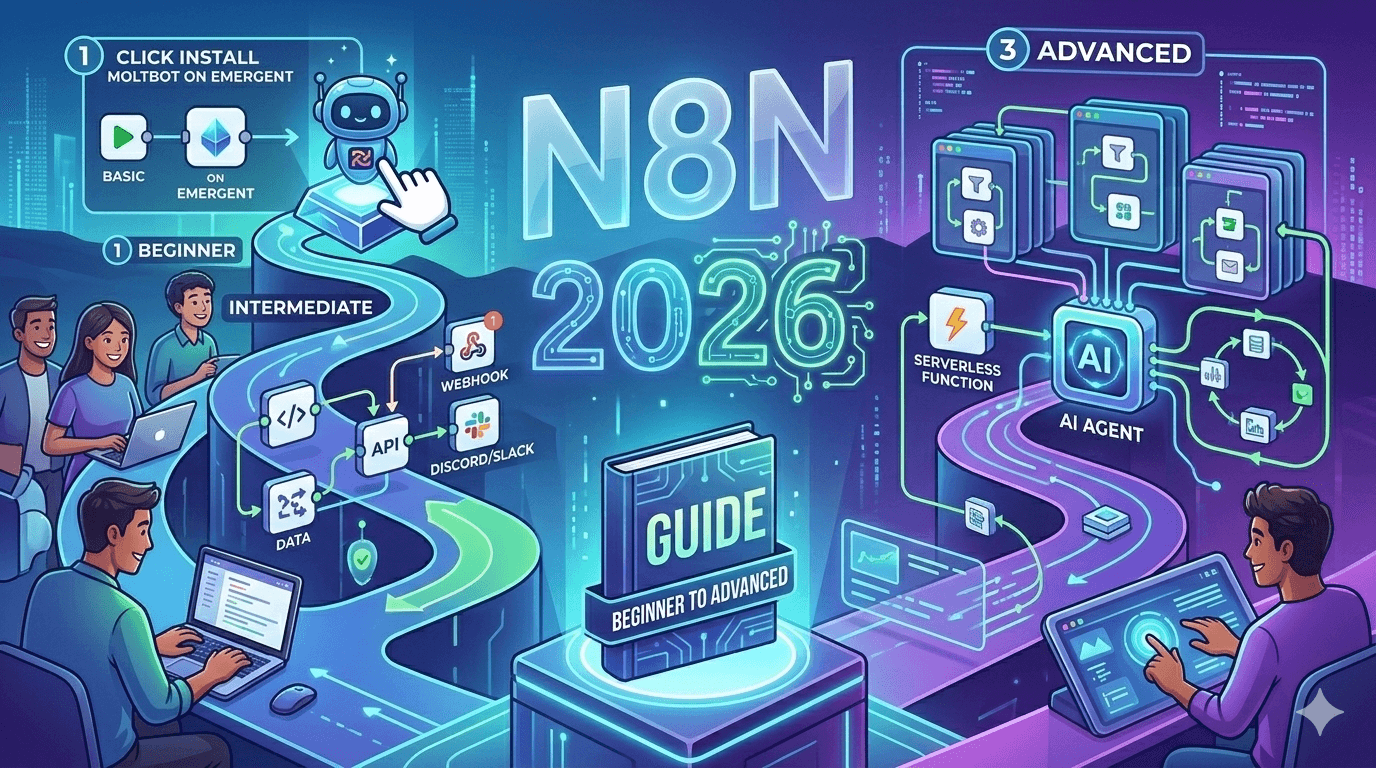
n8n Complete Guide 2026: Build Your First Automated Workflow in 15 Minutes

n8n Automation Guide 2026 Beginner to Advanced Workflows

n8n automation is everywhere in 2026.

From small creators to large agencies, everyone is building workflow automation systems to save time and reduce manual work. If you are just starting, no need to worry. It is very simple only once you understand basics.

This n8n tutorial 2026 will help you go from beginner setup to advanced workflows. We will also look at real business use cases and how you can download ready-made workflows directly from buldrr.com.


My Experience: Why I Switched to n8n in 2026

I tried Zapier, Make, and Integromat. Cost was the first problem. Then control was the second.

One day my Zapier bill crossed $200. For what? Simple workflows that ran a few times daily. Not complex stuff — just RSS to social, lead to CRM, email to sheet. Basic things that should cost nothing.

That day I shifted to n8n. Since then, I run 50+ workflows. Total monthly cost? $3.99 hosting. That’s it.

But here’s my honest take — n8n is not perfect. The interface looks intimidating at first. Error messages are sometimes cryptic. And if you have zero technical background, the first hour will feel frustrating.

My opinion: push through that first hour. It is the only real barrier. After your first working workflow, everything clicks. I have seen complete non-coders become confident n8n builders in a week.

The other thing nobody tells you — don’t build from scratch. Import a template, break it, understand it. That approach is 10x faster than reading documentation. Which is exactly why we built the free workflow library at BULDRR AI.

This guide is from real experience building 50+ workflows. Not theory. Not rephrased documentation.


What Is n8n Automation and Why It Is Growing in 2026?

n8n automation is a workflow automation platform that lets you connect apps, APIs, and services without writing heavy code. It works using nodes. Each node performs one task, like sending email, fetching data, or updating spreadsheet.

n8n supports 400+ integrations. You can connect tools like Google Sheets, Slack, Notion, OpenAI, Telegram, Shopify and many more.

In 2026, peoples prefer n8n because:

  • It is open-source
  • You can self-host it
  • No forced monthly pricing
  • Full control over data

Many users shifted from Zapier-type tools because cost becomes high when workflows increase. With n8n automation, you can run unlimited workflow automation if you host it yourself.


Beginner Setup, How to Start With n8n

First you have to install n8n, then only it will work properly.

Step 1: Install n8n

You have three main options:

  1. Install locally using Node.js
  2. Run using Docker
  3. Use n8n Cloud version

If you are beginner, do one thing. Start with local setup or cloud trial. It will help you understand interface without server complexity.

Step 2: Create Your First Workflow

Inside dashboard, click “New Workflow”.

Add:

  • One Trigger node, like Webhook or Manual Trigger
  • One Action node, like Send Email or Add Row in Google Sheets

Connect both nodes. Click “Execute Workflow” to test.

If everything works, activate workflow. Now it will run automatically based on trigger.

Step 3: Monitor and Improve

You can check execution history inside n8n itself.

If any error comes, logs will show exactly where problem happened. This makes debugging easier compared to many other workflow automation tools.


Real n8n Automation Workflow Examples

Theory is fine, but examples make things clear.

Here are practical n8n automation workflows you can use immediately.

1. Auto Post Blog to Social Media

Whenever you publish new blog, workflow automatically:

  • Fetch RSS feed
  • Generate caption using AI
  • Post to Twitter, LinkedIn, and Facebook

This saves 30 to 60 minutes daily for content creators.

2. Website Lead to Google Sheets

When someone fills contact form:

  • Data goes to Google Sheets
  • Email notification is sent
  • CRM entry is created

No manual copy-paste required. For agencies, this workflow automation itself can save hours weekly.

3. AI Email Reply Automation

Connect Gmail + OpenAI.

Incoming emails are analyzed. Draft reply is generated automatically. You just review and send.

For support teams, this n8n automation reduces response time drastically.

If you do not want to build these from scratch, BULDRR AI already has ready JSON workflows. You can download and import directly.


Business Use Cases of n8n Automation in 2026

n8n automation is not just for tech people.

Agencies use it for client reporting, lead capture, and automated SEO reports.

E-commerce stores automate order confirmation, abandoned cart emails, and stock alerts.

Local businesses can automate WhatsApp reminders and appointment confirmations.

SaaS founders build internal automation for onboarding and analytics tracking.

The tool itself is flexible. You can start small and scale slowly.


How to Download Free n8n Workflows From BULDRR AI

If you are beginner, building from zero may feel confusing.

Do one thing.

Go to https://buldrr.com and open workflows section.

You will find 10,000+ free n8n automation workflows with complete how-to guides.

Search by keyword like:

  • SEO automation
  • AI workflow
  • Lead generation
  • Social media automation

Click on workflow. Download JSON file. Then in n8n dashboard, import that file.

No signup required. No credit card. Completely free only.

This saves huge time, especially if you are learning workflow automation step by step.


FAQs

Is n8n free?

Yes. Self-hosted version is free and open-source. Cloud version has paid plans.

Is n8n good for beginners?

Yes, but you need basic understanding of logic and APIs. Once you build 2 to 3 workflows, confidence comes automatically.

Can I use n8n for business automation?

Definitely. Many agencies and startups use n8n automation for real production systems.

How many integrations does n8n support?

n8n supports 400+ integrations and also allows custom API connections.


n8n automation in 2026 is not just trend. It is practical skill.

Start small. Build one workflow. Break it. Fix it. That is how you learn properly.

If you want shortcut, buldrr.com already has thousands of workflows ready for you.


Looking for free n8n workflows?

Go to BULDRR AI and download from 10,000+ ready-made n8n automation workflows.
Full How-To guides included. No signup. No credit card. Completely free.

Ask more Questions about this Blog with AI:

Follow us:

There’s no automation you can’t learn to build with BULDRR AI.

I'll show how you can implement AI AGENTS to take over repetitive tasks.

Promoted by BULDRR AI

n8n Complete Guide 2026: Build Your First Automated Workflow in 15 Minutes

n8n Automation Guide 2026 Beginner to Advanced Workflows

n8n automation is everywhere in 2026.

From small creators to large agencies, everyone is building workflow automation systems to save time and reduce manual work. If you are just starting, no need to worry. It is very simple only once you understand basics.

This n8n tutorial 2026 will help you go from beginner setup to advanced workflows. We will also look at real business use cases and how you can download ready-made workflows directly from buldrr.com.


My Experience: Why I Switched to n8n in 2026

I tried Zapier, Make, and Integromat. Cost was the first problem. Then control was the second.

One day my Zapier bill crossed $200. For what? Simple workflows that ran a few times daily. Not complex stuff — just RSS to social, lead to CRM, email to sheet. Basic things that should cost nothing.

That day I shifted to n8n. Since then, I run 50+ workflows. Total monthly cost? $3.99 hosting. That’s it.

But here’s my honest take — n8n is not perfect. The interface looks intimidating at first. Error messages are sometimes cryptic. And if you have zero technical background, the first hour will feel frustrating.

My opinion: push through that first hour. It is the only real barrier. After your first working workflow, everything clicks. I have seen complete non-coders become confident n8n builders in a week.

The other thing nobody tells you — don’t build from scratch. Import a template, break it, understand it. That approach is 10x faster than reading documentation. Which is exactly why we built the free workflow library at BULDRR AI.

This guide is from real experience building 50+ workflows. Not theory. Not rephrased documentation.


What Is n8n Automation and Why It Is Growing in 2026?

n8n automation is a workflow automation platform that lets you connect apps, APIs, and services without writing heavy code. It works using nodes. Each node performs one task, like sending email, fetching data, or updating spreadsheet.

n8n supports 400+ integrations. You can connect tools like Google Sheets, Slack, Notion, OpenAI, Telegram, Shopify and many more.

In 2026, peoples prefer n8n because:

  • It is open-source
  • You can self-host it
  • No forced monthly pricing
  • Full control over data

Many users shifted from Zapier-type tools because cost becomes high when workflows increase. With n8n automation, you can run unlimited workflow automation if you host it yourself.


Beginner Setup, How to Start With n8n

First you have to install n8n, then only it will work properly.

Step 1: Install n8n

You have three main options:

  1. Install locally using Node.js
  2. Run using Docker
  3. Use n8n Cloud version

If you are beginner, do one thing. Start with local setup or cloud trial. It will help you understand interface without server complexity.

Step 2: Create Your First Workflow

Inside dashboard, click “New Workflow”.

Add:

  • One Trigger node, like Webhook or Manual Trigger
  • One Action node, like Send Email or Add Row in Google Sheets

Connect both nodes. Click “Execute Workflow” to test.

If everything works, activate workflow. Now it will run automatically based on trigger.

Step 3: Monitor and Improve

You can check execution history inside n8n itself.

If any error comes, logs will show exactly where problem happened. This makes debugging easier compared to many other workflow automation tools.


Real n8n Automation Workflow Examples

Theory is fine, but examples make things clear.

Here are practical n8n automation workflows you can use immediately.

1. Auto Post Blog to Social Media

Whenever you publish new blog, workflow automatically:

  • Fetch RSS feed
  • Generate caption using AI
  • Post to Twitter, LinkedIn, and Facebook

This saves 30 to 60 minutes daily for content creators.

2. Website Lead to Google Sheets

When someone fills contact form:

  • Data goes to Google Sheets
  • Email notification is sent
  • CRM entry is created

No manual copy-paste required. For agencies, this workflow automation itself can save hours weekly.

3. AI Email Reply Automation

Connect Gmail + OpenAI.

Incoming emails are analyzed. Draft reply is generated automatically. You just review and send.

For support teams, this n8n automation reduces response time drastically.

If you do not want to build these from scratch, BULDRR AI already has ready JSON workflows. You can download and import directly.


Business Use Cases of n8n Automation in 2026

n8n automation is not just for tech people.

Agencies use it for client reporting, lead capture, and automated SEO reports.

E-commerce stores automate order confirmation, abandoned cart emails, and stock alerts.

Local businesses can automate WhatsApp reminders and appointment confirmations.

SaaS founders build internal automation for onboarding and analytics tracking.

The tool itself is flexible. You can start small and scale slowly.


How to Download Free n8n Workflows From BULDRR AI

If you are beginner, building from zero may feel confusing.

Do one thing.

Go to https://buldrr.com and open workflows section.

You will find 10,000+ free n8n automation workflows with complete how-to guides.

Search by keyword like:

  • SEO automation
  • AI workflow
  • Lead generation
  • Social media automation

Click on workflow. Download JSON file. Then in n8n dashboard, import that file.

No signup required. No credit card. Completely free only.

This saves huge time, especially if you are learning workflow automation step by step.


FAQs

Is n8n free?

Yes. Self-hosted version is free and open-source. Cloud version has paid plans.

Is n8n good for beginners?

Yes, but you need basic understanding of logic and APIs. Once you build 2 to 3 workflows, confidence comes automatically.

Can I use n8n for business automation?

Definitely. Many agencies and startups use n8n automation for real production systems.

How many integrations does n8n support?

n8n supports 400+ integrations and also allows custom API connections.


n8n automation in 2026 is not just trend. It is practical skill.

Start small. Build one workflow. Break it. Fix it. That is how you learn properly.

If you want shortcut, buldrr.com already has thousands of workflows ready for you.


Looking for free n8n workflows?

Go to BULDRR AI and download from 10,000+ ready-made n8n automation workflows.
Full How-To guides included. No signup. No credit card. Completely free.

Ask more Questions about this Blog with AI:

Follow us:

Promoted by BULDRR AI

Our AI Articles

Learn from our AI Articles to excel in your profession ;)

Complete AI Lead Generation Workflow Using Claude AI + ChatGPT

AI workflow to automate lead generation, outreach emails, and scalable client acquisition....

Use Amazon Bedrock To Try Claude, OpenAI, DeepSeek, And More

Beginner guide to using Amazon Bedrock with Claude, OpenAI, DeepSeek, APIs, and AI workflows....

Build n8n Automations With Claude Code

This guide shows how to build AI automation systems using Cursor, Claude Code, n8n, MCP, and agents....

Anthropic’s Prompt Engineering Guide, Explained Simply

Anthropic’s workshop reveals prompt engineering is about context, structure, and iteration — not magic words....

Building Effective AI Agents

A practical breakdown of Barry’s Anthropic talk on AI agents, workflows, orchestration systems, and production deployment....

Tools Stack

A curated AI tools stack covering research, coding, automation, creativity, sales, and learning workflows....

Claude Code MBA

A complete beginner-to-operator guide for mastering [Claude Code](https://www.anthropic.com/claude-code?utm_source=chatgpt.com) without needing a technical background. Learn how to think like an AI...

OpenRouter Free Models 2026: Full API Key Setup + 15+ Free Model IDs Listed

The complete OpenRouter free tier guide for 2026. Get your API key, see all 15+ free models with their exact...

CLAUDE Viral Content Machine

Complete Setup Guide Important Note: Unlike ChatGPT custom GPTs, Claude Projects cannot be shared directly via links. That’s why I’m...

Create motion graphic videos using Codex + Remotion

Create motion graphic videos using Codex and Remotion by turning prompts into code-driven animations, building scenes, adding assets, and rendering...

Frequently Asked Questions

We share all our insights and resources for free, but building them isn’t cheap. Ads help us recover those costs so we can keep offering everything at no charge forever.

Yes, Ofcourse. Contact us and we’ll set it up. We also offer 100+ hours of free visibility to select brands.

No, nothing at all. In fact, many ads come with extra discounts for you.

Yes, sometimes. If you buy through our links, we may earn a small commission at no extra cost to you.

1:1 Free Strategy Session
Your competitors are already automating. Are you still paying for it manually?

Do you want to adopt AI Automation?

Every hour your team does repetitive work, you're burning real money.
While you wait, faster businesses are cutting costs and moving quicker.
AI and automations aren't the future anymore — they're the present.

Book a live 1-on-1 session where we show you exactly which of your daily tasks can be automated — and what it’s costing you not to.