
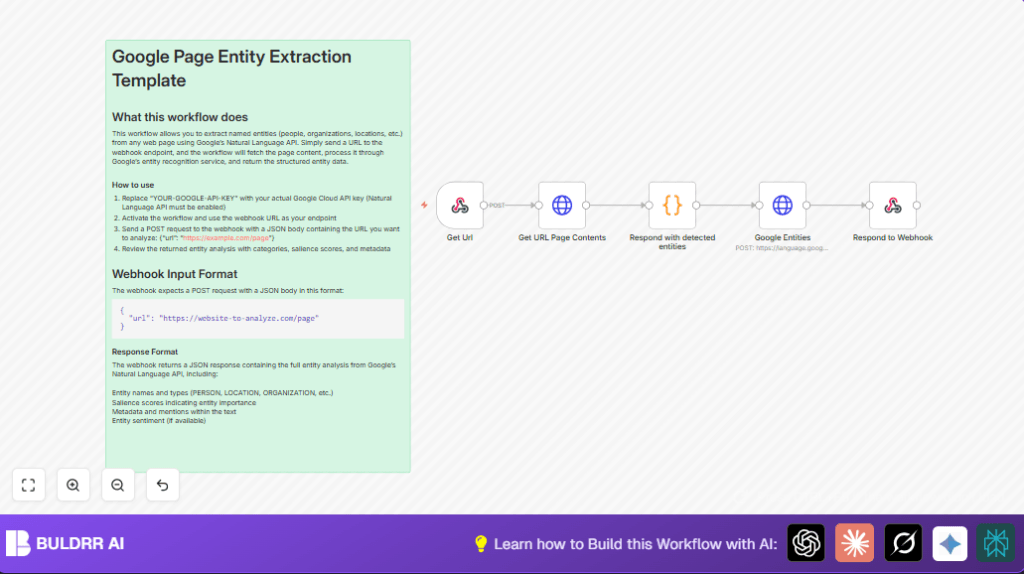

What This Workflow Does
This workflow helps you get named entities from any webpage URL you send it.
You send a URL to a webhook, and the workflow fetches the page HTML.
Then it sends the HTML to Google Natural Language API for entity detection.
You get back a list of entities like people, organizations, and locations found on the page.
This saves you from reading and tagging web content by hand.
Who Should Use This Workflow
If you do content analysis and spend hours extracting company names, people, or places from web articles, this workflow is for you.
It is good for content analysts, marketers, or researchers wanting fast, structured text data.
Anyone needing quick entity info from any webpage without manual copy-paste will find it useful.
Tools and Services Used
- n8n Workflow Automation Platform: Runs the automation with nodes.
- Google Cloud Natural Language API: Detects entities in raw HTML.
- Webhook node: Receives URLs via POST requests.
- HTTP Request node: Gets web page HTML and calls Google API.
- Code node: Prepares the API request JSON with trimmed HTML.
- Respond to Webhook node: Sends entity data back to caller.
Inputs, Processing, and Outputs Explained
Input
The workflow takes a POST request with JSON body that has a “url” field.
Example input:
{
  "url": "https://example.com"
}
Processing
- The Webhook node listens for the incoming POST and extracts the URL.
- The HTTP Request node fetches the full HTML content of the page from that URL.
- The Code node trims the HTML if too big and builds the JSON request body for Google NLP API with the HTML content.
// Clean and prepare HTML for API request const html = $input.item.json.data; const trimmedHtml = html.length > 100000 ? html.substring(0, 100000) : html; return { json: { apiRequest: { document: { type: "HTML", content: trimmedHtml }, encodingType: "UTF8" } } } - A second HTTP Request node posts this JSON to Google Natural Language API’s analyzeEntities endpoint, sending the API Key as a query parameter.
- The Respond to Webhook node sends the Google API’s response back to the original requester.
Output
The caller receives JSON containing entity details.
It includes types like PERSON, ORGANIZATION, LOCATION, salience scores, metadata, and text mentions.
Beginner Step-by-Step: How to Use This Workflow in n8n Production
Step 1: Import Workflow
- Download the workflow file using the Download button on this page.
- Open n8n editor and choose “Import from File”.
- Select the downloaded workflow JSON file to import it.
Step 2: Configure Credentials and Settings
- Open the Google Entities HTTP Request node.
- Replace YOUR-GOOGLE-API-KEY in the query parameters with your actual Google Cloud API Key.
- If there are any IDs, emails, channel names, or table references in the workflow nodes, update them properly for your setup.
Step 3: Test the Workflow
- Send a POST request to the webhook URL with JSON body:
{ "url": "https://example.com" } - Check the response to verify entity extraction works as expected.
Step 4: Activate Workflow for Production
- Save the workflow if you made changes.
- Toggle the active switch to live the workflow.
- Start using the webhook URL in your other apps or automations.
- If running n8n on your own server, consider self-host n8n for better control.
Common Problems and How to Fix Them
- 403 Forbidden or Invalid API Key errors: Check API key correctness and that Google’s Natural Language API is enabled in Google Cloud.
- Empty responses from webhook: Ensure POST requests include JSON with valid “url” field, not GET requests.
- Google API request size too large: The Code node trims input HTML to 100,000 characters by default; adjust this if needed.
Customization Ideas
- Add Sentiment Analysis: Add
features: {extractEntitySentiment: true}to the Google NLP request JSON in the Code node. - Filter Entities: Add a Code node after Google Entities to keep only certain types like PERSON or ORGANIZATION.
- Save to Google Sheets: Add a Google Sheets node after entity extraction to log data for reports.
- Change NLP Features: Modify the Google API endpoint or parameters to include syntax analysis or content classification.
Summary
✓ Automate named entity extraction from any webpage URL with this workflow.
✓ Save time and remove manual copy-paste or tagging errors.
✓ Get structured entity data instantly, including types and salience scores.
✓ Easy configure for production by importing, adding API keys, testing, and activating.
✓ Expand with sentiment analysis, filtering, or saving results as needed.
