
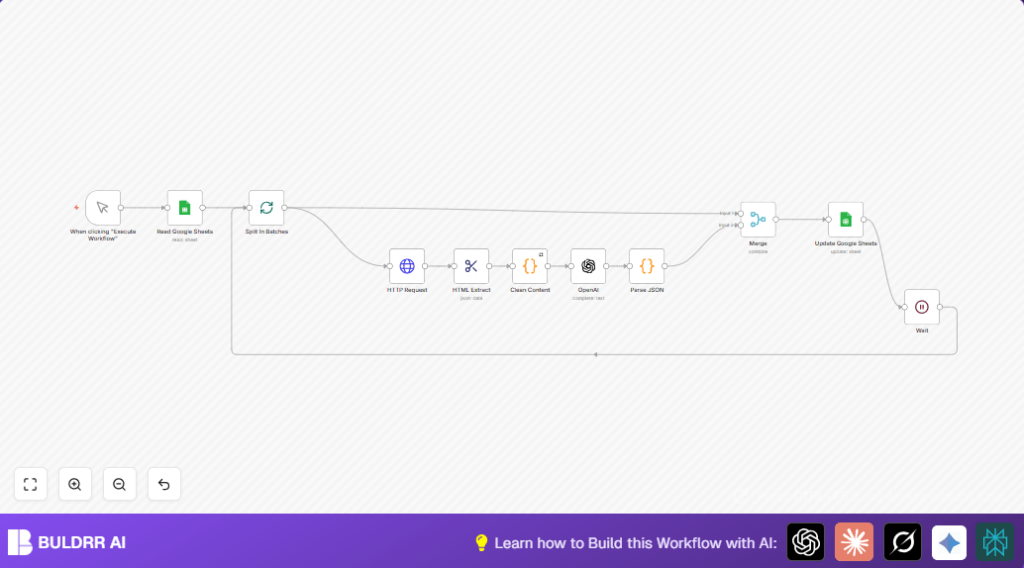

What this workflow does
This workflow reads a list of website domains from Google Sheets. It fetches the HTML content of each website. Then it cleans the content and sends it to OpenAI. OpenAI returns key company details like value proposition, industry, and market type. The workflow writes these details back into the Google Sheet. This saves time on manual web research and data entry.
Who should use this workflow
This helps marketing teams or researchers who collect company profiles from many websites. It fits users who want to quickly get business info without manually browsing. It works best for users with basic n8n skills and access to Google Sheets and OpenAI services.
Tools and services used
- Google Sheets: Stores input domain list and output company data.
- HTTP Request node: Fetches website HTML content.
- HTML Extract node: Extracts the full HTML body.
- Code node: Cleans HTML content to plain text.
- OpenAI node: Generates company business insights.
- Merge node: Combines original and AI data.
- Wait node: Pauses between batches to avoid rate limits.
Inputs, processing steps, and outputs
Inputs
- List of company domains from a Google Sheet column.
Processing steps
- Split domains into batches to handle them one by one.
- Send HTTP requests to fetch homepage HTML.
- Extract HTML with CSS selector “html”.
- Clean HTML content by removing extra spaces and truncating to 10,000 characters.
- Send cleaned text to OpenAI with a prompt to get value proposition, industry, target audience, and market type.
- Parse OpenAI’s JSON reply into separate fields.
- Merge AI data with original domain info.
- Update the Google Sheet with new insights.
- Wait some seconds before processing next batch.
Outputs
- Updated Google Sheet rows with new columns: Value Proposition, Industry, Target Audience, Market.
Beginner step-by-step: How to build this in n8n
1. Import the workflow
- Download the workflow file by clicking the Download button on this page.
- Go to n8n editor and click “Import from File”.
- Select the downloaded workflow and import it.
2. Configure credentials and settings
- Add Google Sheets OAuth2 credentials to allow reading and writing.
- Add OpenAI API Key credentials.
- Check and update the Google Sheet ID and Sheet Name if different.
- Verify that in the HTTP Request node, the URL matches the domain with correct “https://” prefix.
- Review the OpenAI prompt text if needed for industry changes. The prompt is inside the OpenAI node.
3. Test the workflow
- Run the workflow manually by clicking Execute.
- Verify the Google Sheet updates with extracted company data.
4. Activate for production
- After confirming the test work, turn on the workflow by clicking “Activate”.
- Optionally add triggers to schedule runs or integrate into other systems.
For users wanting full control over API keys and data, self-host n8n on a VPS can be an option.
Customization ideas
- Change the industry list inside the OpenAI prompt to better fit target sectors.
- Adjust the Wait node time to speed up or slow down batch processing.
- Modify the CSS selector in the HTML Extract node for cleaner or different sections of the page.
- Increase the slice length in the Clean Content code node to send more text to OpenAI.
- Change batch size in the Split in Batches node based on API limits and workflow speed.
Edge cases and common errors
HTTP Request fails with 404 or timeout
Cause: Some domains may lack “https://” or redirect strangely.
Solution: Make sure all domains have a protocol prefix or edit the HTTP Request URL to add it.
OpenAI node returns invalid JSON or no response
Cause: Prompt formatting problems or API quota exceeded.
Solution: Check prompt syntax and OpenAI quotas. Enable “Continue on Fail” to avoid stopping entire workflow.
Google Sheets update does not show changes
Cause: Wrong match column or missing write access.
Solution: Confirm column names in Google Sheets node and that OAuth permissions allow updates.
Summary
✓ The workflow automatically reads domains and gets company insights.
✓ It cleans and processes website content for OpenAI.
✓ AI returns structured business details added back to Google Sheets.
→ Saves manual effort and errors in researching company data.
→ Helps marketing and research teams update databases fast.
