
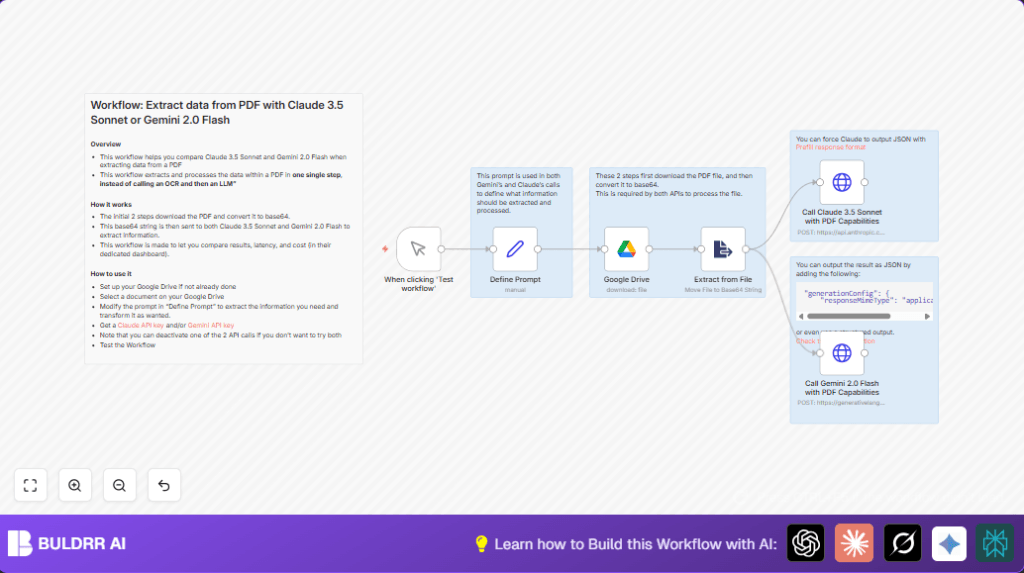

What this workflow does
This workflow extracts VAT numbers from PDF invoices automatically in n8n.
It avoids manual copy-pasting and no extra OCR steps are needed.
You get fast, AI-extracted data ready to compare from two models: Claude 3.5 Sonnet and Google Gemini 2.0 Flash.
It downloads PDF files from Google Drive, converts them to base64 strings, then sends each to AI APIs with a clear prompt for VAT extraction.
You will receive results for easy side-by-side comparison to pick the best AI model for your workflow.
Who should use this workflow
This workflow fits financial officers or accountants who must handle many PDF invoices monthly.
It helps reduce time wasted on manual VAT extraction and lowers errors.
Users want to automate trusted extraction without juggling multiple software or manual OCR.
Non-technical users who know basic n8n can run and customize it easily.
Tools and services used
- Google Drive: Stores and shares PDF invoices.
- Anthropic Claude API: Extracts VAT using Claude 3.5 Sonnet model.
- Google Gemini API: Extracts VAT using Gemini 2.0 Flash model.
- n8n automation platform: Builds workflow and manages API calls.
Inputs, Processing steps, and Output
Inputs
- PDF invoice files stored in Google Drive.
- User-defined text prompt specifying what data to extract, for example, “Extract the VAT numbers for each country.”
- API keys for Claude 3.5 Sonnet and Google Gemini 2.0 Flash models.
Processing steps
- Download the PDF file from Google Drive using the provided file ID.
- Convert the PDF binary data into a base64 string inside n8n.
- Send the base64 PDF along with the extraction prompt to Claude 3.5 Sonnet API.
- Send the same PDF and prompt to Gemini 2.0 Flash API.
- Receive structured text or JSON responses from both AI models.
Output
- Two sets of extracted VAT number data, ready for side-by-side comparison.
- Latencies and API cost data can be compared if tracked.
- Data can be parsed further or stored in databases or sheets for records.
Beginner step-by-step: How to use this workflow in n8n production
Download and Import
- Download the workflow file by clicking the Download button on this page.
- Open your n8n editor where the automation is to run.
- Use the “Import from File” function in n8n to load the downloaded workflow.
Configure essentials
- Add Google Drive credentials with access to your PDF folder.
- Enter your Anthropic API Key for the Claude 3.5 Sonnet node under HTTP credentials.
- Enter your Google PaLM API Key for Gemini 2.0 Flash node also under HTTP credentials.
- Replace example Google Drive file ID with the actual invoice PDF file ID you want to process.
- Update the prompt text in the Set node called “Define Prompt” if you want to extract different data.
Test and activate
- Run the workflow once manually by clicking “Execute Node” or “Test Workflow” in the Manual Trigger node.
- Check outputs of Claude and Gemini nodes to see if VAT numbers are properly extracted.
- When working well, activate the workflow by switching it to “Active” so it can be triggered as needed.
- Optionally connect to other nodes for saving or notifications.
Self-host users can refer to self-host n8n options to run on their own servers.
Customizations ideas
- Change the prompt in the Set node to extract dates, names, totals, or other invoice details.
- Disable either Claude or Gemini API call nodes to save costs or focus testing.
- Add configuration to Gemini API JSON body to request JSON responses if needed for easier parsing.
- Add error handling nodes to catch failed API calls or rate limits gracefully.
- Connect outputs to Google Sheets or databases for automatic record keeping.
Common edge cases and failures
- 401 Unauthorized error on HTTP requests means API keys are wrong or expired.
Fix by updating your credentials in the nodes. - No data extracted or blank AI responses can come from wrong base64 encoding or unclear prompts.
Check PDF conversion node and make the prompt clearer. - Google Drive PDF download fails usually caused by bad file ID or missing permissions.
Verify file ID and Google Drive access rights.
Summary
→ Saves time by automating VAT extraction from PDFs using AI.
→ No manual OCR needed, PDF base64 sent directly to AI models.
→ Gets extraction results from Claude 3.5 Sonnet and Google Gemini 2.0 Flash for comparison.
→ Input PDFs come from Google Drive, all inside one n8n workflow.
→ Beginner users can import, configure, test, and activate with simple steps.
