
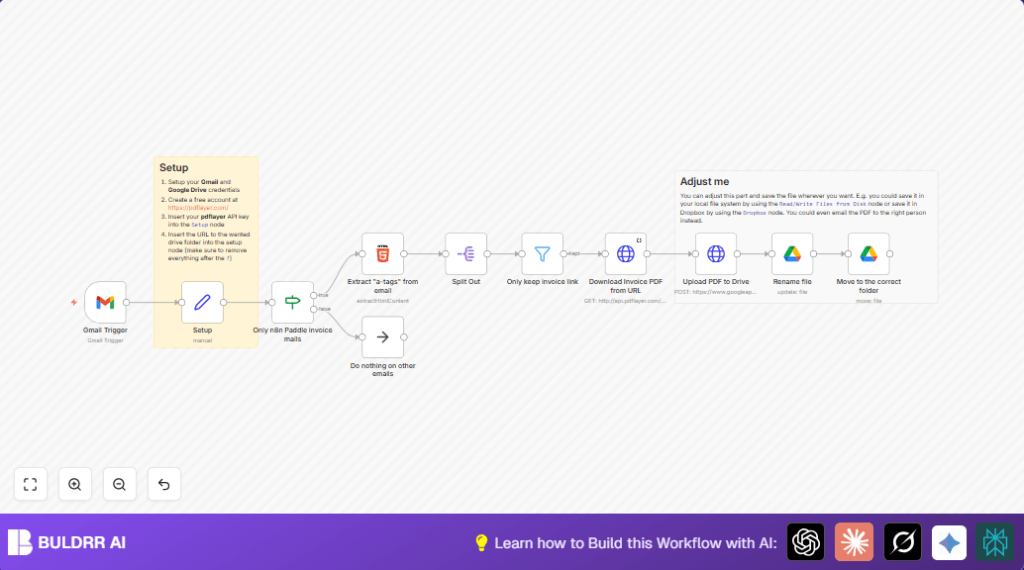

What This Automation Does
This workflow watches your Gmail inbox for emails from help@paddle.com with “Your invoice” in the subject.
It looks inside each email to find links leading to Paddle invoice receipts.
It picks only links containing “/receipt/” to get the exact invoice page URLs.
Then, it asks the pdflayer API to turn each invoice URL into a PDF file.
After that, it uploads the PDF file to Google Drive, renames it with a date pattern like n8n_cloud_invoice_YYYY-MM-DD.pdf, and moves it into the set folder.
This saves time and avoids errors by doing all invoice capture and storage automatically.
Tools and Services Needed
- Gmail with OAuth2 credentials in n8n: To watch for invoice emails.
- Google Drive with OAuth2 credentials in n8n: To save, rename, and move the invoice PDFs.
- API key from pdflayer.com: To convert invoice receipt URLs into PDF documents.
- n8n platform account: To run the automation workflow.
Inputs, Processing, and Outputs
Inputs
- New emails arriving in the Gmail inbox.
- Incoming emails must be from help@paddle.com and contain “Your invoice” in the subject.
Processing Steps
- Extract all hyperlinks from the email HTML body.
- Split the extracted links to check each one individually.
- Filter links to keep only those with “/receipt/” for Paddle invoice pages.
- Call pdflayer API to convert each invoice URL to a PDF file.
- Upload the PDF file to Google Drive.
- Rename the PDF file with the current date in the format n8n_cloud_invoice_YYYY-MM-DD.pdf.
- Move the renamed PDF file to the target Google Drive folder set in the configuration.
Outputs
- New invoice PDF files saved and organized in the Google Drive folder.
- Each file is named with the date to make record-keeping easy.
Beginner step-by-step: How to use this workflow in n8n
1. Importing the Workflow
- Click the Download button for this workflow on this page.
- In the n8n editor, choose the menu and select “Import from File”.
- Upload the downloaded workflow file.
2. Configuring Credentials and Settings
- Set up Gmail OAuth2 credentials in the Gmail Trigger node.
- Provide Google Drive OAuth2 credentials in the relevant Google Drive nodes.
- In the Setup node, enter the pdflayer API key as
api_key. - Also enter the Google Drive folder URL in the
url_to_drive_foldervariable, making sure to omit any query parameters. - Change any folder IDs, emails, or channel names if the workflow includes those for your setup.
3. Testing and Activation
- Send a test Paddle invoice email to your Gmail inbox or wait for a new invoice email to arrive.
- Run the workflow manually in n8n once to check for errors.
- Look at logs and output results to assure files are created and uploaded correctly.
- When fully tested, turn on the workflow toggle to run it automatically every minute.
Following these steps will let the user run this automation safely in production without building the flow from scratch.
Also, self hosting n8n is helpful to fully control the workflow operation and credentials. Consider self-host n8n if more control is needed.
Customizations
- Change email sender and subject filters to detect invoices from different providers.
- Replace Google Drive nodes with Dropbox or local Filesystem nodes for saving PDFs.
- Add a Gmail or SMTP node after upload to auto-forward invoice PDFs to accounting.
- Swap pdflayer API with other PDF converters by adjusting HTTP request properties.
- Add Slack notifications after upload to alert the team about new invoices.
Common Problems and Fixes
- No emails trigger the workflow: Check Gmail OAuth2 credentials and scopes.
- Invoice PDF download fails: Verify pdflayer API key and invoice URL correctness.
- PDF not found in Google Drive: Confirm Google Drive credentials and folder permissions.
- Incorrect file renaming or moving: Check date format and folder URL input.
Summary
✓ Extracts Paddle invoice emails automatically from Gmail inbox.
✓ Converts invoice web pages to PDFs using pdflayer API.
✓ Saves PDFs to Google Drive with correct names and folders.
→ Saves hours of manual work and reduces errors.
→ Keeps financial records neat and timely updated.
