
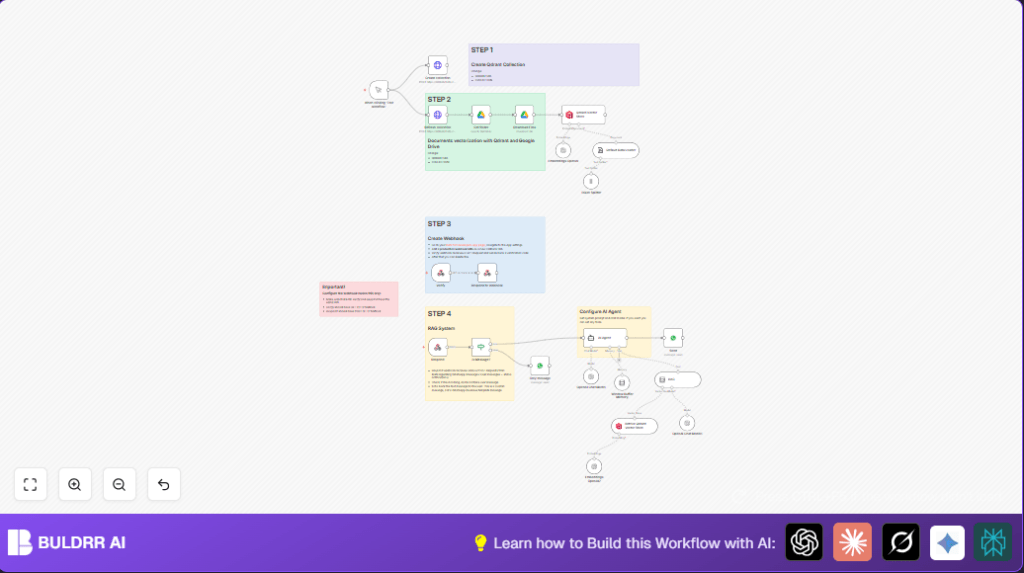

What this workflow does
This workflow reads text messages sent to a WhatsApp Business number.
It uses AI to give fast, correct answers based on stored company documents.
It stops slow replies and mistakes from manual handling.
Users get quick and helpful replies about products or support.
Who should use this workflow
Any business with many customer questions on WhatsApp.
This is good for stores which want to answer fast and without errors.
People who want their company documents to guide AI answers will benefit.
Tools and services used
- WhatsApp Business API: To receive and send WhatsApp messages.
- Google Drive: Stores company documents like manuals and FAQs.
- OpenAI API: Creates text embeddings and chat AI responses.
- Qdrant vector database: Holds vectorized company knowledge for AI search.
- n8n automation platform: Runs the whole workflow and connects nodes.
Workflow inputs, processing, and outputs
Inputs
- Incoming text messages from WhatsApp users.
- Company documents from Google Drive folder.
Processing steps
- Webhook node verifies WhatsApp message and checks if text.
- Google Drive nodes download documents as text files.
- Token Splitter node breaks documents into smaller parts.
- OpenAI Embeddings node turns document chunks into vectors.
- Qdrant Vector Store node saves vectors for retrieval.
- AI Agent node receives WhatsApp user messages and searches vector data.
- Window Buffer Memory node keeps track of chat history to keep replies relevant.
- AI generates reply based on user message and company knowledge.
- Send node posts AI answer back to user via WhatsApp.
Outputs
- Quick, personalized WhatsApp replies to customers.
- Reduced manual work and faster customer support.
Beginner step-by-step: How to build this in n8n
Step 1: Import the workflow
- Click the Download button on this page to get the workflow file.
- Open your n8n editor.
- Use the menu option “Import from File” to upload the workflow.
Step 2: Configure credentials
- Go to each node requiring authentication and add API Keys or login info.
- Update any placeholders like Google Drive folder ID, WhatsApp phone number, Qdrant URL, and collection name.
- Check the OpenAI API key is set in the respective nodes.
Step 3: Test the workflow
- Trigger the Qdrant collection creation node to make sure it works.
- Send a test message to WhatsApp and watch if a reply comes back.
- Look at the nodes’ output panels for errors or missing info.
Step 4: Activate workflow for production
- Switch the workflow from draft to active mode in n8n.
- Make sure webhook URLs are set in the Meta Developer Console for live WhatsApp messages.
- Monitor logs in n8n cloud or server for steady running.
If self hosting n8n, see self-host n8n for options.
Edge cases and failure points
- If webhook verification fails, check the Verify
node returns the exact challenge token Meta needs on HTTP GET requests.
- If messages do not appear, ensure webhook is subscribed to message events and If node correctly detects message payload.
- If embeddings fail to insert into Qdrant, verify API keys and collection names.
- Make sure Google Drive permissions allow file download by n8n.
Customization ideas
- Change wording or tone in the system prompt of AI Agent node.
- Add support to send images or documents via WhatsApp by changing message type in Send node.
- Include more document folders or cloud storage for broader knowledge.
- Set a scheduled refresh to update vectors with new documents.
- Modify the AI prompt and use chat models that support multiple languages.
Summary
✓ The workflow automates answering WhatsApp customer texts quickly.
✓ It builds AI responses using company documents and chat context.
→ Saves time and avoids missed or slow replies.
→ Makes customer support easier and more accurate.
