
Learn n8n in 30 Days — A Realistic Timeline
This roadmap is designed to take you from zero to building
real workflows in 30 days — at a pace of 1 hour per day.
Here’s the breakdown by week:
Week 1 (Days 1–7) — Foundations + Core Building Blocks
Understand what n8n is, how data flows, and how to use
triggers, Set nodes, and basic data cleanup. Goal: build
your first working workflow from scratch.
Week 2 (Days 8–14) — Logic & External Connections
Learn IF conditions, Switch routing, Merge nodes, and
connect your first external apps (Gmail, Sheets, Webhooks).
Goal: build a workflow that connects two real tools.
Week 3 (Days 15–21) — Real-World Practice Builds
Build 3 complete workflows from the practice path below.
Focus on one goal per workflow, one clear output.
Goal: have 3 working automations running in production.
Week 4 (Days 22–30) — Advanced + Pro Habits
Add AI nodes, error handling, monitoring alerts, and
workflow organization. Goal: think like a pro and build
workflows that don’t break quietly.
30 days. 1 hour/day. One working automation system.
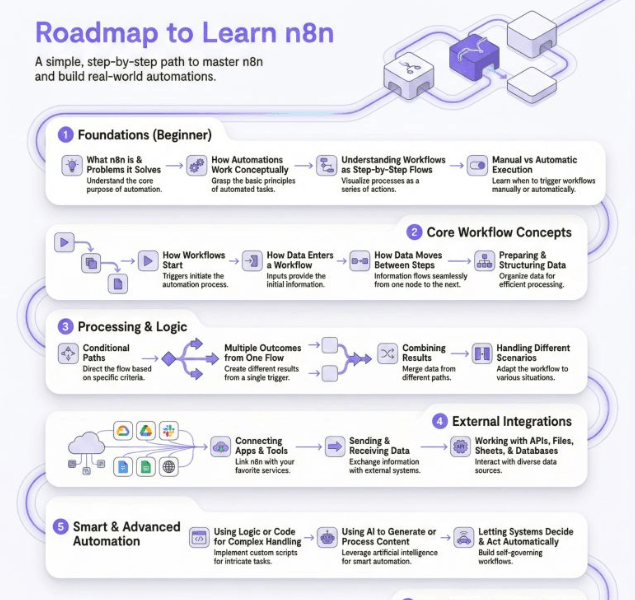
1. Foundations — Start Here
Before building anything, understand these basics clearly:
What n8n actually is
n8n is a workflow engine.
It moves data between tools and decides what happens next.
If you understand data flow, you’ll understand n8n.
How workflows work
Every workflow follows the same pattern:
Trigger → Steps → Output
If the trigger is wrong, everything breaks.
If the data is wrong early, errors appear late.
Manual vs Automatic runs
- Manual runs are for testing and debugging
- Automatic runs are for real usage
Many beginners forget to remove manual triggers in production.
Data flow mindset (important)
Each node receives data from the previous node.
n8n doesn’t “remember” things unless you pass them forward.
Expert tip: Always check
what data shape
2. Core Building Blocks — Daily Skills
These concepts show up in almost every workflow:
How workflows start
- Schedules (time-based)
- Webhooks (event-based)
- App events (email, form, payment, etc.)
Knowing when a workflow starts is more important than what it does.
Receiving & sending data
Data can come from:
- Apps
- APIs
- Forms
- Files
And it almost always needs cleanup before use.
Cleaning & preparing data
This includes:
- Renaming fields
- Formatting text
- Removing empty values
- Creating consistent structure
Advanced insight: Most bugs are caused by bad data, not bad logic.
Handling lists & multiple items
One item ≠ multiple items.
Understanding this early saves weeks of confusion.
3. Logic & Control — Think in Decisions
This is where workflows become smart.
Conditions
“If this is true, do that.”
Used for filtering, validation, and routing.
Multiple paths
One workflow can handle many scenarios:
- Success vs failure
- Different input types
- Different user actions
Merging results
After splitting paths, data often needs to come back together.
Many broken workflows fail here due to mismatched data.
Preventing silent failures
Decide what should happen when:
- Data is missing
- An API fails
- A condition isn’t met
No decision = hidden bugs.
4. External Connections — Real-World Automation
This is where n8n becomes useful for businesses.
Connecting apps & tools
CRMs, email tools, sheets, databases.
Most “automation value” lives here.
APIs & services
If a tool has an API, n8n can use it — even without native integration.
Webhooks
Used to:
- Receive website events
- Connect custom apps
- Build backend-style logic
Files & storage
Documents, spreadsheets, cloud storage.
Pro insight: External systems fail more often than your workflow. Plan for it.
5. Smart Automation — Advanced but Optional
Use these only when needed.
Code nodes
Best for:
- Calculations
- Data transformations
- Performance-critical logic
Cheaper and more predictable than AI.
AI usage
Great for:
- Text generation
- Classification
- Summarization
Bad for:
- IDs
- Conditions
- Core logic
Systems that “act”
AI agents and automation can decide and act —
but rules must stay explicit.
6. Practice Path — What You Should Actually Build
Don’t copy complex workflows first.
Start with:
- Form → clean data → store
- Schedule → process → report
- Input → AI → output to another tool
One goal per workflow.
One clear output.
7. Growth & Maturity — Think Like a Pro
This is where beginners level up.
Organization
Name workflows clearly.
Group related ones together.
Monitoring & alerts
You should know when something fails — immediately.
Debugging properly
Use execution history to:
- See exact data
- Reproduce failures
- Fix with confidence
Reuse & improve
Good workflows evolve.
Great ones get reused.
Your 30-Day Progress Tracker
Use this checklist to track where you are on the roadmap.
Check each item off as you complete it.
Week 1 — Foundations
☐ Understand what n8n is and how data flows
☐ Set up n8n (cloud or self-hosted)
☐ Build and run your first manual workflow
☐ Use a Schedule or Webhook trigger successfully
☐ Clean and format data using the Set node
Week 2 — Logic & Connections
☐ Build an IF condition that routes two paths
☐ Use a Switch node with 3+ output branches
☐ Connect Gmail, Google Sheets, or Telegram
☐ Send data to an external API using HTTP Request
☐ Merge two branches back into one output
Week 3 — Real Builds
☐ Build: Form → clean data → save to Google Sheets
☐ Build: Schedule → fetch data → send email report
☐ Build: Webhook → AI classification → output to tool
☐ Activate all 3 workflows in production mode
☐ Check execution logs and fix at least one real error
Week 4 — Advanced & Pro Habits
☐ Add an AI node (classify, summarize, or generate)
☐ Set up error handling on a critical workflow
☐ Add a failure alert (email or Telegram)
☐ Name and organize all your workflows clearly
☐ Build one workflow you’d actually use every day
Once every box is checked — you’ve completed the roadmap.
Final Takeaway
Learning n8n is not about memorizing nodes.
It’s about:
- Understanding data
- Designing clear logic
- Building small, reliable systems
Once that clicks, everything feels easy.
