

What This Workflow Does
This workflow updates SEO metadata for WooCommerce products using Rank Math SEO plugin automatically.
It stops the need to do manual work on titles, descriptions, and canonical URLs for each product.
The result is faster product updates and better search engine rankings.
The workflow takes your WooCommerce base URL, sends an API request to Rank Math to update SEO fields, and handles authentication securely.
It also notices if the update fails and tries again to make sure the changes go through.
Inputs, Processing Steps, and Output
Inputs
- WooCommerce base URL: Used to target the API correctly.
- Product post ID and SEO metadata: such as title, description, and canonical URL sent in API request.
- WordPress API credentials: for WordPress and WooCommerce authentication.
Processing Steps
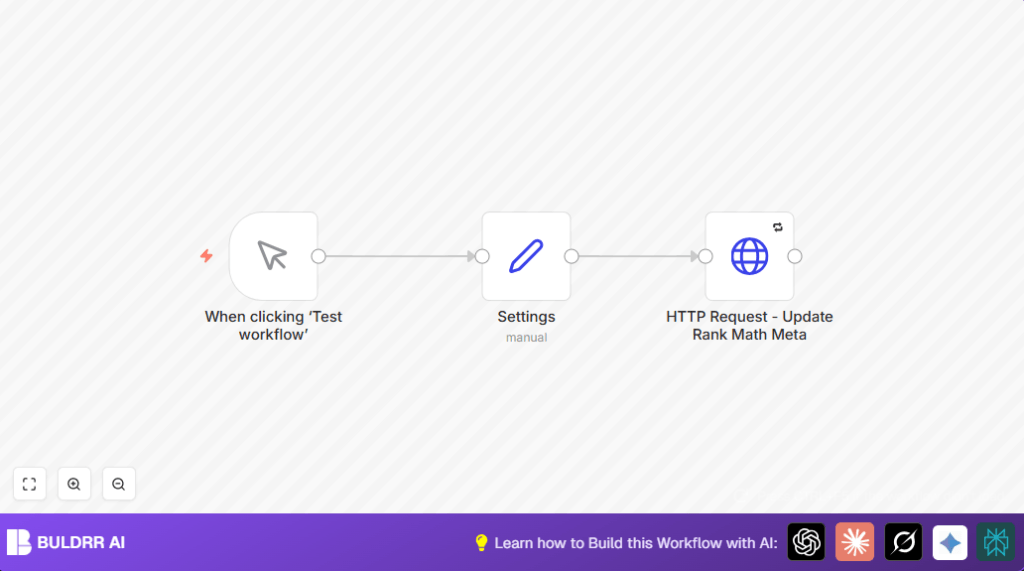
- The workflow starts with the Manual Trigger node.
- A Set node holds the WooCommerce base URL for dynamic use.
- An HTTP Request node sends a POST request to Rank Math’s update-meta API endpoint.
- The HTTP request includes SEO fields like post_id, rank_math_title, rank_math_description, and rank_math_canonical_url.
- The HTTP request uses saved WordPress credentials for authentication.
- If the request fails, retries happen automatically.
Output
Updated SEO metadata on the WooCommerce product page.
Immediate feedback on update success or failure.
Who Should Use This Workflow
This workflow suits WooCommerce store managers who spend lots of time changing SEO data manually.
Users who want to cut errors in SEO updates and launch new products faster will benefit.
Anyone using Rank Math SEO plugin for WordPress with WooCommerce can use this.
It also fits users familiar with n8n automations wanting to save time.
Tools and Services Used
- WooCommerce API: Provides product post IDs and base URL.
- Rank Math SEO API: Updates SEO metadata fields via REST API.
- WordPress API with credentials: Handles authentication securely.
- n8n Automation Platform: Runs the workflow nodes.
- Rank Math Plugin: Installed with API enabled on WordPress site.
Beginner Step-by-Step: How to Use This Workflow in n8n
Step 1: Download and Import Workflow
- Download the workflow file using the Download button on this page.
- Open the n8n editor where you want to use the workflow.
- Click on menu → choose “Import from File”.
- Select the downloaded workflow file.
Step 2: Configure Credentials and Settings
- Add your WooCommerce API credentials and WordPress API credentials in n8n under the Credentials section.
- Edit the Set node called “Settings” and put your WooCommerce site’s base URL exactly, for example,
https://yourstore.com/. - Change the
post_idin the HTTP Request node body parameters if needed to match the product you want to update. - Update SEO text fields like
rank_math_title,rank_math_description, andrank_math_canonical_urlto the new values you want.
Step 3: Test the Workflow
- Click on the first Manual Trigger node.
- Press the “Execute Workflow” button.
- Wait to see the HTTP request succeed and confirm changes on your WooCommerce product SEO.
Step 4: Activate for Production Use
- Switch the workflow from draft to active mode in n8n.
- Optionally, replace Manual Trigger with a Cron node for scheduled updates.
- Monitor the workflow’s execution in n8n UI regularly.
If using self-host n8n, see self-host n8n for tips.
Customization Ideas
- Make
post_iddynamic by linking a WooCommerce node to fetch multiple products and pass their IDs to the HTTP request. - Add social SEO fields like
rank_math_facebook_titleorrank_math_twitter_descriptionin the HTTP request body for richer metadata. - Switch Manual Trigger node to Cron node for automatic routine updates of SEO data.
- Add a Slack or Email node after the HTTP request node to notify the team if updates fail.
Troubleshooting Common Issues
- Authentication Failed: Check WordPress API credentials and make sure the user has permission to update SEO.
- 404 Not Found Response: Verify WooCommerce URL ends with slash and the API endpoint path is correct.
- Metadata Update Fails Without Clear Error: Confirm that post_id exists and all required SEO fields are included.
Pre-Production Checklist
- Confirm the WooCommerce site URL in the Set node is accurate.
- Test WordPress API credentials for access rights.
- Run a manual test from the Manual Trigger node and check the HTTP response.
- Ensure SEO metadata updates correctly on WooCommerce product page.
- Backup WordPress database before large scale runs.
Deployment Guide
Activate the workflow after testing by switching to active mode.
Schedule automatic workflows using a Cron node if wanted.
Keep checking logs in n8n UI to catch any fail alerts early.
Summary
✓ Saves hours by automating Rank Math SEO metadata updates
✓ Reduces human errors improving SEO ranking
✓ Works using WooCommerce and WordPress APIs with secure authentication
→ Provides easy manual or scheduled updating inside n8n
→ Lets users control SEO updates without editing each product page
