
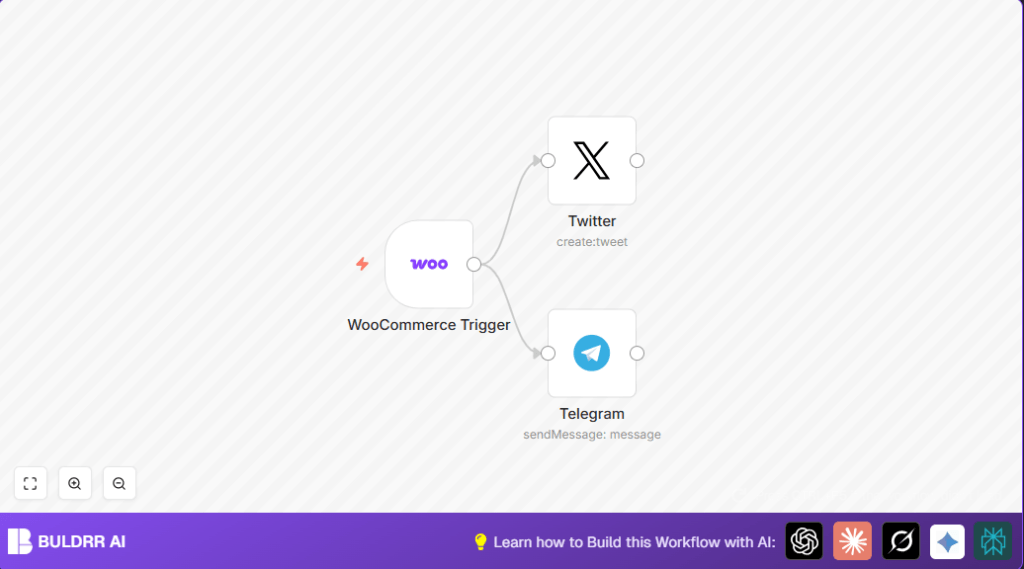

What this workflow does
This workflow watches for new products added to a WooCommerce store.
When a new product appears, it sends a message to Twitter and Telegram automatically.
This saves time and makes sure no product announcement is missed.
Tools and services used
- WooCommerce REST API: Sends product creation events.
- Twitter API with OAuth1: Posts product announcements to Twitter.
- Telegram Bot API: Sends messages to Telegram channels or groups.
- n8n automation platform: Connects services and runs the workflow.
Inputs, Processing Steps, and Output
Inputs
- New product creation event data from WooCommerce.
- Product details like name and link.
Processing Steps
- WooCommerce Trigger listens for the new product event.
- Twitter node formats a message using product name and URL and posts it.
- Telegram node formats the same message and sends it to a Telegram chat ID.
Output
- A tweet announcing the new product.
- A Telegram message announcing the new product.
Beginner step-by-step: How to use this workflow in n8n production
Step 1: Import the Workflow
- Download the workflow file using the Download button on this page.
- Open the n8n editor.
- Click on the menu and choose “Import from File”.
- Select the downloaded workflow file to load it.
Step 2: Add Credentials and Update IDs
- Click on each node that needs credentials.
- Add WooCommerce API credentials to the WooCommerce Trigger node.
- Add Twitter OAuth1 API keys to the Twitter node.
- Add Telegram Bot API credentials and set the Chat ID in the Telegram node.
- Update any URLs, emails, or IDs if needed to fit your store or channels.
Step 3: Test the Workflow
- Create a new product in WooCommerce or simulate the event to trigger the workflow.
- Check that the tweet posts successfully and the Telegram message arrives.
Step 4: Activate the Workflow
- Switch the workflow toggle in n8n from inactive to active.
- Make sure WooCommerce is sending real webhook events to the workflow URL.
- Now new products will be announced automatically.
Note: For users running on their own server, see self-host n8n resources.
Customizations and improvements
- Change message templates to include price or other details using expressions like
{{$json["price"]}}. - Add conditional nodes to post only for products in certain categories or price ranges.
- Add more nodes for posting to other channels such as Facebook or email.
Troubleshooting common issues
- Twitter node errors: These happen if OAuth keys are incorrect or expired. Fix by renewing keys in Twitter Developer portal.
- Telegram messages not sent: Check if the Chat ID is correct and the bot has admin rights in the target channel.
- Webhook not triggering: Confirm WooCommerce webhook URL is set properly and active.
Pre-production checklist
- Verify WooCommerce webhook sends events to n8n URL.
- Test posting a sample tweet using the Twitter node.
- Send a test Telegram message to confirm bot access and correct chat ID.
- Check n8n execution logs for errors after tests.
Summary
✓ Notifies Twitter and Telegram instantly when new WooCommerce products are added.
✓ Saves 30+ minutes daily by automating announcements.
✓ Keeps message text consistent across channels using dynamic product data.
→ Allows business owners to focus more on store growth, less on manual postings.
