
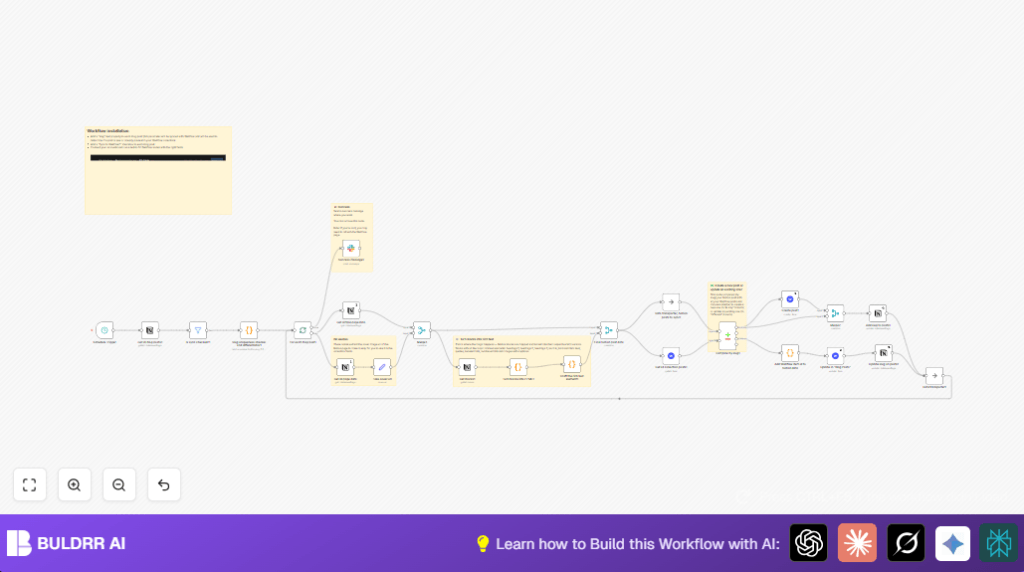

What This Automation Does
This workflow moves blog posts from Notion to Webflow automatically.
It solves the problem of slow manual transferring that takes hours and causes errors.
You get properly formatted posts on your website with unique slugs and images set right.
The system also tells your team when posts are ready via Slack messages.
How The Workflow Works
Inputs: Notion blog post database entries marked for sync.
Processing: The workflow first fetches all posts from Notion.
Then it filters to only posts with the “Sync to Webflow?” box checked.
Next, JavaScript ensures every slug is unique by adding numbers if needed.
Posts are split to process one by one.
It loads full post content including blocks from Notion.
The workflow converts the Notion blocks—headings, paragraphs, images, lists, quotes, code—into HTML fit for Webflow.
List blocks are grouped as <ul> or <ol> elements correctly in a later step.
Then it checks what posts already exist in Webflow by slug.
New posts go to creation nodes, existing ones get updates.
After Webflow is updated, the slug in Notion is synced back.
Finally, the workflow sends a message to Slack showing sync success.
Outputs: Blog posts on Webflow with neat content and images, unique URLs, and Slack notifications.
Who Should Use This Workflow
People who write blog posts in Notion and use Webflow for their website.
Those who want to save time by avoiding copy-pasting and formatting mistakes.
Teams needing to keep content consistent and notify each other about live posts.
This helps users who want simple automation without complex coding.
Tools and Services Involved
- Notion API: To read blog posts and their content blocks from Notion.
- Webflow API: To create or update blog post items on the website CMS.
- Slack API: To send messages notifying about sync results.
- n8n: The automation platform running this entire workflow and managing nodes.
Beginner Step-by-step: How to Use This Workflow in n8n
Import the Workflow
- 1. Download the workflow file using the Download button on this page.
- 2. Open n8n editor where you want to run the workflow.
- 3. Click the menu and choose “Import from File” to upload the workflow file.
Configure Credentials and IDs
- 1. Add your Notion API credentials with access to your blog database.
- 2. Add your Webflow OAuth2 credentials connected to your website.
- 3. Setup Slack OAuth2 credentials for sending messages.
- 4. Update any site IDs, collection IDs, Slack channel IDs, or database IDs in the nodes to match your accounts.
Use Provided JavaScript Code
- 1. Go to the Code node named “Ensure Unique Slugs” and confirm the JavaScript matches your slug property name if different.
- 2. Check the “Turn blocks into HTML” node JavaScript for your text conversion needs.
Test and Activate Workflow
- 1. Run the workflow manually in n8n to verify it works with your data.
- 2. Watch for errors and check that posts appear in Webflow correctly.
- 3. When ready, activate the workflow so the schedule trigger keeps it running automatically.
You can use self-host n8n for more control if you want to run your workflow privately on your own server.
Inputs → Process → Outputs Explained
Inputs
- Blog post data from Notion database filtered by the “Sync to Webflow?” checkbox.
- Slack channel and Webflow site info for notifications and posting.
Process
- Fetch all posts from Notion.
- Filter posts requesting sync.
- Ensure all slugs are unique with JavaScript.
- Split posts to process one at a time.
- Fetch detailed page and content blocks for each post.
- Convert Notion blocks into HTML for web display.
- Fetch existing posts from Webflow.
- Compare slugs to decide create or update actions.
- Send updated or new posts to Webflow CMS.
- Update slug back in Notion.
- Send sync success message to Slack.
Outputs
- Well-formatted blog posts on Webflow with unique URLs and images.
- Slack notifications of success.
- Synced slugs in Notion so both systems match.
Common Problems and Fixes
- 401 Unauthorized from Webflow API: OAuth2 keys expired or wrong.
- No posts through filter: Wrong property name or unchecked checkbox in Notion.
- Improper rich text on Webflow: Missing Notion block conversions in code node.
- Slack messages not sent: Incorrect channel ID or bad OAuth2 tokens.
Customization Ideas
- Change which posts sync by editing filter criteria.
- Support extra Notion block types in the HTML converter code.
- Automatically set draft or publish status in Webflow using Notion properties.
- Modify Slack message text or target different channels.
- Change schedule frequency to fit workload.
Summary
✓ Saves time by automating blog post transfer from Notion to Webflow.
✓ Keeps slugs unique so no URL conflicts happen.
✓ Converts rich text blocks into clean HTML for good website display.
✓ Syncs post slugs back to Notion for data consistency.
✓ Notifies teams instantly when posts are updated on Webflow via Slack.
